CodingNic
Free Courses + Private 1-on-1 Support

Free Coding Courses & 1-on-1 Tech Tutoring

Start beginner-friendly tech courses anytime or schedule private tutoring sessions for faster progress and personal guidance.

26+ Courses

Free learning paths

1200+ Learners

Trusted by students

Flexible Booking

Choose your time

Fastest Way to Get Help

Book a Private 1-on-1 Session

Get personal support with coding challenges, debugging, projects, assignments, or learning roadblocks.

Topic JavaScript Help
Date Friday
Time 4:00 PM
Duration 60 Minutes
Schedule Your Session

Flexible slots • Beginner friendly • Personal guidance

Choose Your Learning Path

Learn independently or get personal support when you need it.

Free Learning

Self-Paced Courses

Learn coding through structured lessons, projects, and practical exercises.

  • ✓ Start anytime
  • ✓ Beginner friendly
  • ✓ Lifetime access
  • ✓ Resume where you left off
Explore Courses
Premium Support

1-on-1 Tutoring Sessions

Book private sessions for debugging help, faster progress, accountability, or deep explanations.

  • ✓ Flexible scheduling
  • ✓ Personal guidance
  • ✓ Fast problem solving
  • ✓ Beginner to advanced topics
Book a Session

Popular Free Courses

Start with beginner-friendly lessons and build real skills.

View All Courses →
Authentication, Security & Testing for Node.js
Intermediate

Authentication, Security & Testing for Node.js

Make a Node.js and Express API production-ready: password hashing, session and JWT authentication, role-based authorization, input validation, security hardening, and automated testing with Jest and Supertest.

10 Modules Start
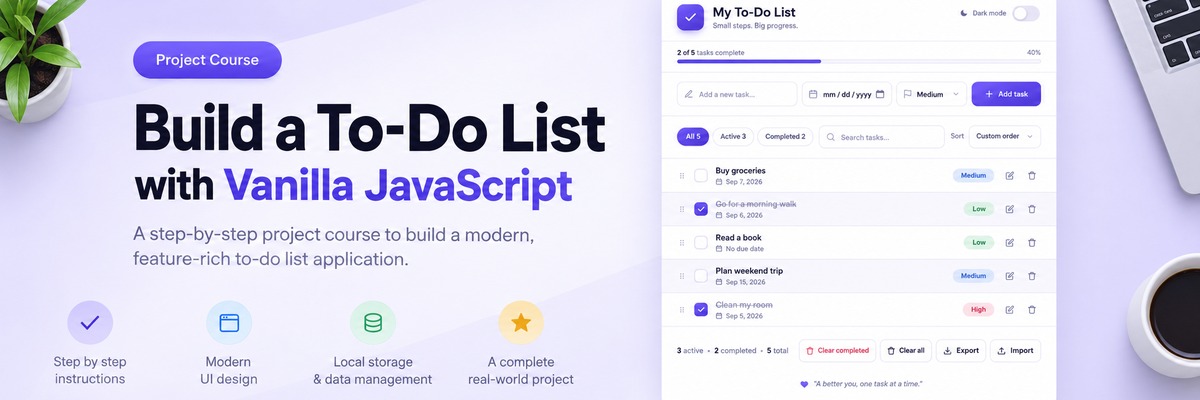
Build a To-Do List with Vanilla JavaScript
Intermediate

Build a To-Do List with Vanilla JavaScript

Build a complete, polished To-Do List application step by step using a prepared UI and vanilla JavaScript. Add tasks, editing, filtering, search, sorting, persistence, custom modals, drag and drop, import and export, and dark mode.

10 Modules Start
Build a calculator with vanilla JavaScript
Beginner

Build a calculator with vanilla JavaScript

Build the logic behind a polished calculator interface using JavaScript state, events, and application logic.

8 Modules Start

Book a Private Session

Need help now? Schedule a one-on-one session for focused support.

✓ Debugging & coding help
✓ Exam or assignment guidance
✓ Career mentoring
✓ Flexible time slots

How Booking Works

1. Choose your topic
2. Pick available date & time
3. Confirm your booking
4. Join your session
Schedule Now

Student Results

Trusted by learners growing their skills.

★★★★★

Nicholas is very good at explaining concepts in a way that I understand. He is patient and understands what I'm trying to accomplish in my coding and walks through the solutions with me.

Ann

★★★★★

Nicholas is a great tutor! His expertise in front end applications was a huge help with my coding assignment. He was able to bring clarity to a confusing topic I was learning in class. Thank you for your patience Nicholas!

Viviana

★★★★★

Very good tutor , walked me thru my home work and project :) everything you can ask for and more

Charbel

Frequently Asked Questions

Quick answers about courses, tutoring sessions, and how everything works.

Are the courses really free?

Yes. Every self-paced course on CodingNic is free, from JavaScript and React to Node.js, Python and SQL. Only private 1-on-1 tutoring sessions are paid.

Do I need an account to take a course?

You need to sign in to track your progress. Sign-in is passwordless: enter your email and we'll send you a 6-digit code. Once you're signed in, opening a lesson enrolls you in that course automatically.

How do I pick up where I left off?

Go to My Courses. Each course shows your progress and a Resume button that takes you straight to the last lesson you opened.

What level are the courses for?

Each course shows its level (Beginner, Intermediate and so on) on the course page. Many are project-based: you build a real app, such as a Kanban board, a weather app or a movie discovery app, step by step.

What can I get help with in a tutoring session?

Debugging and coding help, guidance on exams or assignments, career mentoring, or working through any of our courses together. Mention your topic when you book so the session can be prepared in advance.

How do I book a session?

Sign in, click Book Session, choose your topic, then pick an available date and time. You'll get a confirmation email with the session details and a calendar invite.

How long is a session, and when are you available?

Sessions are 60 minutes. Available times appear on the booking page in your own time zone. You can book from 6 hours ahead up to 30 days in advance.

How do I pay?

We will send you a payment link or an invoice by email. You can pay before, during, or after your session, whatever suits you best.

Can I reschedule or cancel?

Yes, anytime. Things happen, so I'm flexible. You can reschedule or cancel from My Bookings, or just send me a message and we'll find a time that works.

Will I get a reminder before my session?

Yes. You'll get an email reminder before each session, so you have time to prepare your questions or code.

Can I contact the tutor between sessions?

Yes. Signed-in students can use Messages to ask questions or share updates. You'll get an email when there's a reply.

I'm in a different country. Will the times be correct?

Yes. The booking page shows every available time in your own time zone, and your confirmation email and calendar invite use it too.

Still have a question?

Send a message and you'll get a personal reply.

Get in touch