
Home Location & the Overflight Log
Objectives
By the end of this chapter, you should be able to:
- Build a three-state home-location config UI (
HomeLocationLayer) and thePUT /api/settings/homebackend behind it, wired through a newhomefield on the store - Complete
packages/shared/src/geo.tswithbearingDeg, and use it alongsidedistanceNmto power a “from home” distance/bearing readout - Build a full-history overflight log page, distinct from the live alert feed the header already shows
💡 Why this matters: The poller has been able to detect overflights since Module 2 —
detectOverflightTransitionschecks every aircraft againsthomeLocation.radiusNmandaltitudeCeilingFton every cycle, and the previous lesson wired the WSoverflightmessage and the header’s live alert feed straight through to the browser. None of that has had anywhere to point, though —getHomeLocationhas been returningnullthis whole time because there’s been no UI to set one. This chapter closes that loop: an editable home location, and a place to browse every overflight that’s ever been logged against it, not just the ones that happened to arrive while the tab was open.
Setting the Home Location: Repo and Route
homeLocationRepo.ts has had getHomeLocation since Module 2. It gets a write counterpart now:
// apps/server/src/db/repos/homeLocationRepo.ts (add to the Module 2 version)
export interface SetHomeLocationInput {
  lat: number;
  lon: number;
  radiusNm: number;
  altitudeCeilingFt: number;
}

export async function setHomeLocation(input: SetHomeLocationInput): Promise<HomeLocationSettings> {
  const [row] = await db
    .insert(homeLocation)
    .values({ id: 1, ...input })
    .onConflictDoUpdate({
      target: homeLocation.id,
      set: { ...input, updatedAt: new Date() },
    })
    .returning();
  return {
    lat: row.lat,
    lon: row.lon,
    radiusNm: row.radiusNm,
    altitudeCeilingFt: row.altitudeCeilingFt,
    updatedAt: row.updatedAt.toISOString(),
  };
}
This is an upsert against the singleton row Module 1’s schema lesson set up: home_location carries a check("home_location_singleton", sql\${t.id} = 1`)constraint, soid: 1is the only value that can ever exist there..onConflictDoUpdate({ target: homeLocation.id, … })leans directly on that — insertid: 1, and if a row with that id already exists, update it in place instead of erroring. The repo function doesn't have to reason about "does a home location already exist"; the database's own constraint plus Postgres's ON CONFLICT` handling does that for it.
// apps/server/src/routes/settings.ts
import type { FastifyInstance } from "fastify";
import { z } from "zod";
import { getHomeLocation, setHomeLocation } from "../db/repos/homeLocationRepo.js";

const putBodySchema = z.object({
  lat: z.number().min(-90).max(90),
  lon: z.number().min(-180).max(180),
  radiusNm: z.number().min(0.5).max(100).default(15),
  altitudeCeilingFt: z.number().min(0).max(60000).default(5000),
});

/** The overflight tracker's "home" reference point -- null until the user configures one. */
export function registerSettingsRoutes(app: FastifyInstance): void {
  app.get("/settings/home", async () => {
    const home = await getHomeLocation();
    return { home };
  });

  app.put("/settings/home", async (req, reply) => {
    const parsed = putBodySchema.safeParse(req.body);
    if (!parsed.success) {
      return reply.status(400).send({ error: "invalid home location", issues: parsed.error.issues });
    }
    const home = await setHomeLocation(parsed.data);
    return { home };
  });
}
radiusNm and altitudeCeilingFt both default in the Zod schema, matching the columns’ own Postgres defaults (15nm, 5000ft) from Module 1 — a caller setting just lat/lon gets sane defaults on both ends, not just whichever layer happens to run first. Register registerSettingsRoutes in routes/index.ts the same one-import-one-call way as every other resource so far.
The Store’s Three-State Home Field
The frontend needs somewhere to hold the current home location that every component sharing it — the map control and the detail panel’s distance readout, later in this lesson — reads from the same value. It’s a three-state field, not a plain nullable object, and the distinction matters:
// apps/web/src/store/useAppStore.ts (additions to the Module 5 lesson 2 version)
import type { HomeLocationSettings } from "@skywatch/shared";

interface AppState {
  // ...existing fields...

  /**
   * The overflight-tracker's home reference point. `undefined` = not yet
   * fetched, `null` = fetched and confirmed unset. Lives here (not as
   * per-component hook state) so setting it from HomeLocationLayer's map
   * control is immediately visible to DetailPanel's distance/bearing
   * readout -- both call useHomeLocation, which just reads/writes this.
   */
  home: HomeLocationSettings | null | undefined;

  setHome: (home: HomeLocationSettings | null) => void;
}

export const useAppStore = create<AppState>((set) => ({
  // ...existing fields...
  home: undefined,

  setHome: (home) => set({ home }),
}));
A naive home: HomeLocationSettings | null field can’t tell “we haven’t checked the server yet” apart from “we checked, and nothing’s configured” — both collapse to the same falsy value, which means any component reading it on first render would flash an incorrect empty state (OverflightLogPage’s “no home location set” banner, for instance) for the brief moment before the initial fetch resolves, then flicker to the real state once it does. Starting at undefined and only ever setting null after a confirmed empty response keeps those two situations distinguishable everywhere home is read.
// apps/web/src/hooks/useHomeLocation.ts
"use client";

import { useCallback, useEffect, useRef } from "react";
import { apiUrl } from "@/lib/serverUrl";
import { useAppStore } from "@/store/useAppStore";

export interface HomeLocationInput {
  lat: number;
  lon: number;
  radiusNm?: number;
  altitudeCeilingFt?: number;
}

/**
 * The single overflight-tracker reference point (server-side, Postgres --
 * see apps/server/src/db/schema.ts's home_location table). Backed by
 * useAppStore's `home` field so every component sees the same value the
 * instant it changes -- setting it from HomeLocationLayer's map control
 * updates DetailPanel's distance/bearing readout without a page refresh.
 * Null until the user sets one; `undefined` while the initial fetch is in
 * flight.
 */
export function useHomeLocation() {
  const home = useAppStore((s) => s.home);
  const setHomeState = useAppStore((s) => s.setHome);
  const fetchedOnce = useRef(false);

  useEffect(() => {
    if (fetchedOnce.current) return;
    fetchedOnce.current = true;
    fetch(apiUrl("/api/settings/home"))
      .then((r) => r.json())
      .then((data: { home: typeof home }) => setHomeState(data.home ?? null))
      .catch((err) => {
        console.error("[home-location] fetch failed:", err);
        setHomeState(null);
      });
  }, [setHomeState]);

  const setHome = useCallback(
    async (input: HomeLocationInput) => {
      const res = await fetch(apiUrl("/api/settings/home"), {
        method: "PUT",
        headers: { "Content-Type": "application/json" },
        body: JSON.stringify(input),
      });
      if (!res.ok) throw new Error(`failed to set home location (${res.status})`);
      const data: { home: NonNullable<typeof home> } = await res.json();
      setHomeState(data.home);
      return data.home;
    },
    [setHomeState]
  );

  return { home, setHome };
}
fetchedOnce is a useRef, not a dependency-array trick — this hook gets called from more than one component (HomeLocationLayer, DetailPanel, OverflightLogPage), and each mount should read the store’s already-fetched value rather than each firing its own redundant GET. Notice the error path still calls setHomeState(null), not leaving home stuck at undefined forever — a failed fetch should resolve to “confirmed unset” rather than an indefinite loading state.
The Home Location Map Control
// apps/web/src/components/HomeLocationLayer.tsx
"use client";

import { useState } from "react";
import { Circle, Marker, useMap } from "react-leaflet";
import L from "leaflet";
import { useHomeLocation } from "@/hooks/useHomeLocation";

const homeIcon = L.divIcon({
  className: "home-icon",
  html: `<svg width="20" height="20" viewBox="0 0 24 24" fill="var(--amber)" stroke="var(--bg-deep)" stroke-width="0.8"><path d="M12 2 L22 11 L19 11 L19 21 L14 21 L14 14 L10 14 L10 21 L5 21 L5 11 L2 11 Z"/></svg>`,
  iconSize: [20, 20],
  iconAnchor: [10, 18],
});

/**
 * Renders the home marker + overflight-radius circle (once configured),
 * and a small floating control for setting/adjusting it -- captures the
 * map's current center as home lat/lon, since that's simpler and more
 * direct than a separate lat/lon entry form.
 */
export function HomeLocationLayer() {
  const map = useMap();
  const { home, setHome } = useHomeLocation();
  const [open, setOpen] = useState(false);
  const [radiusNm, setRadiusNm] = useState(15);
  const [altitudeCeilingFt, setAltitudeCeilingFt] = useState(5000);
  const [saving, setSaving] = useState(false);

  const startEditing = () => {
    setRadiusNm(home?.radiusNm ?? 15);
    setAltitudeCeilingFt(home?.altitudeCeilingFt ?? 5000);
    setOpen(true);
  };

  const save = async () => {
    const center = map.getCenter();
    setSaving(true);
    try {
      await setHome({ lat: center.lat, lon: center.lng, radiusNm, altitudeCeilingFt });
      setOpen(false);
    } catch (err) {
      console.error("[home-location] save failed:", err);
    } finally {
      setSaving(false);
    }
  };

  return (
    <>
      {home && (
        <>
          <Marker position={[home.lat, home.lon]} icon={homeIcon} />
          <Circle
            center={[home.lat, home.lon]}
            radius={home.radiusNm * 1852}
            pathOptions={{ color: "var(--amber)", weight: 1, fillOpacity: 0.04, dashArray: "3 5" }}
          />
        </>
      )}

      <div className="absolute bottom-3.5 left-3.5 z-[500]">
        {open ? (
          <div className="w-[210px] rounded-sm border border-line bg-surface/95 p-3 text-[11px] text-fg">
            <div className="mb-2 text-[10px] uppercase tracking-[0.08em] text-fg-dim">
              Home = current map center
            </div>
            <label className="mb-1.5 block">
              <span className="text-[9px] uppercase tracking-[0.08em] text-fg-dim">Overflight radius (nm)</span>
              <input
                type="number"
                min={0.5}
                max={100}
                step={0.5}
                value={radiusNm}
                onChange={(e) => setRadiusNm(Number(e.target.value))}
                className="mt-0.5 w-full rounded-sm border border-line bg-surface-raised px-1.5 py-1 font-mono text-[11px] text-fg focus:outline-none"
              />
            </label>
            <label className="mb-2 block">
              <span className="text-[9px] uppercase tracking-[0.08em] text-fg-dim">Altitude ceiling (ft)</span>
              <input
                type="number"
                min={0}
                max={60000}
                step={500}
                value={altitudeCeilingFt}
                onChange={(e) => setAltitudeCeilingFt(Number(e.target.value))}
                className="mt-0.5 w-full rounded-sm border border-line bg-surface-raised px-1.5 py-1 font-mono text-[11px] text-fg focus:outline-none"
              />
            </label>
            <div className="flex gap-1.5">
              <button
                type="button"
                onClick={save}
                disabled={saving}
                className="flex-1 rounded-sm border border-phosphor-dim px-2 py-1 text-[10px] tracking-[0.06em] text-phosphor hover:bg-phosphor/10 disabled:opacity-50"
              >
                {saving ? "SAVING…" : "SAVE HOME HERE"}
              </button>
              <button
                type="button"
                onClick={() => setOpen(false)}
                className="rounded-sm border border-line px-2 py-1 text-[10px] tracking-[0.06em] text-fg-dim hover:text-fg"
              >
                CANCEL
              </button>
            </div>
          </div>
        ) : (
          <button
            type="button"
            onClick={startEditing}
            className="rounded-sm border border-line bg-surface/90 px-3 py-2 text-[11px] tracking-[0.08em] text-phosphor transition-colors hover:border-phosphor-dim"
          >
            {home ? "EDIT HOME LOCATION" : "SET HOME LOCATION"}
          </button>
        )}
      </div>
    </>
  );
}
There’s no lat/lon text entry anywhere in this form — “home” is always wherever the map is currently centered when you hit save. That’s a deliberate simplification: an operator setting up a home location is almost certainly looking at the map already, panned to their house or wherever they care about, so reusing map.getCenter() is both less UI to build and a more natural interaction than typing coordinates by hand. Drop <HomeLocationLayer /> inside MapPanel’s MapContainer, alongside WatchRegionsControl — it needs useMap(), same as that component.
Completing geo.ts: bearingDeg
packages/shared/src/geo.ts has carried distanceNm since Module 2 and picked up viewRadiusNm in Module 4 — both landed with the same comment flagging one function still missing. It joins the file now:
// packages/shared/src/geo.ts (add to the existing file)

/** Initial bearing in degrees (0-360, 0 = north) from point 1 to point 2. */
export function bearingDeg(lat1: number, lon1: number, lat2: number, lon2: number): number {
  const toRad = (d: number) => (d * Math.PI) / 180;
  const toDeg = (r: number) => (r * 180) / Math.PI;
  const y = Math.sin(toRad(lon2 - lon1)) * Math.cos(toRad(lat2));
  const x =
    Math.cos(toRad(lat1)) * Math.sin(toRad(lat2)) -
    Math.sin(toRad(lat1)) * Math.cos(toRad(lat2)) * Math.cos(toRad(lon2 - lon1));
  return (toDeg(Math.atan2(y, x)) + 360) % 360;
}
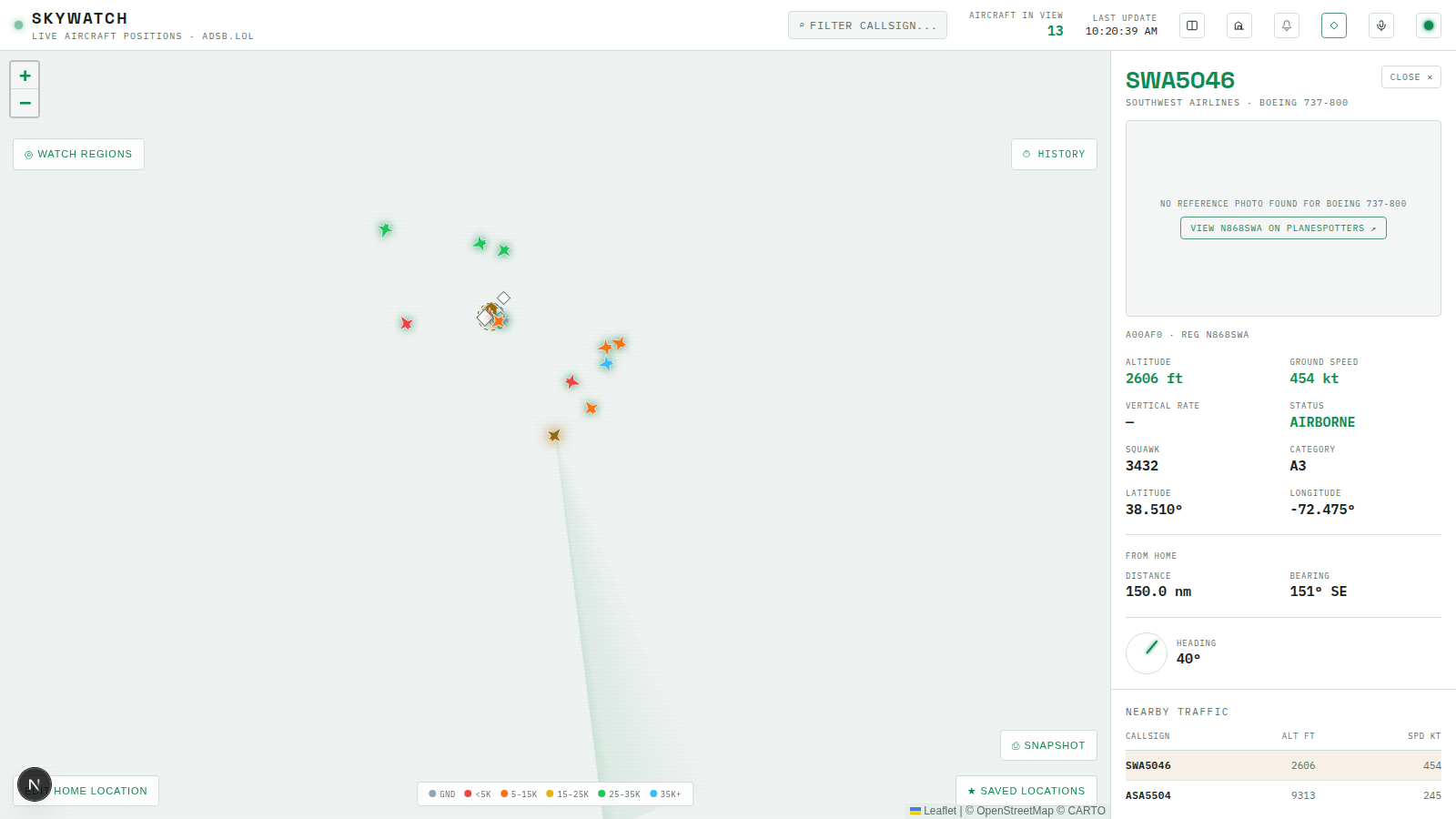
That completes geo.ts’s three helpers: distanceNm (Module 2, “how far”), viewRadiusNm (Module 4, “how big a fetch radius does this viewport need”), and now bearingDeg (“which direction”). The immediate use is the detail panel’s home-relative readout — knowing a squawking aircraft is 8nm away doesn’t tell you much on its own, but “8nm, bearing 240° SW” does:
// apps/web/src/components/DetailPanel.tsx (additions to the version built so far)
import { bearingDeg, distanceNm } from "@skywatch/shared";
import { useHomeLocation } from "@/hooks/useHomeLocation";

const COMPASS_POINTS = ["N", "NE", "E", "SE", "S", "SW", "W", "NW"];
function compassPoint(deg: number): string {
  return COMPASS_POINTS[Math.round(deg / 45) % 8];
}

// inside DetailPanel():
const { home } = useHomeLocation();

const fromHome =
  home && selected.lat != null && selected.lon != null
    ? {
        distance: distanceNm(home.lat, home.lon, selected.lat, selected.lon),
        bearing: bearingDeg(home.lat, home.lon, selected.lat, selected.lon),
      }
    : null;

// in the JSX, after the existing altitude/speed/squawk grid:
{fromHome && (
  <div className="mt-4 border-t border-line pt-4">
    <div className="mb-2 text-[9px] uppercase tracking-[0.1em] text-fg-dim">From home</div>
    <div className="grid grid-cols-2 gap-x-3.5 gap-y-3">
      <DataCell label="Distance" value={`${fmtNum(fromHome.distance, 1)} nm`} />
      <DataCell label="Bearing" value={`${fmtNum(fromHome.bearing)}° ${compassPoint(fromHome.bearing)}`} />
    </div>
  </div>
)}
The whole block is conditional on home being truthy — the three-state field pays off again here, since home === null (confirmed unset) and home === undefined (still loading) both correctly render nothing rather than a readout pointing at (0, 0). bearingDeg takes (fromLat, fromLon, toLat, toLon) — home first, aircraft second — since “initial bearing from point 1 to point 2” is directional, not symmetric; swapping the arguments would silently give you the bearing to fly home from the aircraft instead of the other way around.
The Overflight Log Page
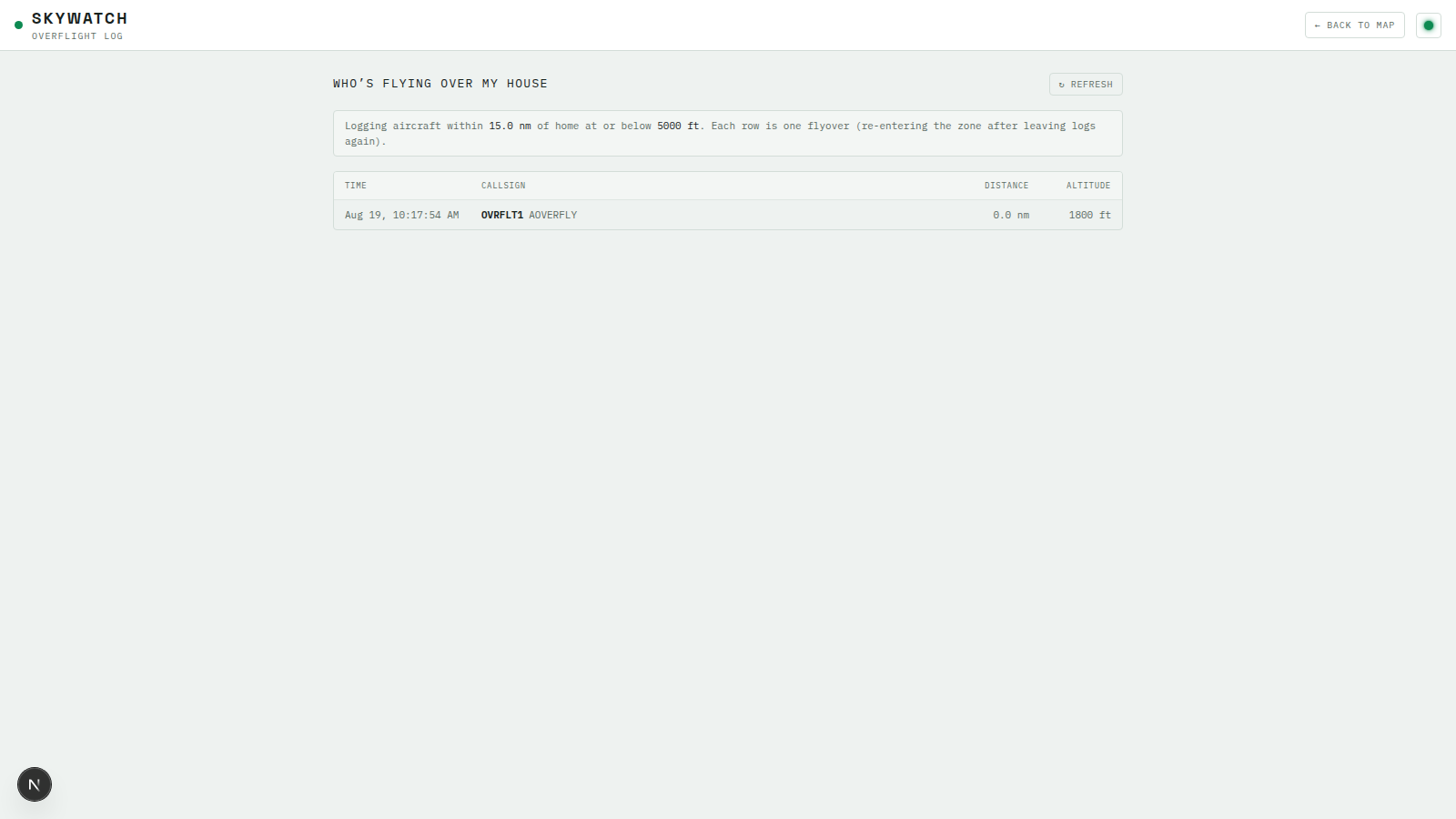
overflight_log has been filling up since Module 2 the moment a home location exists — detectOverflightTransitions writes one row per entry into the zone. What’s been missing is anywhere to read that history back. Start with the repo:
// apps/server/src/db/repos/overflightRepo.ts
import { desc } from "drizzle-orm";
import type { OverflightEvent } from "@skywatch/shared";
import { db } from "../client.js";
import { overflightLog } from "../schema.js";

export async function listRecentOverflights(limit: number): Promise<OverflightEvent[]> {
  const rows = await db
    .select()
    .from(overflightLog)
    .orderBy(desc(overflightLog.detectedAt))
    .limit(Math.min(limit, 500));

  return rows.map((row) => ({
    id: row.id,
    hex: row.hex,
    flight: row.flight,
    lat: row.lat,
    lon: row.lon,
    altBaroFt: row.altBaroFt,
    distanceNm: row.distanceNm,
    detectedAt: row.detectedAt.toISOString(),
  }));
}
// apps/server/src/routes/overflights.ts
import type { FastifyInstance } from "fastify";
import { z } from "zod";
import { listRecentOverflights } from "../db/repos/overflightRepo.js";

const querySchema = z.object({ limit: z.coerce.number().min(1).max(500).default(50) });

export function registerOverflightRoutes(app: FastifyInstance): void {
  app.get("/overflights", async (req, reply) => {
    const parsed = querySchema.safeParse(req.query);
    if (!parsed.success) return reply.status(400).send({ error: "invalid limit" });
    const overflights = await listRecentOverflights(parsed.data.limit);
    return { overflights };
  });
}
Math.min(limit, 500) on top of Zod’s own .max(500) is redundant on the happy path but cheap insurance against the schema ever getting loosened later without someone remembering this query also needs a cap — the same belt-and-suspenders instinct Module 4’s history route used with its request-range cap and its row-count cap.
// apps/web/src/components/OverflightLogPage.tsx
"use client";
import { useCallback, useEffect, useState } from "react";
import Link from "next/link";
import { fmtNum } from "@skywatch/shared";
import type { OverflightEvent } from "@skywatch/shared";
import { apiUrl } from "@/lib/serverUrl";
import { useHomeLocation } from "@/hooks/useHomeLocation";
import { ThemeToggle } from "./ThemeToggle";
const LIMIT = 200;
const AUTO_REFRESH_MS = 30_000;
type LoadStatus = "loading" | "ready" | "error";
function fmtDateTime(iso: string): string {
return new Date(iso).toLocaleString([], {
month: "short",
day: "numeric",
hour: "2-digit",
minute: "2-digit",
second: "2-digit",
});
}
/**
* "Who's flying over my house" log -- a dedicated page (not just a panel)
* since it's meant to be a browsable history, not a live glance: GET
* /api/overflights returns everything detectOverflightTransitions (apps/
* server/src/poller/detect.ts) has logged, edge-triggered on entry into the
* home radius/altitude-ceiling box, so each row is one flyover, not one
* poll tick.
*/
export function OverflightLogPage() {
const { home } = useHomeLocation();
const [events, setEvents] = useState<OverflightEvent[]>([]);
const [status, setStatus] = useState<LoadStatus>("loading");
const load = useCallback(() => {
fetch(apiUrl(`/api/overflights?limit=${LIMIT}`))
.then((r) => {
if (!r.ok) throw new Error(`overflights fetch failed (${r.status})`);
return r.json() as Promise<{ overflights: OverflightEvent[] }>;
})
.then((data) => {
setEvents(data.overflights ?? []);
setStatus("ready");
})
.catch((err) => {
console.error("[overflight-log] fetch failed:", err);
setStatus("error");
});
}, []);
useEffect(() => {
load();
const timer = setInterval(load, AUTO_REFRESH_MS);
return () => clearInterval(timer);
}, [load]);
return (
<div className="flex h-full min-h-screen flex-col bg-base">
<header className="z-20 flex h-14 shrink-0 items-center justify-between border-b border-line bg-surface px-4">
<div className="flex items-center gap-2.5">
<span className="h-[9px] w-[9px] rounded-full bg-phosphor" />
<div>
<h1 className="font-display text-[17px] font-bold tracking-[0.14em] text-fg">SKYWATCH</h1>
<div className="-mt-0.5 text-[10px] tracking-[0.12em] text-fg-dim">OVERFLIGHT LOG</div>
</div>
</div>
<div className="flex items-center gap-3">
<Link
href="/"
className="rounded-sm border border-line px-2.5 py-1.5 text-[10px] uppercase tracking-[0.08em] text-fg-dim transition-colors hover:border-phosphor-dim hover:text-phosphor"
>
← Back to map
</Link>
<ThemeToggle />
</div>
</header>
<div className="mx-auto w-full max-w-[900px] flex-1 px-4 py-6">
<div className="mb-4 flex items-baseline justify-between">
<h2 className="text-[13px] uppercase tracking-[0.1em] text-fg">Who’s flying over my house</h2>
<button
type="button"
onClick={load}
className="rounded-sm border border-line px-2.5 py-1 text-[10px] uppercase tracking-[0.06em] text-fg-dim transition-colors hover:border-phosphor-dim hover:text-phosphor"
>
↻ Refresh
</button>
</div>
{home === undefined && <div className="mb-4 text-[11px] text-fg-dim">Loading home location…</div>}
{home === null && (
<div className="mb-4 rounded-sm border border-line bg-surface-raised px-3 py-2 text-[11px] text-fg-dim">
No home location set yet -- open the map and use the ⌂ control (bottom-left) to set one. Overflights are
only logged once a home location and radius/altitude ceiling are configured.
</div>
)}
{home && (
<div className="mb-4 rounded-sm border border-line bg-surface-raised px-3 py-2 text-[11px] text-fg-dim">
Logging aircraft within <span className="text-fg">{fmtNum(home.radiusNm, 1)} nm</span> of home at or
below <span className="text-fg">{fmtNum(home.altitudeCeilingFt)} ft</span>. Each row is one flyover
(re-entering the zone after leaving logs again).
</div>
)}
<div className="overflow-hidden rounded-sm border border-line">
<div className="flex bg-surface-raised px-3 py-2 text-[9px] uppercase tracking-[0.08em] text-fg-dim">
<span className="w-[150px]">Time</span>
<span className="flex-1">Callsign</span>
<span className="w-[90px] text-right">Distance</span>
<span className="w-[90px] text-right">Altitude</span>
</div>
{status === "loading" && <div className="px-3 py-8 text-center text-[11px] text-fg-dim">Loading…</div>}
{status === "error" && (
<div className="px-3 py-8 text-center text-[11px] text-danger">Couldn’t load the log — try refresh.</div>
)}
{status === "ready" && events.length === 0 && (
<div className="px-3 py-8 text-center text-[11px] text-fg-dim">
No overflights logged yet. They’ll show up here the next time an aircraft passes through the
zone above.
</div>
)}
{status === "ready" &&
events.map((e) => {
const cs = e.flight?.trim() || e.hex.toUpperCase();
return (
<div
key={e.id}
className="flex items-center border-t border-line/60 px-3 py-2 text-[11px] hover:bg-phosphor/5"
>
<span className="w-[150px] text-fg-dim">{fmtDateTime(e.detectedAt)}</span>
<span className="flex-1 truncate font-semibold text-fg">
{cs}
<span className="ml-1.5 font-normal text-fg-dim">{e.hex.toUpperCase()}</span>
</span>
<span className="w-[90px] text-right text-fg-dim">{fmtNum(e.distanceNm, 1)} nm</span>
<span className="w-[90px] text-right text-fg-dim">
{e.altBaroFt != null ? `${fmtNum(e.altBaroFt)} ft` : "—"}
</span>
</div>
);
})}
</div>
{status === "ready" && events.length === LIMIT && (
<div className="mt-2 text-[10px] text-fg-dim">
Showing the {LIMIT} most recent overflights. Older entries aren’t shown here (still kept in the
database).
</div>
)}
</div>
</div>
);
}
Wire it up as its own route:
// apps/web/src/app/overflights/page.tsx
import { OverflightLogPage } from "@/components/OverflightLogPage";

export default function Overflights() {
  return <OverflightLogPage />;
}
This is a genuinely separate concern from the live recentOverflights feed the header’s alert dropdown already shows. That feed only ever holds what arrived over the WebSocket since the tab was opened — close the tab, lose the history. This page fetches GET /api/overflights directly, so it shows every flyover Postgres has ever recorded, going back as far as the table does, whether or not this browser was open when any of them happened. The 30_000ms auto-refresh keeps it reasonably current without needing its own WebSocket subscription — a browsable log doesn’t need sub-second latency the way the live feed does.
Linking It From the Header
Header.tsx gets one more icon in its row, matching the pattern every prior feature module has followed here — a Link to the new route, styled like the other icon buttons already sitting there:
// apps/web/src/components/Header.tsx (add to the icon row, alongside whatever else is already there)
import Link from "next/link";

<Link
  href="/overflights"
  title="Overflight log -- who's flown over home"
  className="flex h-7 w-7 items-center justify-center rounded-sm border border-line text-text-dim transition-colors hover:border-phosphor-dim hover:text-phosphor"
>
  <svg width="14" height="14" viewBox="0 0 24 24" fill="none" stroke="currentColor" strokeWidth="1.6">
    <path d="M4 19h16M4 19V9l6-4 6 4v10" strokeLinejoin="round" strokeLinecap="round" />
    <path d="M9 19v-6h6v6" strokeLinejoin="round" />
  </svg>
</Link>
A house icon, linking straight to /overflights — one glance and a click from the main dashboard to the full history, no digging through the live alert dropdown for something that scrolled past.
The detail panel’s new “From Home” section, showing distance and bearing to a selected aircraft:
And the overflight log itself, once an aircraft has actually crossed the configured zone:
Try It
- Restart the server so the new
settingsandoverflightsroutes are registered, then reload the frontend. - Open the map and click SET HOME LOCATION. Pan the map somewhere with visible traffic first, then set a radius and altitude ceiling and save. Confirm the amber home marker and dashed radius circle appear where you’d expect.
- Click an aircraft on the map or in the flight list and confirm the detail panel now shows a “From home” distance and bearing — reload the page and confirm it’s still there (proof it’s reading from the server, not local-only state).
- Wait for an aircraft to pass inside your configured radius and ceiling (or temporarily set a generous radius/high ceiling to make one qualify sooner), then click the header’s house icon and confirm it shows up on
/overflightswith the right distance and altitude. - Reload
/overflightsdirectly (not by navigating from the dashboard) and confirm the full history still loads — it isn’t relying on anything the live WS feed pushed during this session.
Recap
setHomeLocation’sonConflictDoUpdateis a straightforward consequence of Module 1’shome_location_singletoncheck constraint — becauseidcan only ever be1, upserting against that fixed id is the whole implementation, no “does a row exist yet” branch required.- The store’s
homefield is three-state (undefined/null/ object) on purpose — collapsing “not fetched yet” and “fetched, nothing set” into one falsy value would flash an incorrect empty state on every page that reads it before the initial fetch resolves. bearingDegcompletesgeo.ts’s three helpers (distanceNm,viewRadiusNm, now this), and immediately powers the detail panel’s “From home” readout alongsidedistanceNm.- The overflight log page and the header’s live alert feed answer different questions from the same table — full persisted history versus what’s arrived since the page loaded — which is why they’re two separate UIs instead of one.
Next lesson: putting two watch regions on screen at once with multi-region compare, and a lightweight saved-locations bookmark feature that’s explicitly not the same thing as a watch region.