
Watch Regions & the Default View
Objectives
By the end of this chapter, you should be able to:
- Grow the store from a single flat aircraft list into per-region positions, keyed by the watch region that produced them, plus an operator-configurable default view
- Build the watch-regions control panel — list, add, enable/disable, delete, and set-default — entirely on top of the repo and routes Module 2 already shipped
- Wire the map so it opens on the operator’s chosen default region instead of a hardcoded fallback, and stays correct when that default changes without a page reload
💡 Why this matters: The backend has supported more than one watch region since Module 2 — the schema’s partial unique index, the transactional repo functions, the
POST /:id/defaultroute are all already there. The frontend has been quietly ignoring all of it, storing one flataircraftarray and never asking which region it came from. This chapter is where that catches up: multiple regions, a real default, and a screen that reflects both.
Evolving the Store
positions messages have carried a regionId since Module 2’s realtime layer — the store’s own doc comment flagged this as deferred: “Only one watch region is configured at this point, so the WS message’s regionId is ignored for now — a later module introduces multiple simultaneously-watched regions and, with them, per-region storage.” That module is this one.
// apps/web/src/store/useAppStore.ts
import { create } from "zustand";
import type { AircraftState } from "@skywatch/shared";

export type ConnectionStatus = "connecting" | "open" | "closed";

interface AppState {
  connectionStatus: ConnectionStatus;
  /** Live aircraft, keyed by the watch region that produced them (a region can be rendered by more than one view, e.g. a later multi-region compare). */
  positionsByRegion: Record<number, AircraftState[]>;
  /** The first region we've heard from — fallback for selectPrimaryAircraft until defaultRegionView is known or its data has arrived. */
  primaryRegionId: number | null;
  /**
   * The operator-configured default watch region (WatchRegion.isDefault) —
   * id plus the map view it corresponds to. Two writers keep this current:
   * MapPanel syncs it from /api/watch-regions on load, and
   * WatchRegionsControl overwrites it immediately when the user picks a new
   * default via the star button, so both selectPrimaryAircraft (which
   * region's feed is "primary") and the "return to watch region" control
   * stay correct without a page reload.
   */
  defaultRegionView: { id: number; center: [number, number]; zoom: number } | null;
  lastUpdate: Date | null;

  selectedIcao: string | null;
  filterText: string;

  setConnectionStatus: (status: ConnectionStatus) => void;
  setPositions: (regionId: number, aircraft: AircraftState[], ts: number) => void;
  setDefaultRegionView: (view: { id: number; center: [number, number]; zoom: number } | null) => void;
  setSelectedIcao: (icao: string | null) => void;
  setFilterText: (text: string) => void;
}

export const useAppStore = create<AppState>((set) => ({
  connectionStatus: "connecting",
  positionsByRegion: {},
  primaryRegionId: null,
  defaultRegionView: null,
  lastUpdate: null,

  selectedIcao: null,
  filterText: "",

  setConnectionStatus: (status) => set({ connectionStatus: status }),

  setPositions: (regionId, aircraft, ts) =>
    set((state) => ({
      positionsByRegion: { ...state.positionsByRegion, [regionId]: aircraft },
      primaryRegionId: state.primaryRegionId ?? regionId,
      lastUpdate: new Date(ts),
    })),

  setDefaultRegionView: (view) => set({ defaultRegionView: view }),

  setSelectedIcao: (icao) => set({ selectedIcao: icao }),
  setFilterText: (text) => set({ filterText: text }),
}));

// A fresh `[]` literal on every selector call would change reference
// identity each render even when nothing changed, which — combined with
// Zustand's useSyncExternalStore-based subscription — causes React to
// re-render in a loop ("Maximum update depth exceeded"). Reusing one
// constant keeps the "no data yet" case referentially stable.
const EMPTY_AIRCRAFT: AircraftState[] = [];

/**
 * The primary region's live aircraft list, or empty until data has arrived.
 * Prefers the operator-configured default region the moment its WS feed has
 * produced at least one message; before that — or if no default is
 * configured yet — falls back to whichever enabled region we heard from
 * first, so the map never shows a blank feed just because the default's
 * data hasn't arrived.
 */
export function selectPrimaryAircraft(state: AppState): AircraftState[] {
  const defaultId = state.defaultRegionView?.id;
  if (defaultId != null && state.positionsByRegion[defaultId]) {
    return state.positionsByRegion[defaultId];
  }
  if (state.primaryRegionId == null) return EMPTY_AIRCRAFT;
  return state.positionsByRegion[state.primaryRegionId] ?? EMPTY_AIRCRAFT;
}
setPositions now takes a regionId and files each region’s aircraft under its own key instead of overwriting one shared array — a second watch region’s traffic no longer clobbers the first’s. useLiveFeed’s WS handler needs exactly one change to match: setPositions(msg.aircraft, msg.ts) becomes setPositions(msg.regionId, msg.aircraft, msg.ts), using the regionId the message has carried all along.
selectPrimaryAircraft replaces the old s.aircraft selector everywhere it was read. It exists as a plain exported function, not a store field, so it can be swapped for a smarter version later without touching the store’s shape — the pattern this codebase uses for every piece of derived state.
The Watch Regions Hook
// apps/web/src/hooks/useWatchRegions.ts
"use client";

import { useEffect, useState } from "react";
import type { WatchRegion } from "@skywatch/shared";
import { apiUrl } from "@/lib/serverUrl";

export function useWatchRegions() {
  const [regions, setRegions] = useState<WatchRegion[]>([]);
  const [loaded, setLoaded] = useState(false);

  useEffect(() => {
    let cancelled = false;
    fetch(apiUrl("/api/watch-regions"))
      .then((r) => r.json())
      .then((data: { regions: WatchRegion[] }) => {
        if (!cancelled) setRegions(data.regions ?? []);
      })
      .catch((err) => console.error("[watch-regions] fetch failed:", err))
      .finally(() => {
        if (!cancelled) setLoaded(true);
      });
    return () => {
      cancelled = true;
    };
  }, []);

  return { regions, loaded };
}
Deliberately dumb: fetch once on mount, no refetching, no subscriptions. MapPanel uses this to compute its initial view and never needs it again after that. WatchRegionsControl, below, keeps its own independent list instead of sharing this one — different lifecycle, different reason to exist.
Two Small Map Helpers
Two things the map layer needs before wiring the panel in: a way to tell Leaflet’s own pan/zoom events apart from a map.setView() call this code made itself, and a heuristic for turning a region’s radius into a starting zoom level.
// apps/web/src/lib/mapView.ts
import type L from "leaflet";

/**
 * Leaflet fires `moveend` for both user interaction (drag/scroll-zoom) and
 * our own programmatic `setView`/`panTo` calls. The free-pan feed built
 * later in this module only wants the former to trigger, so every call site
 * that moves the map programmatically tags the map instance right before
 * moving it, and that feed consumes (and clears) the tag on the next
 * `moveend` instead of treating it as a real user pan.
 */
export function markProgrammaticMove(map: L.Map): void {
  (map as unknown as { __skywatchProgrammatic?: boolean }).__skywatchProgrammatic = true;
}

/** Rough radius(nm) -> Leaflet zoom heuristic, tuned by eye, for framing a watch region's initial view. */
export function radiusNmToZoom(radiusNm: number): number {
  if (radiusNm > 200) return 5;
  if (radiusNm > 120) return 6;
  if (radiusNm > 60) return 7;
  if (radiusNm > 30) return 8;
  return 9;
}

/** Fallback view when no watch region is configured yet — matches the original's default. */
export const DEFAULT_VIEW: { center: [number, number]; zoom: number } = {
  center: [40.0, -30.0],
  zoom: 3,
};
The Watch Regions Control Panel
// apps/web/src/components/WatchRegionsControl.tsx
"use client";

import { useEffect, useState } from "react";
import { useMap } from "react-leaflet";
import type { WatchRegion } from "@skywatch/shared";
import { apiUrl } from "@/lib/serverUrl";
import { useAppStore } from "@/store/useAppStore";
import { markProgrammaticMove, radiusNmToZoom } from "@/lib/mapView";

const DEFAULT_RADIUS_NM = 200;

/**
 * Manage the region(s) the *backend poller* continuously watches — distinct
 * from a bookmarks-style control that would only save map views for the
 * frontend. Every enabled region here gets polled every ~15s, so trails and
 * history both become available inside it.
 *
 * The list here is deliberately independent of MapPanel's own
 * useWatchRegions() call (which only picks an initial view once on load) —
 * changes made here take effect on the poller's very next cycle regardless,
 * since it re-reads enabled regions from the DB fresh every tick.
 */
export function WatchRegionsControl() {
  const map = useMap();
  const setDefaultRegionView = useAppStore((s) => s.setDefaultRegionView);
  const [open, setOpen] = useState(false);
  const [regions, setRegions] = useState<WatchRegion[]>([]);
  const [loaded, setLoaded] = useState(false);
  const [newName, setNewName] = useState("");
  const [newRadius, setNewRadius] = useState(String(DEFAULT_RADIUS_NM));
  const [saving, setSaving] = useState(false);
  const [settingDefaultId, setSettingDefaultId] = useState<number | null>(null);
  const [error, setError] = useState<string | null>(null);

  const refresh = () => {
    fetch(apiUrl("/api/watch-regions"))
      .then((r) => r.json())
      .then((data: { regions: WatchRegion[] }) => setRegions(data.regions ?? []))
      .catch((err) => console.error("[watch-regions] fetch failed:", err))
      .finally(() => setLoaded(true));
  };

  useEffect(() => {
    if (open && !loaded) refresh();
    // eslint-disable-next-line react-hooks/exhaustive-deps
  }, [open]);

  const jumpTo = (region: WatchRegion) => {
    markProgrammaticMove(map);
    map.setView([region.lat, region.lon], map.getZoom());
    setOpen(false);
  };

  const addAtCurrentView = async () => {
    const name = newName.trim();
    const radiusNm = Number(newRadius);
    if (!name) return;
    if (!Number.isFinite(radiusNm) || radiusNm < 1 || radiusNm > 250) {
      setError("Radius must be between 1 and 250nm.");
      return;
    }
    setError(null);
    setSaving(true);
    try {
      const center = map.getCenter();
      const res = await fetch(apiUrl("/api/watch-regions"), {
        method: "POST",
        headers: { "Content-Type": "application/json" },
        body: JSON.stringify({ name, lat: center.lat, lon: center.lng, radiusNm }),
      });
      if (!res.ok) throw new Error(`create failed (${res.status})`);
      const data: { region: WatchRegion } = await res.json();
      setRegions((prev) => [...prev, data.region]);
      setNewName("");
      setNewRadius(String(DEFAULT_RADIUS_NM));
    } catch (err) {
      console.error("[watch-regions] create failed:", err);
      setError("Couldn't create that region — try again.");
    } finally {
      setSaving(false);
    }
  };

  const toggleEnabled = async (region: WatchRegion, e: React.MouseEvent) => {
    e.stopPropagation();
    const nextEnabled = !region.enabled;
    setRegions((prev) => prev.map((r) => (r.id === region.id ? { ...r, enabled: nextEnabled } : r)));
    try {
      await fetch(apiUrl(`/api/watch-regions/${region.id}`), {
        method: "PATCH",
        headers: { "Content-Type": "application/json" },
        body: JSON.stringify({ enabled: nextEnabled }),
      });
    } catch (err) {
      console.error("[watch-regions] toggle failed:", err);
      refresh();
    }
  };

  /**
   * Sets `region` as THE default: the backend force-enables it and clears
   * the flag on every other row (see setWatchRegionDefault from Module 2),
   * so we mirror both of those locally rather than just flipping one
   * boolean. Also updates the store immediately and pans the map there now,
   * so setting a default feels like an immediate action instead of
   * something that only takes effect on next reload.
   */
  const setDefault = async (region: WatchRegion, e: React.MouseEvent) => {
    e.stopPropagation();
    if (region.isDefault) return;
    setSettingDefaultId(region.id);
    const prevRegions = regions;
    setRegions((prev) => prev.map((r) => ({ ...r, isDefault: r.id === region.id, enabled: r.id === region.id ? true : r.enabled })));
    try {
      const res = await fetch(apiUrl(`/api/watch-regions/${region.id}/default`), { method: "POST" });
      if (!res.ok) throw new Error(`set default failed (${res.status})`);
      const zoom = radiusNmToZoom(region.radiusNm);
      setDefaultRegionView({ id: region.id, center: [region.lat, region.lon], zoom });
      markProgrammaticMove(map);
      map.setView([region.lat, region.lon], zoom);
    } catch (err) {
      console.error("[watch-regions] set default failed:", err);
      setRegions(prevRegions);
      setError("Couldn't set that as the default — try again.");
    } finally {
      setSettingDefaultId(null);
    }
  };

  const remove = async (id: number, e: React.MouseEvent) => {
    e.stopPropagation();
    const wasDefault = regions.find((r) => r.id === id)?.isDefault ?? false;
    setRegions((prev) => prev.filter((r) => r.id !== id));
    try {
      await fetch(apiUrl(`/api/watch-regions/${id}`), { method: "DELETE" });
      // Deleting the default region promotes another one server-side (see
      // deleteWatchRegion from Module 2) — refetch to find out which,
      // rather than guessing at the promotion order locally.
      if (wasDefault) {
        const res = await fetch(apiUrl("/api/watch-regions"));
        const data: { regions: WatchRegion[] } = await res.json();
        setRegions(data.regions ?? []);
        const newDefault = data.regions?.find((r) => r.isDefault) ?? null;
        setDefaultRegionView(
          newDefault
            ? { id: newDefault.id, center: [newDefault.lat, newDefault.lon], zoom: radiusNmToZoom(newDefault.radiusNm) }
            : null
        );
      }
    } catch (err) {
      console.error("[watch-regions] delete failed:", err);
      refresh();
    }
  };

  return (
    <div className="absolute left-3.5 top-24 z-[500]">
      {open ? (
        <div className="w-[250px] rounded-sm border border-line bg-surface/95 p-3 text-[11px] text-fg">
          <div className="mb-2 flex items-center justify-between">
            <span className="text-[10px] uppercase tracking-[0.08em] text-fg-dim">Watch regions</span>
            <button type="button" onClick={() => setOpen(false)} className="text-fg-dim hover:text-fg">
              ✕
            </button>
          </div>

          <p className="mb-1.5 text-[9px] text-fg-dim">
            ★ sets the default — where the map opens to and which region's traffic it shows.
          </p>

          <div className="mb-2 max-h-[200px] overflow-y-auto">
            {regions.length === 0 && <div className="py-1.5 text-fg-dim">No watch regions yet.</div>}
            {regions.map((region) => (
              <div
                key={region.id}
                role="button"
                tabIndex={0}
                onClick={() => jumpTo(region)}
                onKeyDown={(e) => e.key === "Enter" && jumpTo(region)}
                className="flex cursor-pointer items-center justify-between gap-1.5 rounded-sm px-1 py-1.5 hover:bg-phosphor/10"
              >
                <span className="flex min-w-0 flex-col">
                  <span className="flex items-center gap-1 truncate text-fg">
                    {region.name}
                    {region.isDefault && (
                      <span className="shrink-0 rounded-sm border border-phosphor-dim px-1 py-px text-[8px] tracking-[0.05em] text-phosphor">
                        DEFAULT
                      </span>
                    )}
                  </span>
                  <span className="text-[9px] text-fg-dim">{region.radiusNm}nm radius</span>
                </span>
                <span className="flex shrink-0 items-center gap-1.5">
                  <button
                    type="button"
                    onClick={(e) => setDefault(region, e)}
                    disabled={region.isDefault || settingDefaultId === region.id}
                    aria-label={region.isDefault ? `${region.name} is the default` : `Set ${region.name} as default`}
                    title={region.isDefault ? "Default watch region" : "Set as default — MapPanel opens here"}
                    className={`text-[11px] leading-none ${
                      region.isDefault
                        ? "cursor-default text-phosphor"
                        : "text-fg-dim hover:text-phosphor disabled:opacity-50"
                    }`}
                  >
                    {region.isDefault ? "★" : "☆"}
                  </button>
                  <button
                    type="button"
                    onClick={(e) => toggleEnabled(region, e)}
                    aria-label={region.enabled ? `Disable ${region.name}` : `Enable ${region.name}`}
                    className={`rounded-sm border px-1.5 py-0.5 text-[9px] tracking-[0.05em] ${
                      region.enabled
                        ? "border-phosphor-dim text-phosphor"
                        : "border-line text-fg-dim hover:border-phosphor-dim hover:text-phosphor"
                    }`}
                  >
                    {region.enabled ? "ON" : "OFF"}
                  </button>
                  <button
                    type="button"
                    onClick={(e) => remove(region.id, e)}
                    className="text-fg-dim hover:text-danger"
                    aria-label={`Delete ${region.name}`}
                  >
                    ✕
                  </button>
                </span>
              </div>
            ))}
          </div>

          <div className="border-t border-line pt-2">
            <input
              value={newName}
              onChange={(e) => setNewName(e.target.value)}
              placeholder="Name this region…"
              className="mb-1.5 w-full rounded-sm border border-line bg-surface-raised px-1.5 py-1 font-mono text-[11px] text-fg placeholder:text-fg-dim focus:outline-none"
            />
            <div className="flex gap-1.5">
              <input
                value={newRadius}
                onChange={(e) => setNewRadius(e.target.value)}
                onKeyDown={(e) => e.key === "Enter" && addAtCurrentView()}
                inputMode="numeric"
                placeholder="Radius (nm)"
                className="min-w-0 flex-1 rounded-sm border border-line bg-surface-raised px-1.5 py-1 font-mono text-[11px] text-fg placeholder:text-fg-dim focus:outline-none"
              />
              <button
                type="button"
                onClick={addAtCurrentView}
                disabled={saving || !newName.trim()}
                className="shrink-0 rounded-sm border border-phosphor-dim px-2 py-1 text-[10px] tracking-[0.05em] text-phosphor hover:bg-phosphor/10 disabled:opacity-50"
              >
                ADD AT VIEW
              </button>
            </div>
            <p className="mt-1 text-[9px] text-fg-dim">
              Adds a region centered on the current map view. The poller starts watching it within ~15s.
            </p>
            {error && <p className="mt-1 text-[9px] text-danger">{error}</p>}
          </div>
        </div>
      ) : (
        <button
          type="button"
          onClick={() => setOpen(true)}
          className="rounded-sm border border-line bg-surface/90 px-3 py-2 text-[11px] tracking-[0.08em] text-phosphor transition-colors hover:border-phosphor-dim"
        >
          ◎ WATCH REGIONS
        </button>
      )}
    </div>
  );
}
Every write here — create, toggle, set-default, delete — updates local state optimistically, then either confirms against the server response or rolls back and refetches on failure. That’s why setDefault snapshots prevRegions before touching anything: a failed POST restores exactly what was on screen a moment ago instead of leaving the star in a state the server never confirmed.
Wiring the Default Into the Map
MapPanel needs three things it didn’t have before: the region list (to compute an initial view), a seed write into defaultRegionView so the store has a target the instant the map mounts, and the panel itself.
// apps/web/src/components/MapPanel.tsx (additions to the Module 3 version)
import { useWatchRegions } from "@/hooks/useWatchRegions";
import { DEFAULT_VIEW, markProgrammaticMove, radiusNmToZoom } from "@/lib/mapView";
import { WatchRegionsControl } from "./WatchRegionsControl";
import { selectPrimaryAircraft } from "@/store/useAppStore";

/** Applies the watch region's center/zoom once it's loaded (async, arrives after initial mount). */
function InitialViewSetter({ center, zoom }: { center: [number, number]; zoom: number }) {
  const map = useMap();
  const appliedKey = useRef<string | null>(null);

  useEffect(() => {
    const key = `${center[0]},${center[1]},${zoom}`;
    if (appliedKey.current === key) return;
    appliedKey.current = key;
    markProgrammaticMove(map);
    map.setView(center, zoom);
  }, [center, zoom, map]);

  return null;
}

function AircraftMarkers() {
  const aircraft = useAppStore(selectPrimaryAircraft);
  const selectedIcao = useAppStore((s) => s.selectedIcao);
  const setSelectedIcao = useAppStore((s) => s.setSelectedIcao);

  return (
    <>
      {aircraft
        .filter((a): a is typeof a & { lat: number; lon: number } => a.lat != null && a.lon != null)
        .map((a) => (
          <Marker
            key={a.hex}
            position={[a.lat, a.lon]}
            icon={makePlaneIcon(a.track ?? a.true_heading ?? a.mag_heading ?? 0)}
            eventHandlers={{ click: () => setSelectedIcao(a.hex) }}
          />
        ))}
    </>
  );
}

export function MapPanel() {
  const isDark = useThemeStore((s) => s.isDark);
  const connectionStatus = useAppStore((s) => s.connectionStatus);
  const setDefaultRegionView = useAppStore((s) => s.setDefaultRegionView);
  const { regions, loaded } = useWatchRegions();

  // Seeds the store's defaultRegionView from this component's own load-time
  // fetch, so selectPrimaryAircraft can follow the default region
  // deterministically instead of racing whichever region's WS message
  // happens to land first. This only runs once useWatchRegions() resolves —
  // it does NOT react to later default changes, since useWatchRegions()
  // itself never refetches after mount. WatchRegionsControl is the other,
  // later writer: it overwrites defaultRegionView directly the moment the
  // user picks a new default, which is what keeps things live after this.
  useEffect(() => {
    if (!loaded) return;
    const primary = regions.find((r) => r.isDefault);
    setDefaultRegionView(
      primary ? { id: primary.id, center: [primary.lat, primary.lon], zoom: radiusNmToZoom(primary.radiusNm) } : null
    );
    // eslint-disable-next-line react-hooks/exhaustive-deps
  }, [loaded]);

  const initialView = useMemo(() => {
    const primary = regions.find((r) => r.isDefault) ?? regions.find((r) => r.enabled) ?? regions[0];
    if (!primary) return DEFAULT_VIEW;
    return { center: [primary.lat, primary.lon] as [number, number], zoom: radiusNmToZoom(primary.radiusNm) };
  }, [regions]);

  return (
    <div className="relative h-full w-full">
      <MapContainer center={DEFAULT_VIEW.center} zoom={DEFAULT_VIEW.zoom} minZoom={2} maxZoom={12} worldCopyJump zoomControl attributionControl className="h-full w-full">
        {/* TileLayer unchanged from Module 3 */}
        <AircraftMarkers />
        <WatchRegionsControl />
        {loaded && <InitialViewSetter center={initialView.center} zoom={initialView.zoom} />}
      </MapContainer>
      {connectionStatus !== "open" && (/* unchanged connection banner */ <></>)}
    </div>
  );
}
Two separate effects intentionally do two separate things: initialView (a useMemo) decides where the MapContainer should point once useWatchRegions() resolves, applied via InitialViewSetter since Leaflet won’t re-read center/zoom props after mount; the defaultRegionView effect seeds the store, which is what selectPrimaryAircraft and (starting next chapter) the “return to region” control read from afterward. One is a one-time map instruction, the other is ongoing shared state — conflating them would mean the map only ever gets the region that happened to be default when this component first mounted.
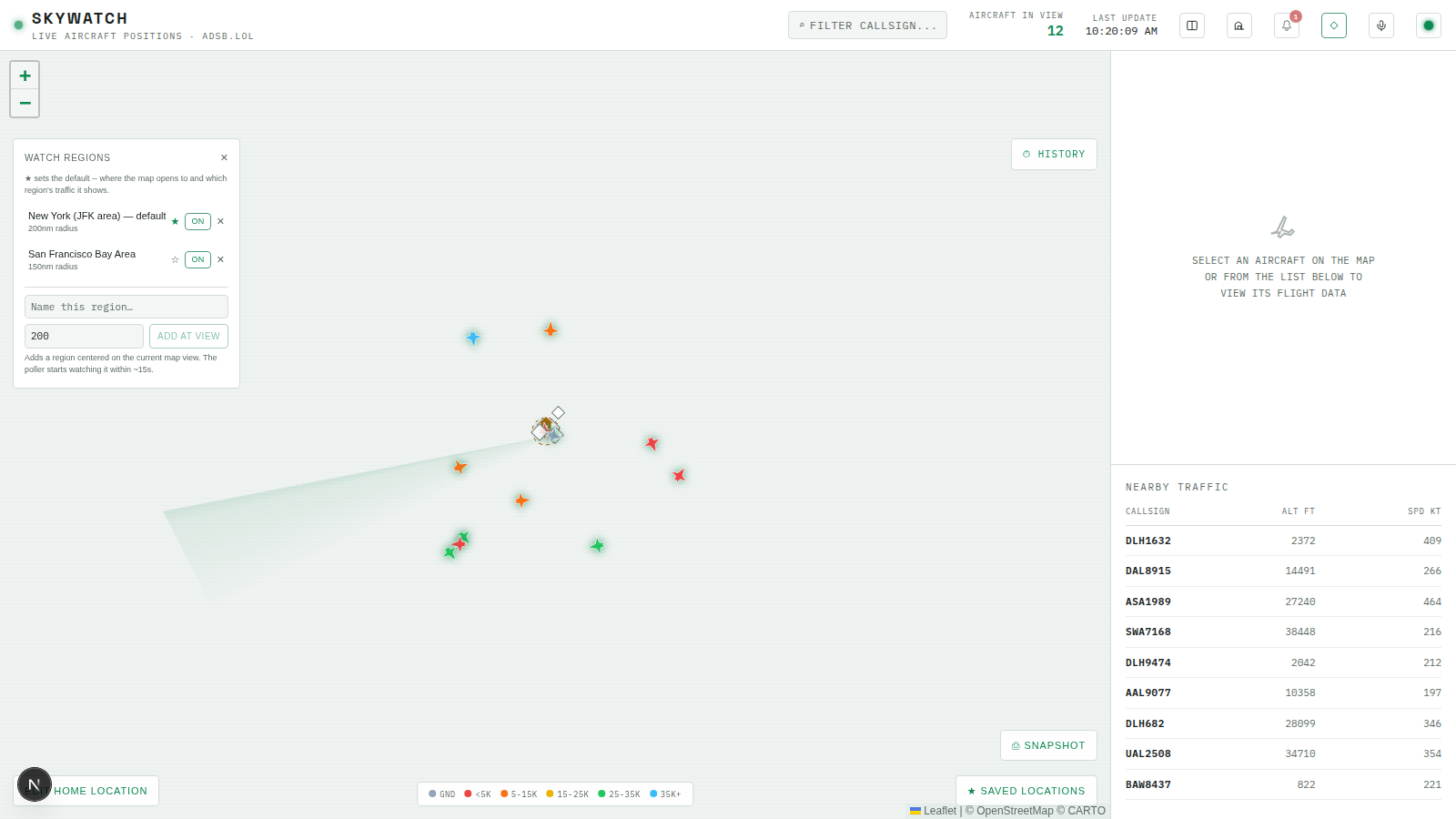
Try It
- Restart the frontend if it’s still running the Module 3 version, then open the app — it should load into
DEFAULT_VIEWbriefly, then jump to your first watch region (the seeded JFK-area default from Module 2’s poller startup) onceuseWatchRegions()resolves. - Click ◎ WATCH REGIONS, add a second region somewhere else on the map (pan first, then ADD AT VIEW), and confirm it appears in the list, unstarred.
- Click its ☆ to make it the default. Confirm the star moves, the
DEFAULTbadge moves with it, and the map immediately pans there. - Reload the page from scratch and confirm it now opens on the new default, not the original one — proof the change is persisted server-side, not just held in local state.
- Delete the current default region and confirm another one is promoted (check the
DEFAULTbadge lands on the oldest remaining region) and the map’s behavior on next reload matches.
Recap
- The watch-regions backend was already done as of Module 2 — this chapter was entirely a frontend problem: a control panel, a per-region store, and a map that reads from both.
positionsByRegionreplaces the flataircraftarray from Module 3, finally consuming theregionIdthe WS message has carried since it was introduced.defaultRegionViewhas two writers by design —MapPanel’s load-time fetch seeds it,WatchRegionsControloverwrites it live — so “where does the map open” and “what’s happening right now” both track the operator’s actual configuration, not a stale snapshot from mount.
Next lesson: what happens when the user pans away from the watch region — free-pan fallback, the way back, and fading aircraft trails.