
Squawk Alerts & the Alert Feed
Objectives
By the end of this chapter, you should be able to:
- Extend the live WS handler to finally consume the socket’s remaining two message types,
squawk_alertandoverflight, wiring both into new store actions - Build a scrolling alert feed dropdown with a flash-on-new-row treatment and an unseen-count badge
- Add the audible + browser-Notification alert layer, with a persisted mute preference that correctly survives a subtle hydrate/persist race condition
💡 Why this matters: The WebSocket has been carrying
squawk_alertandoverflightmessages since Module 2 — the server has been pushing them the whole time, to a frontend that’s simply been throwing them away. This chapter is where that changes: the socket finally gets a client worth listening to it, plus the visible and audible ways an operator actually finds out something needs their attention.
The Store’s Alert State
Two new event arrays and a mute flag, following the same additive pattern every store change in this course has used:
// apps/web/src/store/useAppStore.ts (additions to the previous chapter's version)
import type { OverflightEvent, SquawkAlertEvent } from "@skywatch/shared";

const MAX_EVENT_HISTORY = 100;

interface AppState {
  // ...existing fields...

  recentAlerts: SquawkAlertEvent[];
  recentOverflights: OverflightEvent[];

  /** Sound + browser-notification alerts, persisted to localStorage by useAlertSounds. Defaults to unmuted to match SSR output; hydrated client-side. */
  alertsMuted: boolean;

  pushAlert: (event: SquawkAlertEvent) => void;
  pushOverflight: (event: OverflightEvent) => void;
  setAlertsMuted: (muted: boolean) => void;
  toggleAlertsMuted: () => void;
}

export const useAppStore = create<AppState>((set) => ({
  // ...existing fields...
  recentAlerts: [],
  recentOverflights: [],
  alertsMuted: false,

  pushAlert: (event) =>
    set((state) => ({ recentAlerts: [event, ...state.recentAlerts].slice(0, MAX_EVENT_HISTORY) })),
  pushOverflight: (event) =>
    set((state) => ({ recentOverflights: [event, ...state.recentOverflights].slice(0, MAX_EVENT_HISTORY) })),

  setAlertsMuted: (muted) => set({ alertsMuted: muted }),
  toggleAlertsMuted: () => set((state) => ({ alertsMuted: !state.alertsMuted })),
}));
pushAlert/pushOverflight both prepend (newest first) and cap at MAX_EVENT_HISTORY, rather than letting either array grow forever. This is browser-tab-lifetime state, not a durable log — a session that’s been open for days shouldn’t be holding thousands of alert objects in memory just because nobody refreshed the page. The database rows underneath (squawk_alerts, overflight_log) are the actual durable record; this is only what the current tab has seen.
Finally Consuming the Socket’s Other Two Message Types
ServerToClientMessage has had four branches — connected, positions, squawk_alert, overflight — since Module 2 built the WebSocket layer. useLiveFeed’s handler has only ever acted on one of them:
// apps/web/src/hooks/useLiveFeed.ts (before this chapter)
ws.onmessage = (evt) => {
  let msg: ServerToClientMessage;
  try {
    msg = JSON.parse(evt.data);
  } catch {
    console.error("[live-feed] received malformed WS message");
    return;
  }
  // squawk_alert / overflight arrive on this same socket but have
  // nothing to render yet -- a later module adds their handling here.
  if (msg.type === "positions") {
    setPositions(msg.regionId, msg.aircraft, msg.ts);
  }
};
That deferred comment gets paid off now — a switch over msg.type replaces the single if, with a case for every branch of the union:
// apps/web/src/hooks/useLiveFeed.ts
"use client";

import { useEffect } from "react";
import type { ServerToClientMessage } from "@skywatch/shared";
import { useAppStore } from "@/store/useAppStore";
import { wsUrl } from "@/lib/serverUrl";

const MAX_RECONNECT_DELAY_MS = 15_000;

/**
 * Opens the live WebSocket connection to apps/server and feeds every
 * message into the app store. Replaces the original's 15s REST polling --
 * the server pushes updates the moment the poller has new data. Reconnects
 * with exponential backoff if the connection drops (server restart, network
 * blip); safe to mount once near the root of the app.
 */
export function useLiveFeed() {
  const setConnectionStatus = useAppStore((s) => s.setConnectionStatus);
  const setPositions = useAppStore((s) => s.setPositions);
  const pushAlert = useAppStore((s) => s.pushAlert);
  const pushOverflight = useAppStore((s) => s.pushOverflight);

  useEffect(() => {
    let ws: WebSocket | null = null;
    let reconnectTimer: ReturnType<typeof setTimeout> | null = null;
    let unmounted = false;
    let attempt = 0;

    function connect() {
      setConnectionStatus("connecting");
      ws = new WebSocket(wsUrl());

      ws.onopen = () => {
        attempt = 0;
        setConnectionStatus("open");
      };

      ws.onmessage = (evt) => {
        let msg: ServerToClientMessage;
        try {
          msg = JSON.parse(evt.data);
        } catch {
          console.error("[live-feed] received malformed WS message");
          return;
        }

        switch (msg.type) {
          case "positions":
            setPositions(msg.regionId, msg.aircraft, msg.ts);
            break;
          case "squawk_alert":
            pushAlert(msg.event);
            break;
          case "overflight":
            pushOverflight(msg.event);
            break;
          case "connected":
            break;
        }
      };

      ws.onclose = () => {
        setConnectionStatus("closed");
        if (unmounted) return;
        attempt += 1;
        const delay = Math.min(1000 * 2 ** attempt, MAX_RECONNECT_DELAY_MS);
        reconnectTimer = setTimeout(connect, delay);
      };

      ws.onerror = () => {
        ws?.close();
      };
    }

    connect();

    return () => {
      unmounted = true;
      if (reconnectTimer) clearTimeout(reconnectTimer);
      ws?.close();
    };
  }, [setConnectionStatus, setPositions, pushAlert, pushOverflight]);
}
Two things worth noticing about this shape. First, case "connected": break; is a genuine no-op — the connected message doesn’t need to do anything on arrival — but it’s still written out explicitly rather than left to a default, so the switch stays exhaustive over every member of the union: add a fifth message type to ServerToClientMessage later without a matching case here, and TypeScript can be configured to flag the gap instead of silently ignoring it. Second, this is a one-file change — the WS protocol itself, the message shapes, the LISTEN/NOTIFY plumbing that gets them here, all of that was finished back in Module 2. All that was missing was a client willing to do something with the last two branches.
A REST Endpoint for Alert History
recentAlerts only ever grows from live WS pushes from the moment a tab connects onward — a fresh page load starts empty and stays empty until the next real detection. For anything that wants to look further back than “since I opened this tab,” the underlying squawk_alerts table needs its own query endpoint, the same shape as /api/trails and /api/history from Module 4:
// apps/server/src/db/repos/alertsRepo.ts
import { desc } from "drizzle-orm";
import type { SquawkAlertEvent } from "@skywatch/shared";
import { db } from "../client.js";
import { squawkAlerts } from "../schema.js";

export async function listRecentSquawkAlerts(limit: number): Promise<SquawkAlertEvent[]> {
  const rows = await db
    .select()
    .from(squawkAlerts)
    .orderBy(desc(squawkAlerts.detectedAt))
    .limit(Math.min(limit, 500));

  return rows.map((row) => ({
    id: row.id,
    hex: row.hex,
    flight: row.flight,
    squawk: row.squawk,
    lat: row.lat,
    lon: row.lon,
    altBaroFt: row.altBaroFt,
    detectedAt: row.detectedAt.toISOString(),
  }));
}
// apps/server/src/routes/alerts.ts
import type { FastifyInstance } from "fastify";
import { z } from "zod";
import { listRecentSquawkAlerts } from "../db/repos/alertsRepo.js";

const querySchema = z.object({ limit: z.coerce.number().min(1).max(500).default(50) });

export function registerAlertsRoutes(app: FastifyInstance): void {
  app.get("/alerts", async (req, reply) => {
    const parsed = querySchema.safeParse(req.query);
    if (!parsed.success) return reply.status(400).send({ error: "invalid limit" });
    const alerts = await listRecentSquawkAlerts(parsed.data.limit);
    return { alerts };
  });
}
Math.min(limit, 500) is a second, server-side ceiling on top of Zod’s own .max(500) — the same belt-and-suspenders instinct as getHistoryRange’s limit(20_000) from Module 4: the query schema catches a malformed request, the repo function’s own clamp catches anything that got past it a different way. Register it the same way as every other resource so far: one import, one call in routes/index.ts.
// apps/server/src/routes/index.ts
import { registerAlertsRoutes } from "./alerts.js";
// ...
registerAlertsRoutes(api);
The Alert Feed
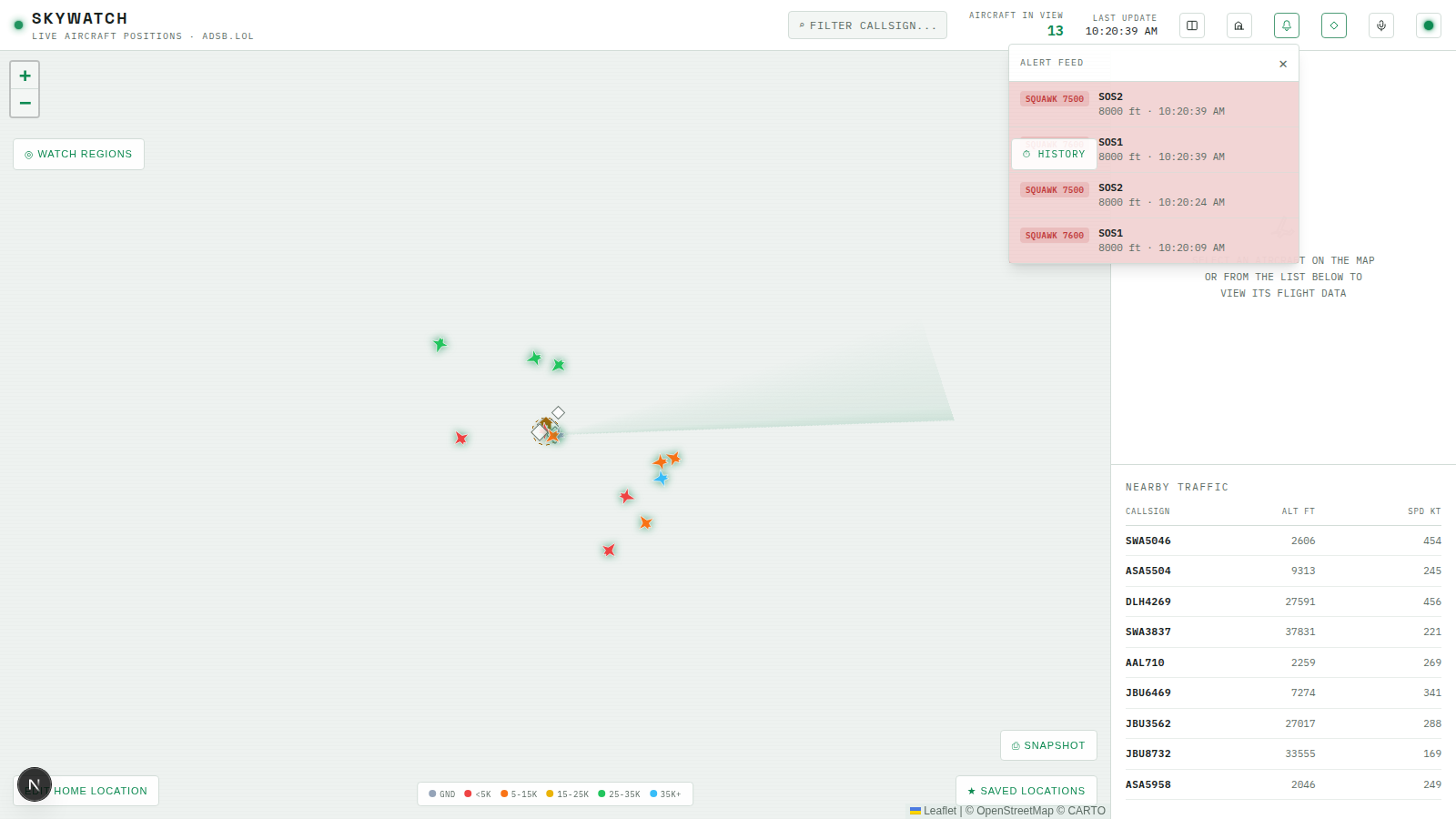
The feed itself reads purely from the store — recentAlerts/recentOverflights, both populated by useLiveFeed’s new pushAlert/pushOverflight calls, merged and sorted newest-first:
// apps/web/src/components/AlertFeed.tsx
"use client";

import { useEffect, useMemo, useRef, useState } from "react";
import { useAppStore } from "@/store/useAppStore";

type FeedItem =
  | {
      kind: "squawk";
      key: string;
      hex: string;
      flight: string | null;
      squawk: string;
      altBaroFt: number | null;
      detectedAt: string;
    }
  | {
      kind: "overflight";
      key: string;
      hex: string;
      flight: string | null;
      distanceNm: number;
      altBaroFt: number | null;
      detectedAt: string;
    };

function fmtTime(iso: string): string {
  return new Date(iso).toLocaleTimeString([], { hour: "2-digit", minute: "2-digit", second: "2-digit" });
}

/**
 * Visible scrolling feed of emergency-squawk (7500/7600/7700) and overflight
 * events, with a one-time flash highlight on rows that weren't in the feed's
 * initial snapshot. This is the visual half of "sound/notification alerts" --
 * useAlertSounds (mounted once near the root) already covers the audible/OS
 * Notification half off this same recentAlerts/recentOverflights store
 * state; this component is purely additive on top of it.
 */
export function AlertFeed() {
  const [open, setOpen] = useState(false);
  const recentAlerts = useAppStore((s) => s.recentAlerts);
  const recentOverflights = useAppStore((s) => s.recentOverflights);

  const events = useMemo<FeedItem[]>(() => {
    const squawks: FeedItem[] = recentAlerts.map((a) => ({
      kind: "squawk",
      key: `squawk-${a.id}`,
      hex: a.hex,
      flight: a.flight,
      squawk: a.squawk,
      altBaroFt: a.altBaroFt,
      detectedAt: a.detectedAt,
    }));
    const overflights: FeedItem[] = recentOverflights.map((o) => ({
      kind: "overflight",
      key: `overflight-${o.id}`,
      hex: o.hex,
      flight: o.flight,
      distanceNm: o.distanceNm,
      altBaroFt: o.altBaroFt,
      detectedAt: o.detectedAt,
    }));
    return [...squawks, ...overflights]
      .sort((a, b) => new Date(b.detectedAt).getTime() - new Date(a.detectedAt).getTime())
      .slice(0, 40);
  }, [recentAlerts, recentOverflights]);

  // Rows present at first render are "history" (e.g. a reconnect replaying
  // recentAlerts) and shouldn't flash -- same first-run guard useAlertSounds
  // uses for the sound half. Captured once via lazy ref init.
  const baselineKeysRef = useRef<Set<string> | null>(null);
  if (baselineKeysRef.current === null) {
    baselineKeysRef.current = new Set(events.map((e) => e.key));
  }

  // Separately, "acknowledged" keys clear the header badge without
  // affecting row-flash state above -- opening the panel counts as read.
  const ackedKeysRef = useRef<Set<string> | null>(null);
  if (ackedKeysRef.current === null) {
    ackedKeysRef.current = new Set(baselineKeysRef.current);
  }
  useEffect(() => {
    if (open) ackedKeysRef.current = new Set(events.map((e) => e.key));
  }, [open, events]);

  const unseenCount = events.filter((e) => !ackedKeysRef.current!.has(e.key)).length;

  return (
    <div className="relative">
      <button
        type="button"
        onClick={() => setOpen((o) => !o)}
        aria-label="Alert feed"
        title="Emergency squawk & overflight feed"
        className="relative flex h-7 w-7 items-center justify-center rounded-sm border border-line text-fg-dim transition-colors hover:border-phosphor-dim hover:text-phosphor"
      >
        <svg width="14" height="14" viewBox="0 0 24 24" fill="none" stroke="currentColor" strokeWidth="1.6">
          <path
            d="M12 3a5 5 0 0 0-5 5v3.2c0 .9-.35 1.77-.98 2.42L4.6 15.1a1 1 0 0 0 .72 1.7h13.36a1 1 0 0 0 .72-1.7l-1.42-1.48A3.4 3.4 0 0 1 17 11.2V8a5 5 0 0 0-5-5Z"
            strokeLinejoin="round"
          />
          <path d="M9.5 19a2.5 2.5 0 0 0 5 0" strokeLinecap="round" />
        </svg>
        {unseenCount > 0 && !open && (
          <span
            style={{ animation: "pulse 1.4s ease-in-out infinite" }}
            className="absolute -right-1 -top-1 flex h-3.5 min-w-[14px] items-center justify-center rounded-full bg-danger px-[3px] text-[8px] font-semibold leading-none text-white"
          >
            {unseenCount > 9 ? "9+" : unseenCount}
          </span>
        )}
      </button>

      {open && (
        <div className="absolute right-0 top-[calc(100%+6px)] z-[600] w-[320px] rounded-sm border border-line bg-surface/95 text-fg shadow-lg">
          <div className="flex items-center justify-between border-b border-line px-3 py-2">
            <span className="text-[10px] uppercase tracking-[0.1em] text-fg-dim">Alert feed</span>
            <button type="button" onClick={() => setOpen(false)} className="text-fg-dim hover:text-fg">
              ✕
            </button>
          </div>
          <div className="max-h-[320px] overflow-y-auto">
            {events.length === 0 && (
              <div className="px-3 py-6 text-center text-[11px] text-fg-dim">No alerts yet.</div>
            )}
            {events.map((e) => {
              const isFresh = !baselineKeysRef.current!.has(e.key);
              const cs = e.flight?.trim() || e.hex.toUpperCase();
              return (
                <div
                  key={e.key}
                  className={`flex items-start gap-2.5 border-b border-line/60 px-3 py-2 text-[11px] last:border-b-0 ${
                    isFresh ? (e.kind === "squawk" ? "alert-flash-squawk" : "alert-flash-overflight") : ""
                  }`}
                >
                  <span
                    className={`mt-0.5 shrink-0 rounded-sm px-1.5 py-0.5 text-[9px] font-semibold uppercase tracking-[0.05em] ${
                      e.kind === "squawk" ? "bg-danger/15 text-danger" : "bg-amber/15 text-amber"
                    }`}
                  >
                    {e.kind === "squawk" ? `SQUAWK ${e.squawk}` : "OVERFLIGHT"}
                  </span>
                  <div className="min-w-0 flex-1">
                    <div className="truncate font-semibold text-fg">{cs}</div>
                    <div className="text-fg-dim">
                      {e.kind === "overflight" ? `${e.distanceNm.toFixed(1)} nm · ` : ""}
                      {e.altBaroFt != null ? `${e.altBaroFt} ft · ` : ""}
                      {fmtTime(e.detectedAt)}
                    </div>
                  </div>
                </div>
              );
            })}
          </div>
        </div>
      )}
    </div>
  );
}
Two Set<string> refs, not one, because “flash” and “unseen” answer genuinely different questions. baselineKeysRef is captured exactly once, on mount — everything already in the feed at that moment is “history,” and never flashes again no matter how many times the panel opens and closes. ackedKeysRef instead updates every time the panel opens, since opening it is what “acknowledging” the current set of alerts means; the badge count is just events whose key isn’t in that acknowledged set. Conflating the two would mean either newly-arrived rows stop flashing the instant you happen to glance at the panel, or the unseen badge never clears just because a row already had its one-time flash.
Add <AlertFeed /> to Header, next to the airports toggle from the previous chapter:
// apps/web/src/components/Header.tsx (add, both the desktop and mobile icon rows)
import { AlertFeed } from "./AlertFeed";
import { AlertMuteToggle } from "./AlertMuteToggle";
// ...
<AlertFeed />
<AirportsToggle />
<AlertMuteToggle />
<ThemeToggle />
The Audible + Notification Layer
Sound is synthesized directly with the Web Audio API rather than shipped as an audio file — no network fetch, no bundled binary, and the two alert kinds are trivially easy to make sound distinct from each other:
// apps/web/src/lib/sound.ts
"use client";

// Synthesized via the Web Audio API rather than an audio file asset -- no
// network fetch, no bundled binary, and it's trivial to make the two alert
// kinds sound distinct (emergency squawk vs. overflight).
let ctx: AudioContext | null = null;

function getContext(): AudioContext | null {
  if (typeof window === "undefined") return null;
  const Ctor = window.AudioContext ?? (window as unknown as { webkitAudioContext?: typeof AudioContext }).webkitAudioContext;
  if (!Ctor) return null;
  if (!ctx) ctx = new Ctor();
  // Browsers suspend new AudioContexts until a user gesture; alerts fire
  // asynchronously from WS messages, not from a click, so nudge it awake.
  if (ctx.state === "suspended") void ctx.resume();
  return ctx;
}

function beep(frequencies: number[], durationMs: number, gainValue: number): void {
  const audioCtx = getContext();
  if (!audioCtx) return;

  const now = audioCtx.currentTime;
  frequencies.forEach((freq, i) => {
    const osc = audioCtx.createOscillator();
    const gain = audioCtx.createGain();
    osc.type = "square";
    osc.frequency.value = freq;
    const start = now + i * (durationMs / 1000);
    const end = start + durationMs / 1000;
    gain.gain.setValueAtTime(0, start);
    gain.gain.linearRampToValueAtTime(gainValue, start + 0.01);
    gain.gain.linearRampToValueAtTime(0, end);
    osc.connect(gain);
    gain.connect(audioCtx.destination);
    osc.start(start);
    osc.stop(end + 0.02);
  });
}

/** Urgent two-tone alarm for emergency squawks (7500/7600/7700). */
export function playEmergencyAlertSound(): void {
  beep([880, 660, 880, 660], 160, 0.18);
}

/** Softer single chime for overflight-log entries. */
export function playOverflightSound(): void {
  beep([520, 780], 140, 0.12);
}

/**
 * Short confirmation chime for the mute toggle -- also serves as the audio
 * unlock: browsers only allow an AudioContext to actually produce sound
 * once it's been created/resumed from within a genuine user gesture (a
 * click), not from an async event like a WebSocket message arriving. Firing
 * this from the toggle's onClick guarantees later alert sounds (which DO
 * fire from async WS messages) aren't silently blocked.
 */
export function playTestSound(): void {
  beep([440, 660], 120, 0.14);
}
The hook that actually watches for new alerts and fires those sounds — plus browser Notifications — is where the mute preference’s persistence lives:
// apps/web/src/hooks/useAlertSounds.ts
"use client";

import { useEffect, useRef } from "react";
import { isEmergencySquawk } from "@skywatch/shared";
import { useAppStore } from "@/store/useAppStore";
import { playEmergencyAlertSound, playOverflightSound } from "@/lib/sound";

const MUTE_STORAGE_KEY = "skywatch:alerts-muted";

/**
 * Watches recentAlerts (emergency squawks) and recentOverflights for newly
 * arrived entries and plays a sound + fires a browser Notification for
 * each -- mount once near the root (Dashboard). The visual alert
 * feed/flash treatment is a separate, later feature; this is just the
 * audible/OS-level half of "sound/notification alerts".
 */
export function useAlertSounds(): void {
  const alertsMuted = useAppStore((s) => s.alertsMuted);
  const setAlertsMuted = useAppStore((s) => s.setAlertsMuted);
  const recentAlerts = useAppStore((s) => s.recentAlerts);
  const recentOverflights = useAppStore((s) => s.recentOverflights);

  const seenAlertIds = useRef<Set<number> | null>(null);
  const seenOverflightIds = useRef<Set<number> | null>(null);
  const skippedFirstPersist = useRef(false);

  // Hydrate the persisted mute preference once on mount (client-only --
  // matches the SSR default of unmuted until this effect runs, same
  // pattern as the theme toggle's hydrateFromDom).
  useEffect(() => {
    try {
      const stored = window.localStorage.getItem(MUTE_STORAGE_KEY);
      if (stored != null) setAlertsMuted(stored === "true");
    } catch {
      // localStorage unavailable (private mode, etc.) -- just keep the default.
    }
  }, [setAlertsMuted]);

  useEffect(() => {
    if (!skippedFirstPersist.current) {
      skippedFirstPersist.current = true;
      return;
    }
    try {
      window.localStorage.setItem(MUTE_STORAGE_KEY, String(alertsMuted));
    } catch {
      // ignore
    }
  }, [alertsMuted]);

  useEffect(() => {
    // First run after mount: just record what's already there (e.g. a
    // reconnect replaying recent history) without alerting retroactively.
    if (seenAlertIds.current === null) {
      seenAlertIds.current = new Set(recentAlerts.map((a) => a.id));
      return;
    }
    const fresh = recentAlerts.filter((a) => !seenAlertIds.current!.has(a.id));
    if (fresh.length === 0) return;
    fresh.forEach((a) => seenAlertIds.current!.add(a.id));

    if (alertsMuted) return;
    const hasEmergency = fresh.some((a) => isEmergencySquawk(a.squawk));
    if (hasEmergency) playEmergencyAlertSound();

    if (typeof Notification !== "undefined" && Notification.permission === "granted") {
      fresh.forEach((a) => {
        const cs = a.flight?.trim() || a.hex.toUpperCase();
        new Notification(`Emergency squawk ${a.squawk}`, {
          body: `${cs} · squawk ${a.squawk}${a.altBaroFt != null ? ` · ${a.altBaroFt} ft` : ""}`,
          tag: `skywatch-squawk-${a.id}`,
        });
      });
    }
  }, [recentAlerts, alertsMuted]);

  useEffect(() => {
    if (seenOverflightIds.current === null) {
      seenOverflightIds.current = new Set(recentOverflights.map((o) => o.id));
      return;
    }
    const fresh = recentOverflights.filter((o) => !seenOverflightIds.current!.has(o.id));
    if (fresh.length === 0) return;
    fresh.forEach((o) => seenOverflightIds.current!.add(o.id));

    if (alertsMuted) return;
    playOverflightSound();

    if (typeof Notification !== "undefined" && Notification.permission === "granted") {
      fresh.forEach((o) => {
        const cs = o.flight?.trim() || o.hex.toUpperCase();
        new Notification("Overflight near home", {
          body: `${cs} · ${o.distanceNm.toFixed(1)} nm away${o.altBaroFt != null ? ` · ${o.altBaroFt} ft` : ""}`,
          tag: `skywatch-overflight-${o.id}`,
        });
      });
    }
  }, [recentOverflights, alertsMuted]);
}
This is the same skippedFirstPersist shape introduced for the airports toggle in the previous chapter — and worth walking through in full here, because it’s easy to get subtly wrong and hard to notice when you have. The hydrate effect (read localStorage, call setAlertsMuted) and the persist effect (write localStorage on every change) both fire on this component’s very first mount, in the order they’re declared, within that same commit. Zustand’s setAlertsMuted from the hydrate effect doesn’t make this component see the new alertsMuted value until React’s next render — so on that very first pass, the persist effect’s closure is still holding the pre-hydration default, false. Without the guard, that first persist run would immediately write "false" back to localStorage, overwriting whatever a previous session had actually muted to, before the hydrated value ever got a chance to matter. Skipping exactly the first run breaks that: if hydration found a stored value and changed alertsMuted, that change is itself a dependency-array trigger for a second, later run of the persist effect — one that now closes over the correct, hydrated value and writes it faithfully. If hydration found nothing stored, there was nothing that needed (re-)writing anyway. It’s the same fix in the same shape as useAirportsVisibility, which is itself the same fix in the same shape as useThemeStore’s hydrateFromDom back in Module 3 — one race, three places it shows up, because “a client-only persisted preference with an SSR-safe default” is a recurring problem, not a one-off.
The two seenAlertIds/seenOverflightIds first-run guards are a related but separate idea: they exist so a fresh mount (or a reconnect that replays recent history) doesn’t retroactively alert on everything that was already in the store — only entries that arrive after that first snapshot are “fresh” enough to play a sound or fire a Notification for.
The mute button itself both flips the store flag and, on unmute, requests Notification permission — browsers require the prompt to originate from a real user gesture, and this click is that gesture:
// apps/web/src/components/AlertMuteToggle.tsx
"use client";

import { useAppStore } from "@/store/useAppStore";
import { playTestSound } from "@/lib/sound";

/**
 * Mutes/unmutes the sound + browser-notification alerts fired by
 * useAlertSounds for emergency squawks and overflights. Unmuting also
 * requests Notification permission if it hasn't been asked yet -- browsers
 * require a user gesture for that prompt, which this click provides -- and
 * plays a short confirmation beep, which both unlocks the AudioContext for
 * later async alert sounds and gives immediate proof that sound works
 * without waiting for a real squawk/overflight event.
 */
export function AlertMuteToggle() {
  const muted = useAppStore((s) => s.alertsMuted);
  const toggle = useAppStore((s) => s.toggleAlertsMuted);

  const handleClick = () => {
    const willBeMuted = !muted;
    toggle();
    // Always play, even when muting -- this is the audio-unlock gesture as
    // much as it's a confirmation sound, so every click should fire it.
    playTestSound();
    if (!willBeMuted && typeof Notification !== "undefined" && Notification.permission === "default") {
      void Notification.requestPermission();
    }
  };

  return (
    <button
      type="button"
      onClick={handleClick}
      aria-label={muted ? "Unmute alert sounds" : "Mute alert sounds"}
      title={muted ? "Alerts muted -- click to unmute" : "Alerts on -- click to mute"}
      className="flex h-7 w-7 items-center justify-center rounded-sm border border-line text-text-dim transition-colors hover:border-phosphor-dim hover:text-phosphor"
    >
      {muted ? (
        <svg width="14" height="14" viewBox="0 0 24 24" fill="none" stroke="currentColor" strokeWidth="1.6">
          <path d="M9 9v3a3 3 0 0 0 4.6 2.55M15 9.34V6a3 3 0 0 0-5.94-.6" strokeLinecap="round" />
          <path d="M5 10v2a7 7 0 0 0 10.71 5.93M19 12a7 6.96 0 0 1-.35 2.2" strokeLinecap="round" />
          <line x1="12" y1="19" x2="12" y2="22" strokeLinecap="round" />
          <line x1="2" y1="2" x2="22" y2="22" strokeLinecap="round" />
        </svg>
      ) : (
        <svg width="14" height="14" viewBox="0 0 24 24" fill="none" stroke="currentColor" strokeWidth="1.6">
          <path d="M9 9v3a3 3 0 0 0 6 0V6a3 3 0 0 0-6 0v0" strokeLinecap="round" />
          <path d="M5 10v2a7 7 0 0 0 14 0v-2" strokeLinecap="round" />
          <line x1="12" y1="19" x2="12" y2="22" strokeLinecap="round" />
        </svg>
      )}
    </button>
  );
}
playTestSound fires unconditionally, even on the click that mutes — it’s doing double duty as the AudioContext’s unlock gesture, not just a confirmation chime, and every click is an equally good opportunity to make sure a future async alert sound won’t be silently blocked by the browser’s autoplay policy.
Wire the hook into Dashboard alongside useAirportsVisibility():
// apps/web/src/components/Dashboard.tsx (add)
import { useAlertSounds } from "@/hooks/useAlertSounds";
// ...
useAlertSounds();
Try It
- Restart the server and frontend, and open the browser console so you can watch for
[live-feed]errors. - With a WebSocket client connected (or just the running frontend), trigger a manual notification the same way Module 2’s real-time-layer chapter did:
Confirm the alert feed badge appears with a count, a sound plays, and (if you granted permission) a browser Notification pops up.
SELECT pg_notify('squawk_alert', '{"id":9001,"hex":"test01","flight":"TEST123","squawk":"7700","lat":40.6,"lon":-73.8,"altBaroFt":5000,"detectedAt":"2024-01-01T00:00:00.000Z"}'); - Open the alert feed panel and confirm the new row has the one-time flash treatment, and that the unseen badge clears once you’ve opened it.
- Click the mute toggle, trigger another test notification the same way, and confirm it’s silent but still appears in the feed — muting is audio/Notification-only, never visual.
- Reload the page and confirm the mute state you left it in is exactly what it loads back into.
Recap
ServerToClientMessage’ssquawk_alertandoverflightbranches existed on the wire since Module 2 — this chapter is entirely about the frontend finally having something to do with them, via aswitchinuseLiveFeedand two new store actions.AlertFeedtracks “flash” and “unseen” as two independentSet<string>refs on purpose — one captured once at mount, one refreshed every time the panel opens — because a row that’s already flashed once shouldn’t need to flash again just because you looked at it.useAlertSounds’skippedFirstPersistguard is the same hydrate/persist race fix as the airports toggle’s, which is itself the same fix as the theme store’shydrateFromDomfrom Module 3 — the same shape recurring for the third time on the same underlying problem: a client-only persisted preference that must start from an SSR-safe default.playTestSoundin the mute toggle is doing two jobs at once — confirmation chime and AudioContext unlock gesture — which is why it fires on every click, muting included.
Next lesson: giving the overflight tracker a real home location to work from — a settings form for it — and turning recentOverflights and the overflight_log table into an actual “who’s flown over my house” log page.