
Multi-Region Compare & Saved Locations
Objectives
By the end of this chapter, you should be able to:
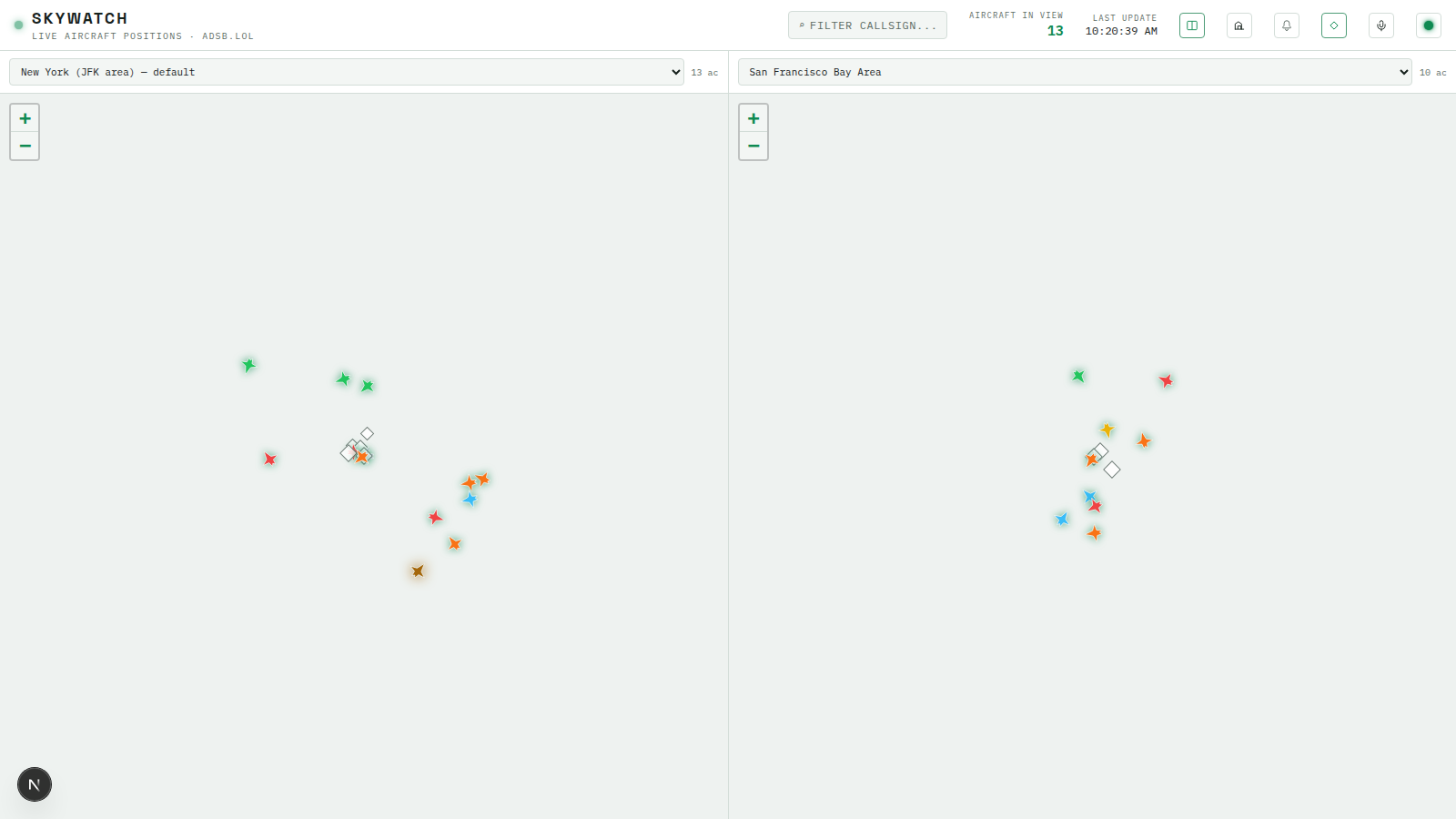
- Render two watch regions side by side, each showing its own live traffic, entirely from data the store already has
- Build a region-scoped map pane that reuses
MapPanel’s core rendering pieces instead of duplicating them - Build a lightweight saved-locations bookmark feature, and explain precisely why it’s not the same thing as a watch region
💡 Why this matters: Module 4 made
positionsByRegionkey live aircraft by the watch region that produced them, specifically so more than one region’s traffic could be tracked at once without one overwriting another. This chapter is the payoff: a second view that reads two different slices of that same map instead of one. Alongside it, a much smaller feature that looks superficially similar to watch regions but solves a different problem entirely — bookmarking a map view for yourself, with zero effect on what the poller is doing.
Two Airspaces, Zero New Backend Work
The poller has re-polled every enabled watch region independently, on its own cycle, since Module 2. The WS layer has broadcast each region’s positions tagged with its regionId since that same module. The store has kept positionsByRegion: Record<number, AircraftState[]> — one entry per region, not one shared array — since Module 4. Put those three facts together and a side-by-side compare view needs no new backend at all: it’s a second, region-scoped consumer of data that’s already flowing.
// apps/web/src/components/CompareView.tsx
"use client";

import { useEffect, useState } from "react";
import type { AircraftState } from "@skywatch/shared";
import { useAppStore } from "@/store/useAppStore";
import { useWatchRegions } from "@/hooks/useWatchRegions";
import { RegionMapPane } from "./RegionMapPane";

const EMPTY_AIRCRAFT: AircraftState[] = [];

function RegionSelect({
  value,
  onChange,
  options,
}: {
  value: number | null;
  onChange: (id: number) => void;
  options: { id: number; name: string; enabled: boolean }[];
}) {
  return (
    <select
      value={value ?? ""}
      onChange={(e) => onChange(Number(e.target.value))}
      className="min-w-0 flex-1 truncate rounded-sm border border-line bg-surface-raised px-2 py-1.5 font-mono text-[11px] text-fg focus:outline-none"
    >
      {options.length === 0 && <option value="">No watch regions yet</option>}
      {options.map((r) => (
        <option key={r.id} value={r.id}>
          {r.name}
          {r.enabled ? "" : " (disabled)"}
        </option>
      ))}
    </select>
  );
}

/**
 * Split-screen two airspaces side by side (e.g. home region vs. a busy hub
 * like LHR or JFK). Needed zero backend work -- the poller already re-polls
 * every enabled watch region independently and the WS layer already
 * broadcasts each region's positions tagged with its regionId, so
 * positionsByRegion in the store already has everything both panes need
 * simultaneously. This is purely a second, region-scoped consumer of that
 * same data.
 */
export function CompareView() {
  const { regions, loaded } = useWatchRegions();
  const [leftId, setLeftId] = useState<number | null>(null);
  const [rightId, setRightId] = useState<number | null>(null);

  useEffect(() => {
    if (!loaded || regions.length === 0 || leftId != null) return;
    const enabled = regions.filter((r) => r.enabled);
    const pool = enabled.length > 0 ? enabled : regions;
    setLeftId(pool[0].id);
    setRightId(pool.length > 1 ? pool[1].id : pool[0].id);
  }, [loaded, regions, leftId]);

  const leftAircraft = useAppStore((s) => (leftId != null ? (s.positionsByRegion[leftId] ?? EMPTY_AIRCRAFT) : EMPTY_AIRCRAFT));
  const rightAircraft = useAppStore((s) =>
    rightId != null ? (s.positionsByRegion[rightId] ?? EMPTY_AIRCRAFT) : EMPTY_AIRCRAFT
  );

  const leftRegion = regions.find((r) => r.id === leftId) ?? null;
  const rightRegion = regions.find((r) => r.id === rightId) ?? null;

  if (loaded && regions.length === 0) {
    return (
      <div className="flex h-full items-center justify-center px-8 text-center text-[12px] tracking-[0.05em] text-fg-dim">
        No watch regions configured yet -- add at least two from Watch Regions on the map to compare them side by
        side.
      </div>
    );
  }

  return (
    <div className="flex h-full min-w-0 flex-1">
      <div className="flex min-w-0 flex-1 flex-col border-r border-line">
        <div className="flex items-center gap-2 border-b border-line bg-surface px-2.5 py-2">
          <RegionSelect value={leftId} onChange={setLeftId} options={regions} />
          <span className="shrink-0 font-mono text-[10px] text-fg-dim">{leftAircraft.length} ac</span>
        </div>
        <div className="relative min-h-0 flex-1">
          {leftRegion && <RegionMapPane region={leftRegion} aircraft={leftAircraft} />}
        </div>
      </div>

      <div className="flex min-w-0 flex-1 flex-col">
        <div className="flex items-center gap-2 border-b border-line bg-surface px-2.5 py-2">
          <RegionSelect value={rightId} onChange={setRightId} options={regions} />
          <span className="shrink-0 font-mono text-[10px] text-fg-dim">{rightAircraft.length} ac</span>
        </div>
        <div className="relative min-h-0 flex-1">
          {rightRegion && <RegionMapPane region={rightRegion} aircraft={rightAircraft} />}
        </div>
      </div>
    </div>
  );
}
The default-pick effect (leftId/rightId seeded once useWatchRegions() resolves) prefers two enabled regions if at least two exist, falling back to whatever’s available otherwise — including picking the same region for both sides if only one exists at all, so the view never renders half-empty just because the operator hasn’t configured a second region yet. Either dropdown can be changed independently afterward; nothing here ties the left pane’s selection to the right pane’s, which is the whole point of a comparison view — you pick what you’re comparing.
The Region-Scoped Map Pane
CompareView needs a map per side, but not the full MapPanel — no free-pan, no history playback, no watch-region CRUD panel. Each pane is locked to one region and reads that region’s slice of positionsByRegion directly, rather than going through selectViewAircraft’s “whatever the single primary map is showing” logic:
// apps/web/src/components/RegionMapPane.tsx
"use client";

import { memo, useMemo } from "react";
import { MapContainer, Marker, TileLayer } from "react-leaflet";
import type { AircraftState, WatchRegion } from "@skywatch/shared";
import { altitudeFt, isOnGround } from "@skywatch/shared";
import { useAppStore } from "@/store/useAppStore";
import { useThemeStore } from "@/store/useThemeStore";
import { makePlaneIcon } from "@/lib/aircraftIcon";
import { radiusNmToZoom } from "@/lib/mapView";

const DARK_TILES = "https://{s}.basemaps.cartocdn.com/dark_all/{z}/{x}/{y}{r}.png";
const LIGHT_TILES = "https://{s}.basemaps.cartocdn.com/light_all/{z}/{x}/{y}{r}.png";
const TILE_ATTRIBUTION = "© OpenStreetMap © CARTO";

interface PaneMarkerProps {
  aircraft: AircraftState & { lat: number; lon: number };
  isSelected: boolean;
  onSelect: (hex: string) => void;
}

/** Same memoization rationale as MapPanel's AircraftMarker -- avoid rebuilding every marker's DOM node on every poll tick. */
const PaneMarker = memo(function PaneMarker({ aircraft, isSelected, onSelect }: PaneMarkerProps) {
  const track = aircraft.track ?? aircraft.true_heading ?? aircraft.mag_heading ?? 0;
  const altFt = altitudeFt(aircraft);
  const onGround = isOnGround(aircraft);
  const icon = useMemo(
    () => makePlaneIcon(track, isSelected, altFt, onGround),
    [track, isSelected, altFt, onGround]
  );

  return (
    <Marker
      position={[aircraft.lat, aircraft.lon]}
      icon={icon}
      zIndexOffset={isSelected ? 1000 : 0}
      eventHandlers={{ click: () => onSelect(aircraft.hex) }}
    />
  );
});

/**
 * One half of the multi-region compare view (see CompareView) -- a
 * self-contained, read-only-ish map locked to a single watch region, fed
 * directly from positionsByRegion[region.id] rather than the single
 * "primary view" selectViewAircraft used by the main MapPanel. Deliberately
 * lean: no free-pan, history playback, or watch-region CRUD controls --
 * those apply to "the" map, and compare mode's whole point is two fixed,
 * independent airspaces side by side.
 */
export const RegionMapPane = memo(function RegionMapPane({
  region,
  aircraft,
}: {
  region: WatchRegion;
  aircraft: AircraftState[];
}) {
  const isDark = useThemeStore((s) => s.isDark);
  const selectedIcao = useAppStore((s) => s.selectedIcao);
  const setSelectedIcao = useAppStore((s) => s.setSelectedIcao);

  const center: [number, number] = [region.lat, region.lon];
  const zoom = radiusNmToZoom(region.radiusNm);

  const withPosition = aircraft.filter(
    (a): a is typeof a & { lat: number; lon: number } => a.lat != null && a.lon != null
  );

  return (
    <div className="relative h-full w-full">
      <MapContainer
        key={region.id}
        center={center}
        zoom={zoom}
        minZoom={2}
        maxZoom={12}
        worldCopyJump
        zoomControl
        attributionControl={false}
        className="h-full w-full"
      >
        <TileLayer
          key={isDark ? "dark" : "light"}
          url={isDark ? DARK_TILES : LIGHT_TILES}
          attribution={TILE_ATTRIBUTION}
          subdomains="abcd"
          maxZoom={19}
        />
        {withPosition.map((a) => (
          <PaneMarker key={a.hex} aircraft={a} isSelected={a.hex === selectedIcao} onSelect={setSelectedIcao} />
        ))}
      </MapContainer>

      {!region.enabled && (
        <div className="absolute inset-x-3 top-3 z-[500] rounded-sm border border-line bg-surface/95 px-2.5 py-1.5 text-center text-[10px] tracking-[0.05em] text-fg-dim">
          This region is disabled -- enable it in Watch Regions to see live traffic here.
        </div>
      )}
    </div>
  );
});
key={region.id} on MapContainer is doing real work: react-leaflet doesn’t re-point an already-mounted map at a new center/zoom prop after the fact (the same limitation InitialViewSetter worked around back in Module 4), so when the operator picks a different region in either dropdown, this key forces React to tear down the old MapContainer and mount a fresh one centered correctly, rather than leaving a stale map showing the previous region’s framing with a new region’s markers on top of it. radiusNmToZoom and makePlaneIcon are both reused straight from Module 4/3’s lib/ and MapPanel rather than reimplemented — RegionMapPane shares the pieces that don’t depend on “which map is the primary one” and only diverges where that distinction actually matters (no ViewportFeed, no WatchRegionsControl, no HistoryPlaybackControl).
The !region.enabled banner matters because WatchRegionsControl’s ON/OFF toggle (Module 4) can disable a region without deleting it — a disabled region still has a lat/lon/radiusNm to render a pane at, it just isn’t being polled, so its positionsByRegion entry stays frozen at whatever it last held. Telling the operator that plainly is better than a pane that silently stops updating with no explanation.
Wiring Compare Mode Into the Header and Dashboard
Header grows a compareMode/onToggleCompareMode prop pair, rendered as one more icon button alongside the ones already in its row:
// apps/web/src/components/Header.tsx (additions)
export interface HeaderProps {
  // ...existing props...
  compareMode: boolean;
  onToggleCompareMode: () => void;
}

// in the icon row:
<button
  type="button"
  onClick={onToggleCompareMode}
  aria-pressed={compareMode}
  title={compareMode ? "Exit compare mode" : "Compare two watch regions side by side"}
  className={`flex h-7 w-7 items-center justify-center rounded-sm border transition-colors ${
    compareMode
      ? "border-phosphor-dim text-phosphor"
      : "border-line text-text-dim hover:border-phosphor-dim hover:text-phosphor"
  }`}
>
  <svg width="14" height="14" viewBox="0 0 24 24" fill="none" stroke="currentColor" strokeWidth="1.6">
    <rect x="3" y="4" width="18" height="16" rx="1.5" />
    <line x1="12" y1="4" x2="12" y2="20" />
  </svg>
</button>
Dashboard is where this finally gets used — and it’s the useState import Module 3’s lesson on the core dashboard UI left sitting unused specifically for this moment:
// apps/web/src/components/Dashboard.tsx (additions)
import dynamic from "next/dynamic";

const CompareView = dynamic(() => import("./CompareView").then((m) => m.CompareView), {
  ssr: false,
  loading: () => (
    <div className="flex h-full items-center justify-center text-xs tracking-[0.1em] text-fg-dim">
      LOADING COMPARE VIEW…
    </div>
  ),
});

// inside Dashboard():
const [compareMode, setCompareMode] = useState(false);

// ...
<Header
  // ...existing props...
  compareMode={compareMode}
  onToggleCompareMode={() => setCompareMode((v) => !v)}
/>

{compareMode ? (
  <div className="flex min-h-0 flex-1">
    <CompareView />
  </div>
) : (
  <div className="flex min-h-0 flex-1">
    {/* MapPanel + detail panel + flight list, unchanged */}
  </div>
)}
CompareView gets the same dynamic(..., { ssr: false }) treatment as MapPanel and for the identical reason — it renders MapContainer internally (twice, via RegionMapPane), and react-leaflet touches window/document at module-evaluation time, so it can only run client-side. The compareMode ? ... : ... swap replaces the entire main content area rather than layering compare mode on top of the single-map layout — the sidebar’s detail panel and flight list disappear while compare mode is active, since both panes already show their own selection state via PaneMarker’s click handler, and cramming a third panel next to two map panes would leave none of them enough width to be useful.
Saved Locations: Bookmarks, Not Watch Regions
It’s tempting to look at SavedLocationsControl and assume it’s a second, redundant way to do what WatchRegionsControl already does. It isn’t, and the distinction is worth being explicit about before writing any code: a watch region tells the poller to continuously fetch and store traffic for that airspace — every enabled region gets polled every ~15s, feeds trails, feeds history, feeds the WS push layer, and (as of this lesson) can be one half of a compare pane. A saved location does none of that. It’s a bookmark for the frontend map view only — a name, a lat/lon, a zoom level — with zero effect on what the poller is doing. Jumping to one is exactly like panning there by hand: it flows into the free-pan / ViewportFeed path from Module 4, fetching whatever’s currently in view on demand, the same as any other unplanned pan.
That difference is why saved locations get their own, much simpler backend — no partial unique index for “at most one default,” no transactional “clear the old flag, set the new one” repo logic, no interaction with the poller’s region list at all. Just a name and a place, CRUD, nothing more.
packages/shared/src/location.ts has held HomeLocationSettings since Module 2 — it gets a second, unrelated interface now, since both happen to be “a saved point on a map” shaped types that live in the same small file:
// packages/shared/src/location.ts (add to the Module 2 version)

/** A user-saved map location for the "jump to a favorite spot" dropdown. */
export interface SavedLocation {
  id: number;
  name: string;
  lat: number;
  lon: number;
  zoom: number;
  createdAt: string;
}
The Saved Locations Backend
// apps/server/src/db/repos/savedLocationsRepo.ts
import { eq } from "drizzle-orm";
import type { SavedLocation } from "@skywatch/shared";
import { db } from "../client.js";
import { savedLocations } from "../schema.js";

function toApi(row: typeof savedLocations.$inferSelect): SavedLocation {
  return {
    id: row.id,
    name: row.name,
    lat: row.lat,
    lon: row.lon,
    zoom: row.zoom,
    createdAt: row.createdAt.toISOString(),
  };
}

export async function listSavedLocations(): Promise<SavedLocation[]> {
  const rows = await db.select().from(savedLocations).orderBy(savedLocations.createdAt);
  return rows.map(toApi);
}

export async function createSavedLocation(input: {
  name: string;
  lat: number;
  lon: number;
  zoom: number;
}): Promise<SavedLocation> {
  const [row] = await db.insert(savedLocations).values(input).returning();
  return toApi(row);
}

export async function deleteSavedLocation(id: number): Promise<boolean> {
  const deleted = await db.delete(savedLocations).where(eq(savedLocations.id, id)).returning();
  return deleted.length > 0;
}
savedLocations is the table Module 1’s schema lesson already defined — this is the first module to actually build a repo against it. No enabled flag, no isDefault, no partial index: everything WatchRegionsControl’s repo layer needed to enforce (Module 2 and 4) simply doesn’t apply here, because there’s no invariant to protect beyond “rows have a name and a place.”
// apps/server/src/routes/savedLocations.ts
import type { FastifyInstance } from "fastify";
import { z } from "zod";
import {
  createSavedLocation,
  deleteSavedLocation,
  listSavedLocations,
} from "../db/repos/savedLocationsRepo.js";

const postBodySchema = z.object({
  name: z.string().trim().min(1).max(80),
  lat: z.number().min(-90).max(90),
  lon: z.number().min(-180).max(180),
  zoom: z.number().min(1).max(19).default(9),
});
const deleteParamsSchema = z.object({ id: z.coerce.number().int().positive() });

export function registerSavedLocationsRoutes(app: FastifyInstance): void {
  app.get("/saved-locations", async () => {
    const locations = await listSavedLocations();
    return { locations };
  });

  app.post("/saved-locations", async (req, reply) => {
    const parsed = postBodySchema.safeParse(req.body);
    if (!parsed.success) {
      return reply.status(400).send({ error: "invalid saved location", issues: parsed.error.issues });
    }
    const location = await createSavedLocation(parsed.data);
    return reply.status(201).send({ location });
  });

  app.delete("/saved-locations/:id", async (req, reply) => {
    const parsed = deleteParamsSchema.safeParse(req.params);
    if (!parsed.success) return reply.status(400).send({ error: "invalid id" });
    const deleted = await deleteSavedLocation(parsed.data.id);
    if (!deleted) return reply.status(404).send({ error: "not found" });
    return reply.status(204).send();
  });
}
Three routes, no PATCH, no /default endpoint — there’s nothing here that needs partial updates or a “set as the special one” action, unlike watch regions’ toggle-enabled and set-default routes. Register registerSavedLocationsRoutes in routes/index.ts, same one-import-one-call pattern as everything else.
The Saved Locations Control
// apps/web/src/components/SavedLocationsControl.tsx
"use client";

import { useEffect, useState } from "react";
import { useMap } from "react-leaflet";
import type { SavedLocation } from "@skywatch/shared";
import { apiUrl } from "@/lib/serverUrl";

/**
 * Postgres-backed "jump to a favorite spot" list. Jumping to a saved
 * location is a real map.setView -- NOT tagged as a programmatic move --
 * so it naturally flows into ViewportFeed's free-pan handling and fetches
 * live traffic for that spot, same as if the user had panned there by hand.
 */
export function SavedLocationsControl() {
  const map = useMap();
  const [open, setOpen] = useState(false);
  const [locations, setLocations] = useState<SavedLocation[]>([]);
  const [loaded, setLoaded] = useState(false);
  const [newName, setNewName] = useState("");
  const [saving, setSaving] = useState(false);

  const refresh = () => {
    fetch(apiUrl("/api/saved-locations"))
      .then((r) => r.json())
      .then((data: { locations: SavedLocation[] }) => setLocations(data.locations ?? []))
      .catch((err) => console.error("[saved-locations] fetch failed:", err))
      .finally(() => setLoaded(true));
  };

  useEffect(() => {
    if (open && !loaded) refresh();
    // eslint-disable-next-line react-hooks/exhaustive-deps
  }, [open]);

  const jumpTo = (loc: SavedLocation) => {
    map.setView([loc.lat, loc.lon], loc.zoom);
    setOpen(false);
  };

  const saveCurrentView = async () => {
    const name = newName.trim();
    if (!name) return;
    setSaving(true);
    try {
      const center = map.getCenter();
      const res = await fetch(apiUrl("/api/saved-locations"), {
        method: "POST",
        headers: { "Content-Type": "application/json" },
        body: JSON.stringify({ name, lat: center.lat, lon: center.lng, zoom: map.getZoom() }),
      });
      if (!res.ok) throw new Error(`save failed (${res.status})`);
      const data: { location: SavedLocation } = await res.json();
      setLocations((prev) => [...prev, data.location]);
      setNewName("");
    } catch (err) {
      console.error("[saved-locations] save failed:", err);
    } finally {
      setSaving(false);
    }
  };

  const remove = async (id: number, e: React.MouseEvent) => {
    e.stopPropagation();
    setLocations((prev) => prev.filter((l) => l.id !== id));
    try {
      await fetch(apiUrl(`/api/saved-locations/${id}`), { method: "DELETE" });
    } catch (err) {
      console.error("[saved-locations] delete failed:", err);
      refresh();
    }
  };

  return (
    <div className="absolute bottom-3.5 right-3.5 z-[500]">
      {open ? (
        <div className="w-[230px] rounded-sm border border-line bg-surface/95 p-3 text-[11px] text-fg">
          <div className="mb-2 flex items-center justify-between">
            <span className="text-[10px] uppercase tracking-[0.08em] text-fg-dim">Saved locations</span>
            <button type="button" onClick={() => setOpen(false)} className="text-fg-dim hover:text-fg">
              ✕
            </button>
          </div>

          <div className="mb-2 max-h-[180px] overflow-y-auto">
            {locations.length === 0 && (
              <div className="py-1.5 text-fg-dim">No saved locations yet.</div>
            )}
            {locations.map((loc) => (
              <div
                key={loc.id}
                role="button"
                tabIndex={0}
                onClick={() => jumpTo(loc)}
                onKeyDown={(e) => e.key === "Enter" && jumpTo(loc)}
                className="flex cursor-pointer items-center justify-between rounded-sm px-1 py-1.5 hover:bg-phosphor/10"
              >
                <span className="truncate text-fg">{loc.name}</span>
                <button
                  type="button"
                  onClick={(e) => remove(loc.id, e)}
                  className="ml-2 shrink-0 text-fg-dim hover:text-danger"
                  aria-label={`Delete ${loc.name}`}
                >
                  ✕
                </button>
              </div>
            ))}
          </div>

          <div className="flex gap-1.5 border-t border-line pt-2">
            <input
              value={newName}
              onChange={(e) => setNewName(e.target.value)}
              onKeyDown={(e) => e.key === "Enter" && saveCurrentView()}
              placeholder="Name this view…"
              className="min-w-0 flex-1 rounded-sm border border-line bg-surface-raised px-1.5 py-1 font-mono text-[11px] text-fg placeholder:text-fg-dim focus:outline-none"
            />
            <button
              type="button"
              onClick={saveCurrentView}
              disabled={saving || !newName.trim()}
              className="shrink-0 rounded-sm border border-phosphor-dim px-2 py-1 text-[10px] tracking-[0.05em] text-phosphor hover:bg-phosphor/10 disabled:opacity-50"
            >
              SAVE
            </button>
          </div>
        </div>
      ) : (
        <button
          type="button"
          onClick={() => setOpen(true)}
          className="rounded-sm border border-line bg-surface/90 px-3 py-2 text-[11px] tracking-[0.08em] text-phosphor transition-colors hover:border-phosphor-dim"
        >
          ★ SAVED LOCATIONS
        </button>
      )}
    </div>
  );
}
Structurally this looks a lot like WatchRegionsControl from Module 4 — a floating panel, a list, a name input, optimistic add/remove with rollback on failure — and that’s fine, even expected: it’s the same “small floating map control backed by simple CRUD” shape applied to a feature with far fewer rules to enforce, the same kind of reuse-the-shape instinct Module 2’s detection functions called out. The meaningful difference is entirely in what jumpTo doesn’t do: WatchRegionsControl.jumpTo (Module 4) calls markProgrammaticMove(map) before panning, deliberately hiding that move from ViewportFeed’s free-pan detection. jumpTo here does not — a saved location isn’t a return to a region the poller is watching, it’s a plain pan to an arbitrary point, so it should behave exactly like the user dragged there themselves: ViewportFeed picks it up, freePan activates, and /api/live starts polling that spot on demand. Drop <SavedLocationsControl /> inside MapPanel’s MapContainer, alongside HomeLocationLayer and WatchRegionsControl.
Try It
- Restart the server so
registerSavedLocationsRoutesis live, then reload the frontend. - Make sure at least two watch regions exist (add a second one via Watch Regions if you only have the default). Click the compare-mode icon in the header and confirm two map panes appear, each with its own region dropdown and live aircraft count.
- Change the left pane’s dropdown to a different region and confirm only that pane’s map re-centers and re-populates — the right pane should be unaffected.
- Disable one of the two compared regions from Watch Regions (back in single-map mode), return to compare mode, and confirm that pane shows the “region is disabled” banner instead of stale traffic.
- Back in single-map mode, pan somewhere interesting, click ★ SAVED LOCATIONS, and save that view under a name. Pan elsewhere, then click the saved entry and confirm the map jumps back — and confirm the free-pan “RETURN TO WATCH REGION” control appears, proving the jump was treated as a normal pan, not a watch-region recenter.
Recap
CompareViewandRegionMapPaneneeded no new backend work at all —positionsByRegion, keyed by region since Module 4, already held everything two simultaneous panes needed.RegionMapPanereusesradiusNmToZoom,makePlaneIcon, and the same tile-layer setup asMapPanelrather than duplicating them, and stays deliberately lean — no free-pan, no history playback, no watch-region CRUD — because compare mode’s whole point is two fixed, independent airspaces.- Saved locations and watch regions solve different problems that happen to share a UI shape: a watch region tells the poller what to continuously track; a saved location is a frontend-only bookmark that jumps the map exactly like a manual pan, with no effect on what’s being polled.
- That’s also why saved locations get the simpler of the two backends — no partial unique index, no default-swapping transaction, just a name, a place, and CRUD.
Next lesson: snapshot sharing and the mobile layout.