
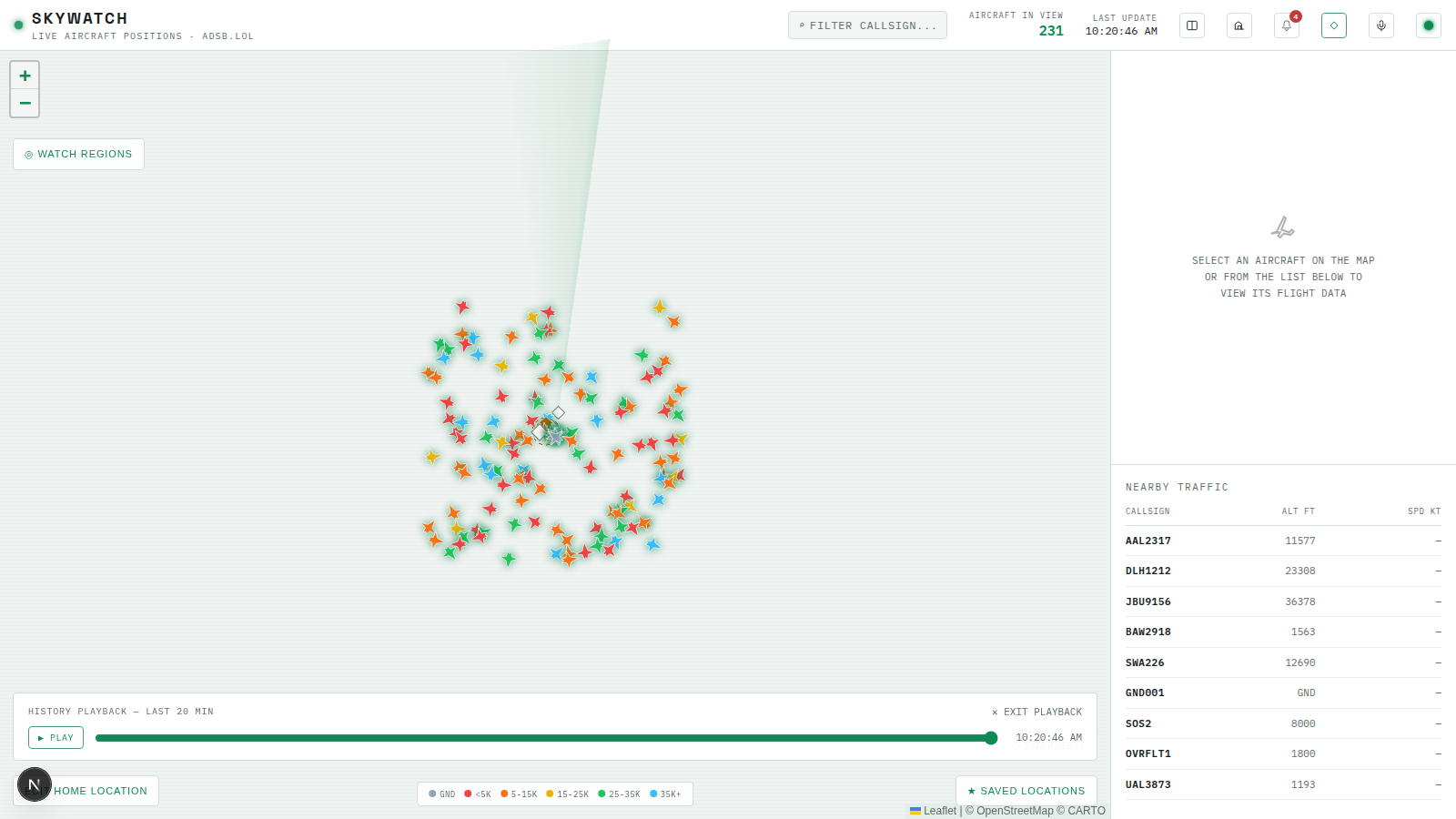
Historical Playback
Objectives
By the end of this chapter, you should be able to:
- Add a bounded time-range query over
position_snapshotsthat returns every aircraft’s positions across a whole window, not just one hex like the trail query from the previous chapter - Reconstruct “what did the map look like at time X” on the client from that range, and expose it as a scrubber the operator can play, pause, and drag
- Give historical playback top priority over both the live feed and free-pan, so it’s an explicit mode the operator opted into rather than something that could silently blend with live data
💡 Why this matters: Trails answer “where has this one aircraft been.” History playback answers a different question: “what did the whole picture look like ten minutes ago.” That needs every aircraft’s positions across a time window, not just one hex’s, and it needs to fully replace the live view while it’s active rather than layering on top of it — otherwise scrubbing backward while new live data keeps arriving would show a mix of two different moments in time.
Querying a Time Range
positionSnapshotsRepo.ts gets a second query alongside getTrail, this one spanning every aircraft rather than filtering to one:
// apps/server/src/db/repos/positionSnapshotsRepo.ts (add to the previous chapter's version)
import { and, asc, eq, gte, lte } from "drizzle-orm";
// ...eq import now also used here...

export interface HistorySnapshot {
  hex: string;
  flight: string | null;
  lat: number;
  lon: number;
  altBaroFt: number | null;
  onGround: boolean;
  trackDeg: number | null;
  recordedAt: string;
}

/** All aircraft positions in a time range — powers the historical playback slider. */
export async function getHistoryRange(from: Date, to: Date): Promise<HistorySnapshot[]> {
  const rows = await db
    .select({
      hex: positionSnapshots.hex,
      flight: positionSnapshots.flight,
      lat: positionSnapshots.lat,
      lon: positionSnapshots.lon,
      altBaroFt: positionSnapshots.altBaroFt,
      onGround: positionSnapshots.onGround,
      trackDeg: positionSnapshots.trackDeg,
      recordedAt: positionSnapshots.recordedAt,
    })
    .from(positionSnapshots)
    .where(and(gte(positionSnapshots.recordedAt, from), lte(positionSnapshots.recordedAt, to)))
    .orderBy(asc(positionSnapshots.recordedAt))
    .limit(20_000);

  return rows.map((r) => ({ ...r, recordedAt: r.recordedAt.toISOString() }));
}
The limit(20_000) is doing real work, not just guarding against an accident — the route below caps the window itself, but a busy region can still produce hundreds of rows per 15-second poll cycle, and this is the backstop that keeps one request from trying to pull an unbounded table scan back to the client.
// apps/server/src/routes/history.ts
import type { FastifyInstance } from "fastify";
import { z } from "zod";
import { getHistoryRange } from "../db/repos/positionSnapshotsRepo.js";

const querySchema = z
  .object({
    from: z.coerce.date(),
    to: z.coerce.date(),
  })
  .refine((v) => v.to > v.from, { message: "'to' must be after 'from'" })
  .refine((v) => v.to.getTime() - v.from.getTime() <= 6 * 60 * 60 * 1000, {
    message: "range too large — max 6 hours per request",
  });

/** Powers the historical playback slider: all recorded positions in a bounded time window. */
export function registerHistoryRoutes(app: FastifyInstance): void {
  app.get("/history", async (req, reply) => {
    const parsed = querySchema.safeParse(req.query);
    if (!parsed.success) {
      return reply.status(400).send({ error: "invalid range", issues: parsed.error.issues });
    }
    const snapshots = await getHistoryRange(parsed.data.from, parsed.data.to);
    return { from: parsed.data.from.toISOString(), to: parsed.data.to.toISOString(), snapshots };
  });
}
The 6-hour cap on the request and the 20,000-row cap on the query are two independent limits catching two independent problems — a caller could ask for a small time range that still happens to be enormous in a very busy region, or a huge time range that would be enormous even quietly. Register it in routes/index.ts the same way as every other resource this module has added.
Reconstructing a Frame on the Client
The server hands back a flat, time-ordered list of snapshots. The client’s job is turning “give me the state at exactly this millisecond” into “each aircraft’s most recent snapshot at-or-before that millisecond” — grouped by hex once, then looked up cheaply on every scrub.
// apps/web/src/hooks/useHistoryPlayback.ts
"use client";

import { useCallback, useState } from "react";
import type { AircraftState } from "@skywatch/shared";
import { apiUrl } from "@/lib/serverUrl";

export interface HistorySnapshot {
  hex: string;
  flight: string | null;
  lat: number;
  lon: number;
  altBaroFt: number | null;
  onGround: boolean;
  trackDeg: number | null;
  recordedAt: string;
}

export type HistoryLoadStatus = "idle" | "loading" | "ready" | "error";

/** How far back playback looks — kept modest since /api/history returns up
 * to 20k rows total across every aircraft in the window, and busy regions
 * can produce hundreds of rows per 15s poll cycle. */
const WINDOW_MINUTES = 20;

function toAircraftState(row: HistorySnapshot): AircraftState {
  return {
    hex: row.hex,
    flight: row.flight,
    lat: row.lat,
    lon: row.lon,
    alt_baro: row.onGround ? "ground" : row.altBaroFt,
    track: row.trackDeg,
  };
}

/**
 * Reconstructs "what did the map look like at time X" from stored
 * position_snapshots, for the historical playback scrubber. Only ever has
 * data for aircraft the poller actually recorded (i.e. inside a watch
 * region), same caveat as trails.
 */
export function useHistoryPlayback() {
  const [status, setStatus] = useState<HistoryLoadStatus>("idle");
  const [byHex, setByHex] = useState<Map<string, HistorySnapshot[]>>(new Map());
  const [range, setRange] = useState<{ from: number; to: number } | null>(null);

  const load = useCallback(async () => {
    setStatus("loading");
    const to = new Date();
    const from = new Date(to.getTime() - WINDOW_MINUTES * 60_000);
    try {
      const res = await fetch(apiUrl(`/api/history?from=${from.toISOString()}&to=${to.toISOString()}`));
      if (!res.ok) throw new Error(`history fetch failed (${res.status})`);
      const data: { snapshots: HistorySnapshot[] } = await res.json();

      const grouped = new Map<string, HistorySnapshot[]>();
      for (const row of data.snapshots) {
        const list = grouped.get(row.hex);
        if (list) list.push(row);
        else grouped.set(row.hex, [row]);
      }
      setByHex(grouped);
      setRange({ from: from.getTime(), to: to.getTime() });
      setStatus("ready");
    } catch (err) {
      console.error("[history] load failed:", err);
      setStatus("error");
    }
  }, []);

  const reset = useCallback(() => {
    setStatus("idle");
    setByHex(new Map());
    setRange(null);
  }, []);

  /** Aircraft as they were at `atMs` — each aircraft's most recent snapshot at-or-before that time. */
  const frameAt = useCallback(
    (atMs: number): AircraftState[] => {
      const out: AircraftState[] = [];
      for (const rows of byHex.values()) {
        // Server returns rows ordered ascending by recordedAt within each hex's group.
        let best: HistorySnapshot | null = null;
        for (const row of rows) {
          if (new Date(row.recordedAt).getTime() > atMs) break;
          best = row;
        }
        if (best) out.push(toAircraftState(best));
      }
      return out;
    },
    [byHex]
  );

  return { status, range, hasData: byHex.size > 0, load, reset, frameAt };
}
frameAt leans on the server’s ordering guarantee (orderBy(asc(...))) instead of re-sorting on the client — each hex’s row list is already oldest-first, so scanning forward until a row’s timestamp passes atMs and keeping the last one that didn’t is enough. Re-sorting per scrub would work too, just for no reason: the data only needs sorting once, at load time, not on every frame the slider produces.
The Store’s Third Feed
Historical playback becomes the store’s third source of “what should the map show,” and it outranks both of the others — it’s a mode the operator explicitly opened, not something that should get silently overridden by a live update arriving mid-scrub.
// apps/web/src/store/useAppStore.ts (additions to the previous chapter's version)

/**
 * Playback of DB-backed history: reconstructs "what did the map look like at
 * time X" from stored position_snapshots, for the historical playback
 * scrubber. Takes priority over both the live WS feed and free-pan when
 * active — see selectViewAircraft.
 */
interface HistoryPlaybackState {
  active: boolean;
  aircraft: AircraftState[];
  asOf: Date | null;
}

interface AppState {
  // ...existing fields...
  historyPlayback: HistoryPlaybackState;

  setHistoryPlaybackFrame: (aircraft: AircraftState[], asOf: Date) => void;
  exitHistoryPlayback: () => void;
}

export const useAppStore = create<AppState>((set) => ({
  // ...existing fields...
  historyPlayback: { active: false, aircraft: EMPTY_AIRCRAFT, asOf: null },

  setHistoryPlaybackFrame: (aircraft, asOf) => set({ historyPlayback: { active: true, aircraft, asOf } }),
  exitHistoryPlayback: () => set({ historyPlayback: { active: false, aircraft: EMPTY_AIRCRAFT, asOf: null } }),
}));

/**
 * Aircraft for whatever the map is currently showing: a reconstructed
 * historical frame when playback is active (highest priority — it's an
 * explicit, deliberate mode the user opted into), the on-demand /api/live
 * result once the user has panned/zoomed away from the primary region, or
 * the primary watch region's WS-pushed feed otherwise. This is what the map
 * markers, flight list, and detail panel should all read from, so they stay
 * in sync with what's actually visible.
 */
export function selectViewAircraft(state: AppState): AircraftState[] {
  if (state.historyPlayback.active) return state.historyPlayback.aircraft;
  if (state.freePan.active) return state.freePan.aircraft;
  return selectPrimaryAircraft(state);
}

/** Timestamp of the data currently backing selectViewAircraft. */
export function selectViewLastUpdate(state: AppState): Date | null {
  if (state.historyPlayback.active) return state.historyPlayback.asOf;
  return state.freePan.active ? state.freePan.lastUpdate : state.lastUpdate;
}
This replaces the two-branch selectViewAircraft from the previous chapter — history now checked first, free-pan second, the live primary feed last. The live WS feed keeps running underneath the whole time playback is active (useLiveFeed doesn’t unmount, doesn’t pause); it’s just not what’s rendered, so live mode resumes instantly the moment playback exits, with no reconnect delay.
The Scrubber
// apps/web/src/components/HistoryPlaybackControl.tsx
"use client";

import { useEffect, useRef, useState } from "react";
import { useAppStore } from "@/store/useAppStore";
import { useHistoryPlayback } from "@/hooks/useHistoryPlayback";

/** One playback step per stored poll cycle — matches the poller's interval. */
const STEP_MS = 15_000;
const PLAY_TICK_MS = 500;

function fmtTime(ms: number): string {
  return new Date(ms).toLocaleTimeString([], { hour: "2-digit", minute: "2-digit", second: "2-digit" });
}

/**
 * Scrub through DB-backed history: "what did the map look like N minutes
 * ago." While active, this overrides the live view entirely (see
 * selectViewAircraft) — the WS feed keeps running underneath so live mode
 * resumes instantly on close, it's just not what's rendered.
 */
export function HistoryPlaybackControl() {
  const [open, setOpen] = useState(false);
  const [playing, setPlaying] = useState(false);
  const [atMs, setAtMs] = useState<number | null>(null);
  const { status, range, hasData, load, reset, frameAt } = useHistoryPlayback();
  const setFrame = useAppStore((s) => s.setHistoryPlaybackFrame);
  const exitPlayback = useAppStore((s) => s.exitHistoryPlayback);
  const timerRef = useRef<ReturnType<typeof setInterval> | null>(null);

  const openPanel = () => {
    setOpen(true);
    setAtMs(null);
    load();
  };

  const closePanel = () => {
    setOpen(false);
    setPlaying(false);
    setAtMs(null);
    reset();
    exitPlayback();
  };

  // Once data loads, start the scrubber at the most recent frame.
  useEffect(() => {
    if (status === "ready" && range && atMs == null) {
      setAtMs(range.to);
    }
  }, [status, range, atMs]);

  // Push whichever frame is selected into the shared store so the map,
  // list, and detail panel all render it.
  useEffect(() => {
    if (!open || atMs == null) return;
    setFrame(frameAt(atMs), new Date(atMs));
  }, [open, atMs, frameAt, setFrame]);

  // Auto-advance while playing.
  useEffect(() => {
    if (!playing || !range) return;
    timerRef.current = setInterval(() => {
      setAtMs((prev) => {
        const next = (prev ?? range.from) + STEP_MS;
        if (next >= range.to) {
          setPlaying(false);
          return range.to;
        }
        return next;
      });
    }, PLAY_TICK_MS);
    return () => {
      if (timerRef.current) clearInterval(timerRef.current);
    };
  }, [playing, range]);

  if (!open) {
    return (
      <button
        type="button"
        onClick={openPanel}
        className="absolute right-3.5 top-24 z-[500] rounded-sm border border-line bg-surface/90 px-3 py-2 text-[11px] tracking-[0.08em] text-phosphor transition-colors hover:border-phosphor-dim"
      >
        ⏱ HISTORY
      </button>
    );
  }

  return (
    <div className="absolute inset-x-3.5 bottom-16 z-[500] rounded-sm border border-line bg-surface/95 px-4 py-3 text-[11px] text-fg">
      <div className="mb-2 flex items-center justify-between">
        <span className="text-[10px] uppercase tracking-[0.08em] text-fg-dim">
          History playback {range && `— last ${Math.round((range.to - range.from) / 60_000)} min`}
        </span>
        <button type="button" onClick={closePanel} className="text-fg-dim hover:text-fg">
          ✕ EXIT PLAYBACK
        </button>
      </div>

      {status === "loading" && <div className="py-2 text-fg-dim">Loading history…</div>}
      {status === "error" && <div className="py-2 text-danger">Couldn't load history — try again.</div>}
      {status === "ready" && !hasData && (
        <div className="py-2 text-fg-dim">No positions recorded in this window yet.</div>
      )}

      {status === "ready" && hasData && range && atMs != null && (
        <div className="flex items-center gap-3">
          <button
            type="button"
            onClick={() => setPlaying((p) => !p)}
            className="shrink-0 rounded-sm border border-phosphor-dim px-2.5 py-1 text-[10px] tracking-[0.05em] text-phosphor hover:bg-phosphor/10"
          >
            {playing ? "⏸ PAUSE" : "▶ PLAY"}
          </button>
          <input
            type="range"
            min={range.from}
            max={range.to}
            step={STEP_MS}
            value={atMs}
            onChange={(e) => {
              setPlaying(false);
              setAtMs(Number(e.target.value));
            }}
            className="min-w-0 flex-1 accent-phosphor"
          />
          <span className="w-[80px] shrink-0 text-right font-mono text-fg-dim">{fmtTime(atMs)}</span>
        </div>
      )}
    </div>
  );
}
STEP_MS matches the poller’s own 15-second cycle deliberately — stepping any finer than the data’s actual resolution would just repeat the same frame, and the range <input>’s step attribute uses the same constant so dragging the handle can’t land between two real snapshots. Add <HistoryPlaybackControl /> inside MapPanel’s outer wrapper (not inside MapContainer — it’s an overlay, not a map layer, same placement as WatchRegionsControl).
Try It
- Restart the frontend, let a watch region collect two or three poll cycles of data (roughly 30-45s), then click ⏱ HISTORY.
- Confirm the panel loads, the slider starts at the rightmost (most recent) position, and the map is now showing that reconstructed frame instead of live data.
- Drag the slider left and confirm aircraft positions on the map jump backward to match. Click ▶ PLAY and confirm it auto-advances in 15-second steps until it reaches the end and stops itself.
- While playback is open, confirm the live connection indicator still shows “open” (the WS feed is still running underneath) — then click ✕ EXIT PLAYBACK and confirm the map immediately shows current live positions again, with no reconnect delay.
- Open the history panel again right after a fresh page load, before any watch region has recorded two cycles yet, and confirm the “No positions recorded in this window yet” state renders instead of an empty or broken slider.
Recap
getHistoryRangeandgetTrailboth readposition_snapshots, but answer different questions — one aircraft’s history over time vs. every aircraft’s state at one moment — and that difference is why they’re two queries, not one parameterized by an optional hex.selectViewAircraft’s three-way priority (history, then free-pan, then live) exists because these are three genuinely different sources the map could be showing, and exactly one should ever be authoritative at a time — silently blending two would show data from two different moments as if they were simultaneous.- The live WS feed never stops running while playback is active — only what gets rendered changes — which is what makes exiting playback instant instead of a fresh reconnect.
Next module: airports and weather overlays, squawk alerts, the overflight log, multi-region compare, snapshot sharing, and the mobile layout.