
Snapshot Sharing & the Mobile Layout
Objectives
By the end of this chapter, you should be able to:
- Add the one-line
crossOrigin="anonymous"fix toMapPanel’sTileLayerand explain why canvas-based screen capture silently fails without it - Capture the live map as a downloadable PNG with
html2canvas-pro, and know why this particular fork is required over plainhtml2canvas - Encode the current view — center, zoom, selected aircraft — into a shareable URL, and read it back out with
parseSharedViewso a pasted link reopens the exact view it was copied from - Build a mobile bottom sheet that finally fills the gap Module 3 explicitly left open below the
mdbreakpoint
💡 Why this matters: Every other lesson in this module added at least one thing on the server — a route, a repo, a table finally getting queried. This one adds none. Snapshot capture is a canvas read against DOM that’s already on screen, sharing is a handful of URL query params, and the mobile layout is a second, narrower rendering of state the store already holds. Three features, zero new backend surface — worth noticing precisely because the previous four lessons trained you to expect otherwise.
The crossOrigin Fix Tile Capture Needs
MapPanel’s TileLayer has looked the same since Module 3: a url, an attribution, a subdomains prop for CARTO’s round-robin subdomains. It works perfectly for displaying tiles. It quietly breaks the moment something tries to read those tiles back out of a <canvas>.
// apps/web/src/components/MapPanel.tsx (addition to the existing TileLayer)
<TileLayer
  key={isDark ? "dark" : "light"}
  url={isDark ? DARK_TILES : LIGHT_TILES}
  attribution={TILE_ATTRIBUTION}
  subdomains="abcd"
  maxZoom={19}
  crossOrigin="anonymous"
/>
Without that prop, Leaflet renders each tile as a plain <img> with no crossorigin attribute. CARTO’s basemap CDN does send permissive CORS headers, but the browser doesn’t check the response headers to decide whether a canvas read is safe — it checks whether the request opted into CORS in the first place. An <img> loaded without crossorigin is treated as tainted for canvas purposes regardless of what the server would have allowed, so any code that tries to draw that image onto a <canvas> and read pixels back out gets silently skipped rather than an error, which is worse: the capture “succeeds,” but every tile is just missing, leaving the pane’s flat background color where the basemap should be.
The prop has to go on TileLayer itself, not somewhere in the capture code that runs later. crossorigin only matters at the moment the browser issues the image request — once a tile has already loaded without it, there’s no way to retroactively mark it as CORS-clean, and the browser won’t just re-fetch it under a different mode on your say-so. That’s why this is a one-line addition to a component that hasn’t changed since Module 3, not a setting inside SnapshotControl below.
Capturing the Map as a PNG
With that fix in place, capture itself is a straightforward canvas read against the Leaflet container:
npm install html2canvas-pro --workspace apps/web
// apps/web/src/components/SnapshotControl.tsx
"use client";

import { useState } from "react";
import { useMap } from "react-leaflet";
import { useAppStore } from "@/store/useAppStore";

type CaptureStatus = "idle" | "capturing" | "error";

export function SnapshotControl() {
  const map = useMap();
  const selectedIcao = useAppStore((s) => s.selectedIcao);
  const [open, setOpen] = useState(false);
  const [status, setStatus] = useState<CaptureStatus>("idle");
  const [copied, setCopied] = useState(false);

  const downloadImage = async () => {
    setStatus("capturing");
    try {
      // html2canvas-pro rather than plain html2canvas: Tailwind v4 generates
      // its opacity-modifier utilities (bg-danger/15, border-line/60, etc.
      // -- used throughout this app) as `color-mix(in oklab, ...)`, which
      // upstream html2canvas 1.x's CSS parser doesn't understand and throws
      // on for any element using them. html2canvas-pro is a maintained fork
      // with oklab/oklch/color-mix support.
      const { default: html2canvas } = await import("html2canvas-pro");
      const canvas = await html2canvas(map.getContainer(), { useCORS: true, backgroundColor: null });
      canvas.toBlob((blob) => {
        if (!blob) {
          setStatus("error");
          return;
        }
        const url = URL.createObjectURL(blob);
        const a = document.createElement("a");
        a.href = url;
        a.download = `skywatch-${new Date().toISOString().replace(/[:.]/g, "-")}.png`;
        document.body.appendChild(a);
        a.click();
        a.remove();
        URL.revokeObjectURL(url);
        setStatus("idle");
      }, "image/png");
    } catch (err) {
      console.error("[snapshot] capture failed:", err);
      setStatus("error");
    }
  };

  // copyShareLink continues below
}
Two things worth pulling apart here. First, map.getContainer() — not document.body, not some ref around the whole MapPanel. That method returns the actual Leaflet root element, which holds exactly the tiles, markers, and on-map controls (WatchRegionsControl, SavedLocationsControl, this control itself) visible right now. The radar-sweep and scanline overlays that give the dashboard its CRT look live outside <MapContainer> in MapPanel’s own markup, as CSS pseudo-element gradients — html2canvas doesn’t render those reliably even when it can see them, so capturing only the Leaflet container sidesteps that problem entirely rather than fighting it.
Second, useCORS: true and backgroundColor: null in the capture call. useCORS tells html2canvas-pro to actually attempt cross-origin image loads for anything it draws — it’s the library-side half of the same CORS story the crossOrigin prop handles on the tile <img> elements themselves; without both halves in place, tiles still come out blank. backgroundColor: null keeps the PNG transparent wherever nothing was drawn, rather than filling it with html2canvas’s default white — an implicit trust that the fix above worked, since if it hadn’t, every tile would render as this same transparent nothing on top of it.
The dynamic import("html2canvas-pro") inside the click handler, rather than a top-level import, keeps a fairly large charting/canvas library out of the initial bundle entirely — it only loads the moment someone actually clicks “Download PNG,” which for most sessions is never.
Encoding and Reading Back a Shared View
The second half of SnapshotControl builds a link instead of an image:
// apps/web/src/components/SnapshotControl.tsx (continued)
const copyShareLink = async () => {
  const center = map.getCenter();
  const url = new URL(window.location.origin + window.location.pathname);
  url.searchParams.set("lat", center.lat.toFixed(4));
  url.searchParams.set("lon", center.lng.toFixed(4));
  url.searchParams.set("zoom", String(map.getZoom()));
  if (selectedIcao) url.searchParams.set("icao", selectedIcao);

  try {
    await navigator.clipboard.writeText(url.toString());
    setCopied(true);
    setTimeout(() => setCopied(false), 2000);
  } catch (err) {
    console.error("[snapshot] clipboard write failed:", err);
    setStatus("error");
  }
};
There’s no separate “encode” helper in lib/shareView.ts for this — the encoding side is small enough (four searchParams.set calls against the map’s own live center/getZoom()) that it just lives inline in the one place that needs it. What does live in shareView.ts is the other half — the parsing this link has to survive being pasted somewhere else and opened cold:
// apps/web/src/lib/shareView.ts
export interface SharedView {
  center: [number, number];
  zoom: number;
  icao: string | null;
}

/**
 * Reads ?lat=&lon=&zoom=&icao= from the current URL, as written by
 * SnapshotControl's "copy share link" action. Returns null if any of
 * lat/lon/zoom is missing or non-numeric, so an ordinary (unshared) URL
 * falls through to the normal watch-region-based initial view untouched.
 * Client-only by nature (reads window.location) -- only ever called from
 * MapPanel, which is itself dynamically imported with ssr:false.
 */
export function parseSharedView(): SharedView | null {
  if (typeof window === "undefined") return null;
  const params = new URLSearchParams(window.location.search);
  const latRaw = params.get("lat");
  const lonRaw = params.get("lon");
  const zoomRaw = params.get("zoom");
  // Explicit presence checks, not just Number.isFinite on the parsed
  // result -- Number(null) coerces to 0 (a finite number), so on an
  // ordinary unshared URL (no lat/lon/zoom at all) the naive version would
  // silently "parse" a bogus {0,0,0} view and clobber the real
  // watch-region default on every normal page load, not just shared links.
  if (latRaw === null || lonRaw === null || zoomRaw === null) return null;
  const lat = Number(latRaw);
  const lon = Number(lonRaw);
  const zoom = Number(zoomRaw);
  if (!Number.isFinite(lat) || !Number.isFinite(lon) || !Number.isFinite(zoom)) return null;
  return { center: [lat, lon], zoom, icao: params.get("icao") };
}
That comment about Number(null) is worth sitting with. Number.parseFloat or a bare Number() call on a missing param doesn’t throw or return NaN the way you’d hope — Number(null) is 0, a perfectly finite number. Skip the presence checks and every normal, un-shared visit to the dashboard would “successfully” parse a { lat: 0, lon: 0, zoom: 0 } view out of three params that were never there, silently overriding the real watch-region default on every single page load rather than only on an actual pasted link. The three === null checks are the whole difference between “sharing works” and “sharing works, but also permanently breaks the default view for everyone.”
parseSharedView returning null for anything short of a fully-formed shared URL is what lets MapPanel treat it as a strict override rather than something it has to merge with the default:
// apps/web/src/components/MapPanel.tsx (additions)
import { parseSharedView } from "@/lib/shareView";

/**
 * A shared-view URL (see SnapshotControl's "copy share link") takes
 * priority over the watch-region default computed below -- someone who
 * opens a pasted link should land on the exact view that was shared, not
 * back at the default region.
 */
const sharedView = useMemo(() => parseSharedView(), []);

const initialView = sharedView ?? defaultRegionView ?? { center, zoom };

useEffect(() => {
  if (loaded && sharedView?.icao) setSelectedIcao(sharedView.icao);
}, [loaded, sharedView, setSelectedIcao]);
useMemo(() => parseSharedView(), []) runs the parse exactly once, on mount — the URL isn’t going to change out from under the component while it’s alive, so there’s no reason to re-read window.location.search on every render. Slotting sharedView in ahead of defaultRegionView in that fallback chain reuses the exact same “which view wins” pattern RecenterControl already established back in Module 4 (defaultRegionView ?? { center, zoom }) — a shared link is simply one more, higher-priority source of “the view to show,” not a separate code path bolted on beside it. The selectedIcao effect is separate on purpose: setting the initial view is synchronous state read once at render time, but auto-selecting an aircraft is a side effect that should only fire once the map has actually finished loading, so it waits on the same loaded flag InitialViewSetter already gates on.
The Snapshot Control’s UI
Both actions live behind one floating panel, positioned just above SavedLocationsControl so the two don’t overlap:
// apps/web/src/components/SnapshotControl.tsx (the render)
return (
<div className="absolute bottom-16 right-3.5 z-[500]">
{open ? (
<div className="w-[190px] rounded-sm border border-line bg-surface/95 p-2.5 text-[11px] text-fg">
<div className="mb-2 flex items-center justify-between">
<span className="text-[10px] uppercase tracking-[0.08em] text-fg-dim">Snapshot & share</span>
<button type="button" onClick={() => setOpen(false)} className="text-fg-dim hover:text-fg">
✕
</button>
</div>
<button
type="button"
onClick={downloadImage}
disabled={status === "capturing"}
className="mb-1.5 w-full rounded-sm border border-line px-2 py-1.5 text-left text-[11px] text-fg transition-colors hover:border-phosphor-dim hover:text-phosphor disabled:opacity-50"
>
{status === "capturing" ? "Capturing…" : "↓ Download PNG"}
</button>
<button
type="button"
onClick={copyShareLink}
className="w-full rounded-sm border border-line px-2 py-1.5 text-left text-[11px] text-fg transition-colors hover:border-phosphor-dim hover:text-phosphor"
>
{copied ? "✓ Link copied" : "⛓ Copy share link"}
</button>
{status === "error" && <div className="mt-1.5 text-[10px] text-danger">Something went wrong -- try again.</div>}
</div>
) : (
<button
type="button"
onClick={() => setOpen(true)}
className="rounded-sm border border-line bg-surface/90 px-3 py-2 text-[11px] tracking-[0.08em] text-phosphor transition-colors hover:border-phosphor-dim"
>
⎙ SNAPSHOT
</button>
)}
</div>
);
SnapshotControl needs useMap() for both the live center/zoom and the container DOM node, so it lives inside <MapContainer> alongside WatchRegionsControl and SavedLocationsControl — drop <SnapshotControl /> in there now. Structurally it’s the same collapsed-button-to-floating-panel shape as those two controls, which by this point in the module should feel less like a coincidence and more like the shape this app reaches for by default any time a map-level feature needs a small self-contained UI.
The Mobile Bottom Sheet
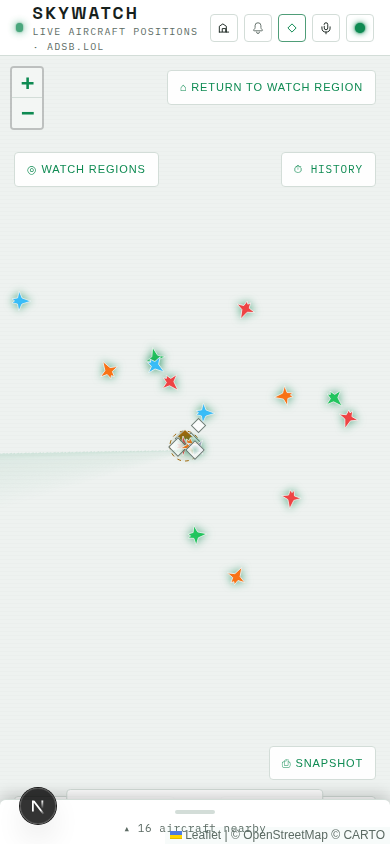
Module 3’s lesson on the core dashboard UI shipped Dashboard with the detail panel and flight list wrapped in a sidebar that’s hidden by default and only becomes flex at the md breakpoint — and said so explicitly: below md, that whole sidebar disappears rather than trying to squeeze a desktop three-column layout into a phone-sized screen. That gap has been sitting there since Module 3. This is where it gets filled, not by making the sidebar responsive, but by giving narrow viewports their own purpose-built component:
// apps/web/src/components/MobileBottomSheet.tsx
"use client";

import { useEffect, useRef, useState } from "react";
import { fmtNum, altitudeFt, isOnGround } from "@skywatch/shared";
import { useAppStore, selectViewAircraft } from "@/store/useAppStore";
import { DetailPanel } from "./DetailPanel";
import { FlightList } from "./FlightList";

/**
 * README stretch goal: "the detail panel is a fixed sidebar; a responsive
 * version that collapses into a bottom sheet on phones would make this
 * usable on the go." Below the `md` breakpoint (exactly where the desktop
 * sidebar in Dashboard.tsx switches from `flex` to `hidden`), this renders
 * the SAME DetailPanel + FlightList content, just re-homed into a sheet
 * anchored to the bottom of the map instead of a side column. Tap-to-toggle
 * rather than a drag gesture -- simpler and more reliable than reimplementing
 * touch physics, and still satisfies "collapses into a bottom sheet."
 * Auto-expands the first time a new aircraft is selected, since tapping a
 * marker while collapsed would otherwise show no feedback at all.
 */
export function MobileBottomSheet() {
  const [expanded, setExpanded] = useState(false);
  const selectedIcao = useAppStore((s) => s.selectedIcao);
  const aircraft = useAppStore(selectViewAircraft);
  const prevSelected = useRef<string | null>(null);

  useEffect(() => {
    if (selectedIcao && selectedIcao !== prevSelected.current) {
      setExpanded(true);
    }
    prevSelected.current = selectedIcao;
  }, [selectedIcao]);

  const selected = selectedIcao ? (aircraft.find((a) => a.hex === selectedIcao) ?? null) : null;
  const summary = selected
    ? (() => {
        const cs = (selected.flight ?? "").trim() || selected.r || selected.hex.toUpperCase();
        const altFt = altitudeFt(selected);
        const onGround = isOnGround(selected);
        return `${cs} · ${altFt != null ? `${fmtNum(altFt)} ft` : onGround ? "ON GROUND" : "—"}`;
      })()
    : `${aircraft.length} aircraft nearby`;

  return (
    <div
      className={`absolute inset-x-0 bottom-0 z-[600] flex flex-col rounded-t-md border-t border-line bg-surface shadow-[0_-4px_16px_rgba(0,0,0,0.2)] transition-[max-height] duration-300 ease-out md:hidden ${
        expanded ? "max-h-[70vh]" : "max-h-[52px]"
      }`}
    >
      <button
        type="button"
        onClick={() => setExpanded((v) => !v)}
        aria-expanded={expanded}
        data-testid="mobile-sheet-toggle"
        className="flex shrink-0 flex-col items-center gap-1.5 px-4 pb-2 pt-2.5"
      >
        <span className="h-1 w-10 rounded-full bg-line" />
        <span className="text-[11px] tracking-[0.05em] text-fg-dim">
          {expanded ? "▾" : "▴"} {summary}
        </span>
      </button>

      {expanded && (
        <div className="flex min-h-0 flex-1 flex-col overflow-y-auto">
          <DetailPanel />
          <div className="flex flex-1 flex-col overflow-hidden">
            <h2 className="px-4 pb-3 pt-4 text-[11px] uppercase tracking-[0.14em] text-fg-dim">Nearby traffic</h2>
            <FlightList />
          </div>
        </div>
      )}
    </div>
  );
}
Notice this reuses DetailPanel and FlightList completely unchanged — the same components the desktop sidebar renders. What’s different isn’t the content, it’s the shell around it: a collapsed 52px strip showing just a drag-handle and a one-line summary (callsign · altitude, or a plain aircraft count with nothing selected), expanding to 70% of viewport height on tap. The max-h-[52px] / max-h-[70vh] swap animated through transition-[max-height] gives the open/close its slide feel without any drag-gesture physics to get wrong — a deliberate trade against a true swipeable sheet, and one worth making: a tap target that always works beats a gesture that’s fussy on every phone differently.
The auto-expand effect is the other detail that matters. Without it, tapping a marker on a phone while the sheet sits collapsed would select the aircraft in the store exactly as it should, but nothing on screen would visibly react — the confirmation that a tap actually landed would be invisible below md even though it’s completely obvious above it. Comparing selectedIcao against prevSelected.current (a ref, not state, so updating it doesn’t itself trigger a re-render) is what limits the auto-expand to changes in selection rather than firing every time the component re-renders for an unrelated reason, like a routine aircraft-position update ticking aircraft in the store.
Because MobileBottomSheet only reads from the store — no useMap(), nothing Leaflet-specific — it doesn’t need to live inside <MapContainer> the way SnapshotControl and SavedLocationsControl do. What it does need is a position: relative ancestor for its own absolute inset-x-0 bottom-0 to anchor against, which points at the same wrapper Dashboard already renders around the map area. Wire it in as a sibling of that hidden md:flex sidebar, with the mirror-image breakpoint: the sidebar disappears at exactly the width where this sheet should appear, so md:hidden here is the other half of the same cutover, not an independent decision made from scratch. Below md there’s now always something at the bottom of the screen — the collapsed strip if nothing’s selected, the full sheet if something is — instead of the flight list and detail panel simply vanishing the way Module 3 left them.
Try It
- Add
crossOrigin="anonymous"toMapPanel’sTileLayer, installhtml2canvas-pro, then drop<SnapshotControl />insideMapContainerand restart the frontend. - Click ⎙ SNAPSHOT, then Download PNG, and open the downloaded file — confirm the basemap tiles are actually visible in the image, not just markers on a flat background (that flatness is exactly what a missing
crossOriginlooks like). - Pan/zoom to a specific view, select an aircraft, click Copy share link, and paste the URL into a new tab. Confirm it loads directly into that view with the same aircraft selected, not the default watch region.
- Open an ordinary bookmark or freshly-typed URL with no
?lat=params and confirm the app loads its normal default view —parseSharedView’s presence checks should mean nothing here silently resolves to{0, 0, 0}. - Shrink the browser window (or open on a phone) below the
mdbreakpoint. Confirm the sidebar is gone, a collapsed strip sits at the bottom of the map instead, and tapping an aircraft marker auto-expands the sheet to show its detail panel and the flight list.
Recap
crossOrigin="anonymous"onTileLayeris a one-line fix with an easy-to-miss failure mode: skip it and canvas capture doesn’t error, it just quietly omits every tile, because the browser decides an image is tainted for canvas reads based on how it was requested, not on the CORS headers the server actually sent.SnapshotControlis two independent actions sharing one panel —html2canvas-procapturingmap.getContainer()for a PNG, and a handful ofURLSearchParamscalls encoding center/zoom/selection into a link — withhtml2canvas-prospecifically required over the upstream library because Tailwind v4’scolor-mix()-based opacity utilities aren’t something plainhtml2canvas’s CSS parser understands.parseSharedView’s explicit=== nullpresence checks are the entire difference between a working share feature and one that silently breaks the default view for every normal visitor, sinceNumber(null)coercing to a finite0makes the naive version indistinguishable from a real shared link.MobileBottomSheetdoesn’t reinvent the responsive layout — it reusesDetailPanelandFlightListverbatim, re-homed into a tap-to-expand sheet anchored below the exact breakpoint where Module 3’s sidebar already disappears.- Nothing in this lesson touched the server: capture, sharing, and the mobile layout are all client-side, closing out the module on a feature set the backend from the earlier lessons never needed to know existed.
Next module: testing and verification — confirming the finished tracker actually behaves the way every prior module claimed it would, and what’s left to check before calling it done.