
Core Dashboard UI
Objectives
By the end of this chapter, you should be able to:
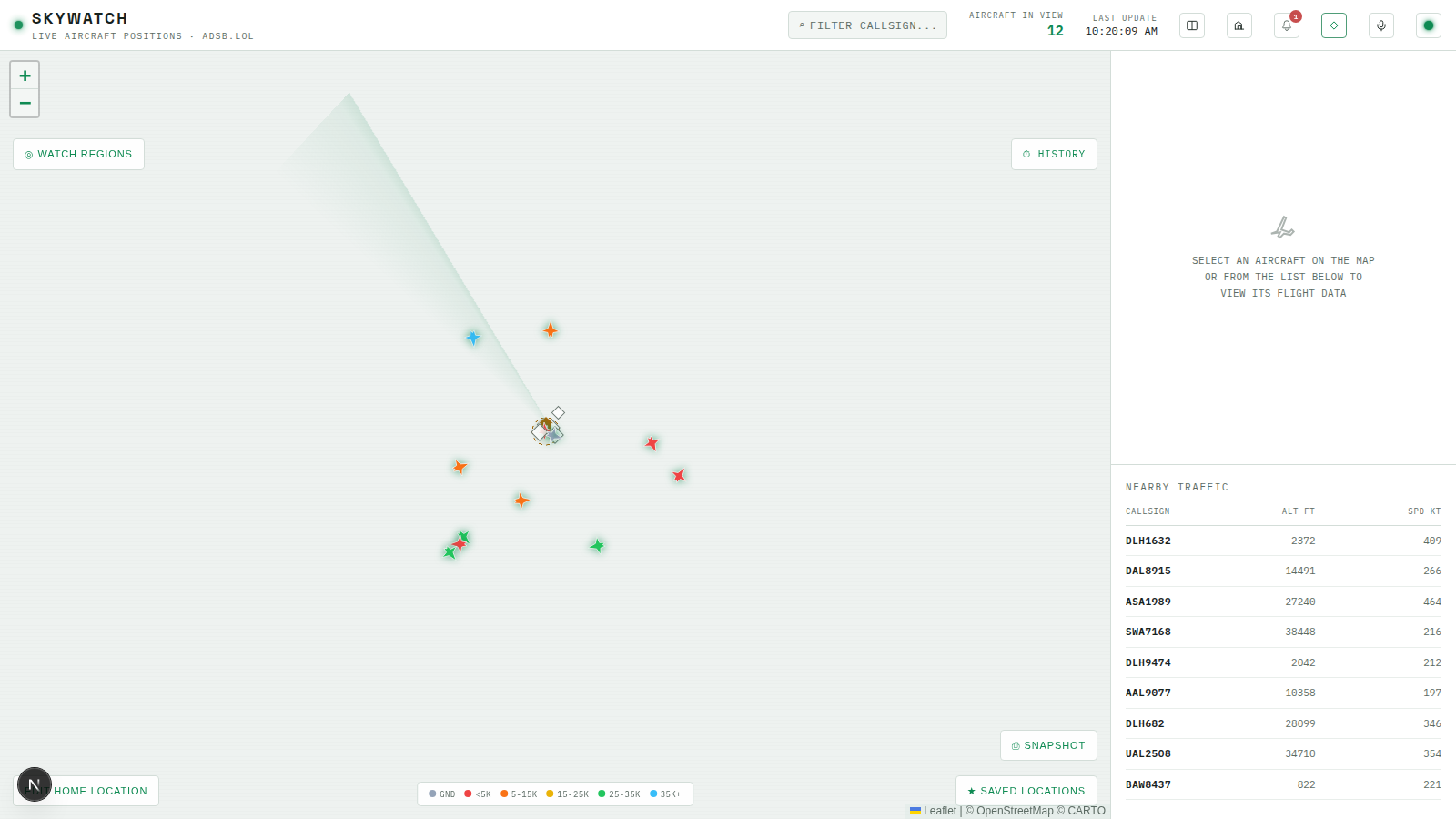
- Build a real header component with search/filter, live counts, and a theme toggle, replacing the previous chapter’s placeholder
- Build a detail panel that shows full telemetry for whichever aircraft is selected, and an empty state when nothing is
- Build a scrollable, filterable flight list that shares selection state with both the map and the detail panel
💡 Why this matters: A map with nothing to click and nowhere to search is a demo, not a dashboard. This chapter turns the single-screen map from the previous chapter into the three-panel layout, map, detail, list, that every later feature module assumes already exists.
The Header
// apps/web/src/components/Header.tsx
"use client";

import { ThemeToggle } from "./ThemeToggle";

export interface HeaderProps {
  searchValue: string;
  onSearchChange: (value: string) => void;
  aircraftCount: number | null;
  lastUpdateLabel: string;
}

export function Header({ searchValue, onSearchChange, aircraftCount, lastUpdateLabel }: HeaderProps) {
  return (
    <header className="z-20 flex h-14 shrink-0 items-center justify-between border-b border-line bg-surface px-4">
      <div className="flex items-center gap-2.5">
        <span className="brand-dot h-[9px] w-[9px] rounded-full bg-phosphor" />
        <div>
          <h1 className="font-display text-[17px] font-bold tracking-[0.14em] text-fg">SKYWATCH</h1>
          <div className="-mt-0.5 text-[10px] tracking-[0.12em] text-fg-dim">LIVE AIRCRAFT POSITIONS · ADSB.LOL</div>
        </div>
      </div>

      <div className="hidden items-center gap-6 sm:flex">
        <div className="flex items-center gap-1.5 rounded-sm border border-line bg-surface-raised px-2.5 py-1.5">
          <span className="text-[11px] text-fg-dim">⌕</span>
          <input
            value={searchValue}
            onChange={(e) => onSearchChange(e.target.value)}
            type="text"
            placeholder="FILTER CALLSIGN..."
            className="w-[140px] bg-transparent font-mono text-xs tracking-[0.05em] text-fg placeholder:text-fg-dim focus:outline-none"
          />
        </div>

        <div className="text-right">
          <div className="text-[9px] uppercase tracking-[0.12em] text-fg-dim">Aircraft in view</div>
          <div className="font-mono text-[15px] font-semibold text-phosphor">{aircraftCount ?? "—"}</div>
        </div>

        <div className="text-right">
          <div className="text-[9px] uppercase tracking-[0.12em] text-fg-dim">Last update</div>
          <div className="font-mono text-xs text-fg">{lastUpdateLabel}</div>
        </div>

        <ThemeToggle />
      </div>

      <div className="flex items-center gap-1.5 sm:hidden">
        <ThemeToggle />
      </div>
    </header>
  );
}
This is the header’s core shape: brand, search, live counts, theme toggle. Every icon button that shows up on the real, finished app’s header, compare mode, the overflight log link, the alert feed, the airports toggle, gets added by whichever module builds that feature, right alongside the component the button controls. Bolting all of them on now, before any of those features exist, would mean either dead buttons or a lot of forward-declared stubs; adding one icon per feature module keeps the header’s history matching the app’s actual capabilities at every point in the course.
The Detail Panel
// apps/web/src/components/DetailPanel.tsx
"use client";

import { useMemo } from "react";
import { altitudeFt, fmtNum, isOnGround } from "@skywatch/shared";
import { useAppStore, selectViewAircraft } from "@/store/useAppStore";

function EmptyState() {
  return (
    <div className="flex flex-1 flex-col items-center justify-center gap-2.5 border-b border-line p-8 text-center text-fg-dim">
      <svg width="34" height="34" viewBox="0 0 24 24" fill="none" stroke="currentColor" strokeWidth="1.4" opacity="0.5">
        <path d="M2 16l4.5-1.5L12 3l1.5 1L10 13l6 2 2-2 1.5 1.5L17 17l-5-1-3 3-1.5-1L9 15l-7 1z" />
      </svg>
      <p className="text-[11px] leading-relaxed tracking-[0.03em]">
        SELECT AN AIRCRAFT ON THE MAP
        <br />
        OR FROM THE LIST BELOW TO
        <br />
        VIEW ITS FLIGHT DATA
      </p>
    </div>
  );
}

function DataCell({ label, value, tone }: { label: string; value: string; tone?: "accent" | "warn" }) {
  return (
    <div>
      <div className="text-[9px] uppercase tracking-[0.1em] text-fg-dim">{label}</div>
      <div className={`text-[15px] font-semibold ${tone === "accent" ? "text-phosphor" : tone === "warn" ? "text-amber" : "text-fg"}`}>
        {value}
      </div>
    </div>
  );
}

export function DetailPanel() {
  const selectedIcao = useAppStore((s) => s.selectedIcao);
  const setSelectedIcao = useAppStore((s) => s.setSelectedIcao);
  const aircraft = useAppStore(selectViewAircraft);

  const selected = useMemo(() => aircraft.find((a) => a.hex === selectedIcao) ?? null, [aircraft, selectedIcao]);

  if (!selected) return <EmptyState />;

  const cs = (selected.flight ?? "").trim() || selected.r || selected.hex.toUpperCase();
  const onGround = isOnGround(selected);
  const altFt = altitudeFt(selected);
  const spdKt = selected.gs ?? null;
  const vrate = selected.baro_rate ?? selected.geom_rate ?? null;
  const track = selected.track ?? selected.true_heading ?? selected.mag_heading ?? null;

  return (
    <div className="border-b border-line p-4">
      <button
        type="button"
        onClick={() => setSelectedIcao(null)}
        className="float-right rounded-sm border border-line px-2 py-1 text-[10px] tracking-[0.08em] text-fg-dim transition-colors hover:border-phosphor-dim hover:text-phosphor"
      >
        CLOSE ✕
      </button>

      <div className="font-display text-[26px] font-bold leading-tight text-phosphor">{cs}</div>
      <div className="mb-4 text-[10px] tracking-[0.1em] text-fg-dim">{selected.hex.toUpperCase()}</div>

      <div className="grid grid-cols-2 gap-x-3.5 gap-y-3">
        <DataCell label="Altitude" value={altFt != null ? `${fmtNum(altFt)} ft` : "—"} tone="accent" />
        <DataCell label="Ground speed" value={spdKt != null ? `${fmtNum(spdKt)} kt` : "—"} tone="accent" />
        <DataCell
          label="Vertical rate"
          value={vrate != null ? `${vrate > 0 ? "+" : ""}${fmtNum(vrate)} fpm` : "—"}
          tone={vrate != null ? (vrate > 100 ? "accent" : vrate < -100 ? "warn" : undefined) : undefined}
        />
        <DataCell label="Status" value={onGround ? "ON GROUND" : "AIRBORNE"} tone={onGround ? "warn" : "accent"} />
        <DataCell label="Squawk" value={selected.squawk || "—"} />
        <DataCell label="Category" value={selected.category || "—"} />
        <DataCell label="Latitude" value={selected.lat != null ? `${fmtNum(selected.lat, 3)}°` : "—"} />
        <DataCell label="Longitude" value={selected.lon != null ? `${fmtNum(selected.lon, 3)}°` : "—"} />
      </div>

      <div className="mt-4 flex items-center gap-2.5 border-t border-line pt-4">
        <div className="relative h-[46px] w-[46px] shrink-0 rounded-full border border-line">
          <div
            className="absolute left-1/2 top-1/2 h-[18px] w-0.5 bg-phosphor shadow-[0_0_4px_var(--phosphor)]"
            style={{ transform: `translate(-50%, -100%) rotate(${track ?? 0}deg)`, transformOrigin: "bottom center" }}
          />
        </div>
        <DataCell label="Heading" value={track != null ? `${fmtNum(track)}°` : "—"} />
      </div>
    </div>
  );
}
Everything here comes straight from selectViewAircraft and the aircraft’s own ADS-B fields — no network calls beyond the WebSocket feed already running. A later module upgrades this panel with a reference photo, resolved aircraft type and operator, a route lookup, and distance/bearing from a configured home location, each backed by a small external API. Building the plain-telemetry version first means that upgrade is a clean addition to a panel that already works, not a prerequisite to seeing anything at all.
The Flight List
// apps/web/src/components/FlightList.tsx
"use client";

import { useMemo } from "react";
import { altitudeFt, fmtNum, isOnGround } from "@skywatch/shared";
import { useAppStore, selectViewAircraft } from "@/store/useAppStore";

const MAX_ROWS = 60;

export function FlightList() {
  const aircraft = useAppStore(selectViewAircraft);
  const filterText = useAppStore((s) => s.filterText);
  const selectedIcao = useAppStore((s) => s.selectedIcao);
  const setSelectedIcao = useAppStore((s) => s.setSelectedIcao);

  const items = useMemo(() => {
    const q = filterText.trim().toUpperCase();
    let list = aircraft.filter((a) => a.lat != null && a.lon != null);
    if (q) {
      list = list.filter((a) => (a.flight ?? "").toUpperCase().includes(q) || a.hex.toUpperCase().includes(q));
    }
    return list.slice(0, MAX_ROWS);
  }, [aircraft, filterText]);

  return (
    <div className="flex flex-1 flex-col overflow-hidden px-4 pb-4">
      <div className="flex justify-between border-b border-line pb-2 text-[9px] uppercase tracking-[0.08em] text-fg-dim">
        <span className="w-[70px]">Callsign</span>
        <span className="w-[60px] text-right">Alt ft</span>
        <span className="w-[60px] text-right">Spd kt</span>
      </div>
      <div className="flex-1 overflow-y-auto">
        {items.length === 0 ? (
          <div className="py-3.5 text-[11px] text-fg-dim">NO AIRCRAFT MATCH</div>
        ) : (
          items.map((a) => {
            const cs = (a.flight ?? "").trim() || a.r || a.hex.toUpperCase();
            const onGround = isOnGround(a);
            const altFt = altitudeFt(a);
            const active = a.hex === selectedIcao;
            return (
              <div
                key={a.hex}
                role="button"
                tabIndex={0}
                onClick={() => setSelectedIcao(a.hex)}
                onKeyDown={(e) => e.key === "Enter" && setSelectedIcao(a.hex)}
                className={`flex cursor-pointer items-center justify-between border-b border-line/50 py-2 text-[11px] transition-colors ${
                  active ? "bg-amber/10" : "hover:bg-phosphor/5"
                }`}
              >
                <span className="w-[70px] font-semibold tracking-[0.05em] text-fg">{cs}</span>
                <span className="w-[60px] text-right text-fg-dim">
                  {altFt != null ? fmtNum(altFt) : onGround ? "GND" : "—"}
                </span>
                <span className="w-[60px] text-right text-fg-dim">{a.gs != null ? fmtNum(a.gs) : "—"}</span>
              </div>
            );
          })
        )}
      </div>
    </div>
  );
}
filterText is read here and in Header’s search input, both from the same store field — type in the header, and the list narrows, with no prop drilling between two components that don’t otherwise know about each other. MAX_ROWS = 60 is a deliberate cap: a busy region can have far more than 60 aircraft in view at once, and rendering every single row would be wasted work for a panel where a human is scanning a list, not processing all of them programmatically.
Assembling the Dashboard
// apps/web/src/components/Dashboard.tsx
"use client";

import { useState } from "react";
import dynamic from "next/dynamic";
import { Header } from "./Header";
import { DetailPanel } from "./DetailPanel";
import { FlightList } from "./FlightList";
import { useLiveFeed } from "@/hooks/useLiveFeed";
import { useAppStore, selectViewAircraft } from "@/store/useAppStore";

const MapPanel = dynamic(() => import("./MapPanel").then((m) => m.MapPanel), {
  ssr: false,
  loading: () => (
    <div className="flex h-full items-center justify-center text-xs tracking-[0.1em] text-fg-dim">
      LOADING MAP…
    </div>
  ),
});

function formatLastUpdate(date: Date | null): string {
  if (!date) return "—";
  return date.toLocaleTimeString();
}

export function Dashboard() {
  useLiveFeed();

  const searchValue = useAppStore((s) => s.filterText);
  const setFilterText = useAppStore((s) => s.setFilterText);
  const aircraft = useAppStore(selectViewAircraft);
  const lastUpdate = useAppStore((s) => s.lastUpdate);

  return (
    <div className="flex h-full flex-col bg-base">
      <Header
        searchValue={searchValue}
        onSearchChange={setFilterText}
        aircraftCount={aircraft.length}
        lastUpdateLabel={formatLastUpdate(lastUpdate)}
      />

      <div className="flex min-h-0 flex-1">
        <div className="relative min-w-0 flex-1 bg-base">
          <MapPanel />
        </div>

        <div className="hidden w-[380px] shrink-0 flex-col overflow-y-auto border-l border-line bg-surface md:flex">
          <DetailPanel />
          <div className="flex flex-1 flex-col overflow-hidden">
            <h2 className="px-4 pb-3 pt-4 text-[11px] uppercase tracking-[0.14em] text-fg-dim">Nearby traffic</h2>
            <FlightList />
          </div>
        </div>
      </div>
    </div>
  );
}
The useState import is unused for now — it’s here because the next feature module’s multi-region compare view adds a compareMode toggle that lives in exactly this spot, right alongside the layout it switches. hidden ... md:flex on the sidebar is the first piece of the responsive layout: below the md breakpoint, the detail panel and flight list disappear entirely rather than squeezing into a phone-sized column — the mobile layout module replaces that gap with a purpose-built bottom sheet instead of trying to force this desktop layout to shrink.
Wire MapPanel’s markers to open the detail panel by adding a click handler that calls setSelectedIcao, the same store action FlightList already uses — both are just two different ways to set the same piece of state, so they stay in sync automatically.
Try It
- Run the app and confirm the three-panel layout: map on the left, detail panel and flight list on the right (on a desktop-width viewport).
- Type a partial callsign into the search box and confirm the flight list narrows to matching rows as you type.
- Click a row in the flight list and confirm the detail panel populates with that aircraft’s telemetry, and that clicking a marker on the map does the same thing.
- Click “CLOSE” in the detail panel and confirm it returns to the empty state.
- Shrink the browser window below the
mdbreakpoint and confirm the sidebar disappears — expected, since the mobile layout for this width doesn’t exist yet.
Recap
Header,DetailPanel, andFlightListall read from the same store built in the previous chapter — no prop drilling required between siblings that need to share selection or filter state.- The detail panel’s empty state exists for the same reason
NO AIRCRAFT MATCHexists in the flight list: showing nothing is a state, and it needs its own explicit UI, not just a blank space. - Icon buttons in the header get added one at a time, by whichever module builds the feature behind them — the header’s history should match the app’s real capabilities at every point in the build.
Next lesson: growing the theme toggle from two states into a full four-theme system.