
Access control
Access control
So far the auth-playground has all the machinery of authentication: registration, hashed passwords, login, session, logout, base template. But there’s a glaring hole.
Right now, anyone can still visit /welcome directly. The session tells us whether the visitor is signed in, but we’re not actually using that information to stop guests from reaching pages they shouldn’t see — we’re just checking by hand at the top of one view function.
That hand-rolled check works for one page. For five pages, it’s repetitive. For a real app with dozens of protected routes, it becomes a quiet security hole — forget the check once and that page is silently public.
This lesson fixes that properly. By the end, protecting a route will take one line — a decorator called @login_required. We’ll also add a brand-new protected route (/secret) to demonstrate the pattern on something other than the welcome page.
What “protected” means
Every route in our playground falls into one of two categories:
Public — anyone can see it. Examples: /register, /login, /users (we deliberately kept the users list public to show registration is working).
Protected — only signed-in users can see it. Examples: /welcome, and (after this lesson) /secret.
Access control is the act of enforcing that distinction. For every protected route, we ask one question before running the view function: is this visitor signed in? If yes, serve the page. If no, redirect them to login.
Here’s the picture:
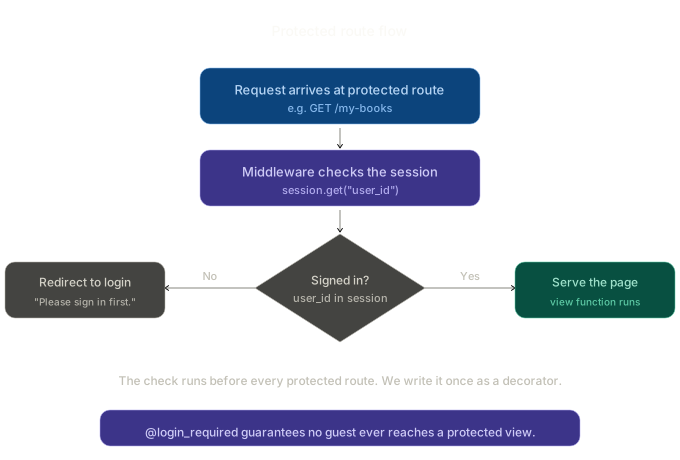
The diamond is the whole point of this lesson. Every protected route runs this check first. We’re going to write it once, as a reusable wrapper called a decorator, and apply it everywhere with a single line.
The naïve approach (and why it doesn’t scale)
We already wrote this check by hand in Lesson 4, inside the welcome route:
@app.route("/welcome")
def welcome():
    user_id = session.get("user_id")
    if user_id is None:
        flash("Please sign in first.")
        return redirect(url_for("login"))

    user = User.query.get(user_id)
    return render_template("welcome.html", user=user)
That works. But imagine adding five more protected routes — every one of them has the same four lines at the top:
    user_id = session.get("user_id")
    if user_id is None:
        flash("Please sign in first.")
        return redirect(url_for("login"))
Two problems with that:
- It’s noisy. Half of every view function is the same auth check. The actual business logic gets lost.
- It’s fragile. Add a new protected route, forget the check, and that page is silently public. There’s no warning, no error — just a quiet security hole.
The fix is to write the auth check once and apply it to routes by tagging them. That’s what decorators are for.
What a decorator is (a quick refresher)
If you’ve used @app.route(...), you’ve used a decorator. A decorator is a function that wraps another function to add behaviour around it — before, after, or both.
The simplest possible decorator:
def shout(func):
    def wrapper():
        result = func()
        return result.upper()
    return wrapper

@shout
def greet():
    return "hello"

greet()   # → "HELLO"
The @shout line means: replace greet with shout(greet). The original greet runs inside wrapper, and the wrapper can do extra things — in this case, uppercasing the result.
For access control, our decorator will be slightly more involved: before running the wrapped view function, check the session, and if the user isn’t signed in, return a redirect instead of calling the view at all.
Build @login_required
Create a new file auth.py in the project root, next to app.py:
# auth.py
from functools import wraps
from flask import session, flash, redirect, url_for, request


def login_required(view_func):
    @wraps(view_func)
    def wrapper(*args, **kwargs):
        if "user_id" not in session:
            flash("Please sign in first.")
            return redirect(url_for("login", next=request.path))
        return view_func(*args, **kwargs)
    return wrapper
Walk through it:
@wraps(view_func)— copies the original function’s name and docstring to the wrapper. Without it, Flask would see every protected route as a function calledwrapper, andurl_forwould break withendpoint name 'wrapper' is already in use. Always include@wraps.*args, **kwargs— passes through any URL parameters Flask captures. Routes like/edit/<int:id>need this;idcomes in as a kwarg.- The session check — if
user_idisn’t there, flash a message and redirect to login. The original view never runs. next=request.path— we remember the URL the guest was trying to reach, so after they sign in we can send them back there instead of dropping them on the home page. We’ll wire this up on the login side in a moment.return view_func(*args, **kwargs)— if the check passes, call the real view and return whatever it returns.
That’s it. Now we can protect any route with a single line.
Apply it to the existing routes
Open app.py. First, import the decorator:
from auth import login_required
Now find the existing welcome route. Replace the hand-rolled session check with the decorator:
@app.route("/welcome")
@login_required
def welcome():
    user = User.query.get(session["user_id"])
    return render_template("welcome.html", user=user)
Two changes:
- Added
@login_requireddirectly below@app.route(...). - Removed the four lines that were doing the check by hand.
- Notice we can now use
session["user_id"]instead ofsession.get("user_id")— the decorator guarantees the key exists by the time the view runs.
Decorator order matters. @app.route must be on top, @login_required directly above the function. Flask reads them inside-out: login_required wraps welcome first, then app.route registers the wrapped version. Reverse them and the URL is bound to the unwrapped function — the auth check silently never runs.
Add a second protected route
To make sure the decorator works as a reusable thing (and not a one-trick fix for the welcome page), let’s add a brand-new protected page: /secret.
In app.py:
@app.route("/secret")
@login_required
def secret():
    user = User.query.get(session["user_id"])
    return render_template("secret.html", user=user)
One line of decorator. That’s the whole auth check.
Create templates/secret.html:
<!-- templates/secret.html -->
{% extends "base.html" %}

{% block title %}The secret page{% endblock %}

{% block content %}
<h1>The secret page</h1>
<p class="lead">Only signed-in users can see this.</p>

<div class="card">
  <p style="margin: 0 0 8px;">
    <strong>{{ user.name }}</strong>, you successfully reached a protected route.
  </p>
  <p style="margin: 0; font-size: 13px; color: #6b7a72;">
    A guest trying to visit this URL would have been bounced to the login page.
  </p>
</div>

<p class="footer-nav">
  <a href="{{ url_for('welcome') }}">Back to welcome</a>
</p>
{% endblock %}
And add a link from welcome.html so the page is discoverable:
<!-- templates/welcome.html — updated footer-nav -->
<p class="footer-nav">
<a href="{{ url_for('secret') }}">Go to the secret page</a> ·
<a href="{{ url_for('users') }}">All users</a>
</p>
That’s all the new code. We added one route, one template, one link.
The user experience
Once @login_required is in place, here’s what a guest sees when they try to open /secret directly:
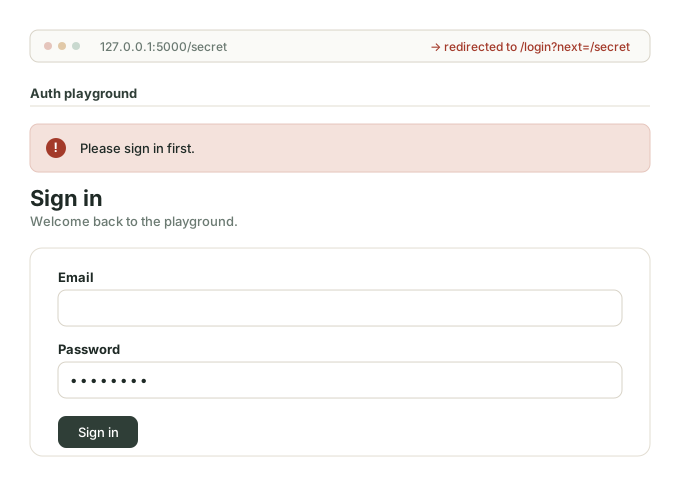
They typed (or clicked a link to) /secret. Instead of seeing the secret content, they’re instantly redirected to the login page, with a clear flash message at the top: “Please sign in first.”
Three things this UX does well:
- No 404 or scary error. The page exists; we just need them to identify themselves first.
- It explains what happened. The flash message is the difference between “this is broken” and “oh, I need to log in.”
- It puts them right where they need to be. The login form is loaded and ready. They sign in, and they’re back in business.
That’s good access control. Quiet, polite, helpful — never silent and never cryptic.
Bouncing back to where they were going
There’s one rough edge so far. After a guest signs in, they land on /welcome — not the page they were originally trying to reach. That’s annoying. If they bookmarked /secret and clicked it, they probably want to land back on /secret after signing in.
The decorator already half-fixed this. Look back at the line:
return redirect(url_for("login", next=request.path))
We pass the original URL as a next query parameter. Flask turns that into /login?next=/secret.
Now we need the login view to honour that parameter. Open app.py, find the success branch of login, and update it:
        session.clear()
        session["user_id"] = user.id
        session["user_name"] = user.name

        flash(f"Welcome back, {user.name}.")

        # Honour the 'next' parameter if it was set, but only if it's a relative path.
        next_url = request.args.get("next")
        if next_url and next_url.startswith("/"):
            return redirect(next_url)

        return redirect(url_for("welcome"))
Three lines added (the next_url block before the default redirect). After successful login:
- If
nextwas set and starts with/→ redirect there. - Otherwise → fall back to the default
/welcome.
The startswith("/") check is critical. Without it, an attacker could craft a link like:
The user signs in legitimately and gets redirected to evil.com. That’s called an open redirect vulnerability, and it’s been used in phishing campaigns for years. The fix is to only accept paths that start with / — relative paths on your own domain. Full URLs to other domains are silently ignored.
This is a small detail with a real security pay-off. Always validate redirect targets.
Server checks, not just UI checks
A common beginner mistake is to “hide” a link from guests in the template and call that access control:
{% if session.user_id %}
  <a href="{{ url_for('secret') }}">Go to the secret page</a>
{% endif %}
That’s fine for UX — guests don’t see a link they can’t use. But it is not access control. An attacker doesn’t need your UI. They can type 127.0.0.1:5000/secret directly into their address bar, or send a request with curl, completely bypassing any template logic.
The rule:
UI checks are for friendliness. Server checks are for security. You need both — but never rely on the UI alone.
@login_required on the route is the security boundary. The {% if %} in the template is just a courtesy to logged-in users so the navigation looks right.
What about ownership?
We’ve now ensured some signed-in user is required to access protected routes. But there’s a subtler question: which signed-in user?
In a real multi-user app — say, the Books app from Module 4 — every user has their own books. If Alice creates a book and Bob is also a registered user, what stops Bob from visiting /edit-book/<alice's-book-id> and editing or deleting her book? Both are authenticated. @login_required only checks “is someone signed in?” — not “is the right someone signed in?”
This is object-level authorization, and it’s distinct from authentication. The fix is to add an owner check inside each view that handles a specific record. You’ll see exactly this pattern in Lesson 8’s mini-project, when we add the user_id foreign key to Book and protect every per-record action with an ownership check.
For now, @login_required is the bulk of what you need. Ownership is the polish step that comes later.
Run it
Walk through the whole loop:
- Open an incognito window so you’re a guest.
- Try to visit
http://127.0.0.1:5000/secretdirectly. You should bounce to/loginwith the flash message “Please sign in first.” Notice the URL has?next=/secrettacked on. - Sign in. Land on
/secret— not/welcome. Thenextparameter took you back to your original destination. - Sign out. Now try
http://127.0.0.1:5000/login?next=https://google.com. Sign in. You should land on/welcome, not Google. That maliciousnextwas silently ignored by thestartswith("/")check. - Visit
/welcomedirectly as a guest. Same bounce. - Visit
/usersas a guest. Loads normally —/usersis intentionally public.
If all of that works, your access control is in place.
Common mistakes
- Forgetting
@wraps. Causes theendpoint name 'wrapper' is already in useerror when you protect more than one route. (You’ll definitely hit this if you skip@wrapsand then add a second protected route — like we just did with/secret.) - Wrong decorator order.
@login_requiredabove@app.routemakes the route stay public. The route decorator must be on top. - Relying on template-only hiding. Hiding a link in HTML is not access control. The server route must check too.
- Forgetting an
@login_required. Easy to do when adding a new route weeks later. Make it a habit: every new route, decide explicitly whether it’s public or protected, and apply the decorator immediately. - Open redirect via
next. Validate that thenextURL starts with/before redirecting. Otherwise attackers can use your login page to bounce users to phishing sites. - Confusing authentication with ownership.
@login_requiredsays “someone is signed in.” It doesn’t say “this is the right someone.” For per-record protection, check the owner inside the view (Lesson 8).
Summary
- Sessions tell you who the user is. Access control uses that information to enforce what they can see.
- The
@login_requireddecorator runs a session check before every protected route, so you write the check once and apply it everywhere. - Use
@wraps(view_func)and keep*args, **kwargsin the wrapper. - Decorator order:
@app.routeon top,@login_requiredbelow it. - The
nextquery parameter lets users land back on the page they were trying to reach. Always validate it starts with/to prevent open-redirect attacks. - UI checks (hiding links) are friendliness; server checks (decorators) are security. You need both.
@login_requiredonly checks “is someone signed in?” — not “is this their resource?” Per-record ownership is a separate check, coming in the mini-project.
Outcome
Guests can no longer wander into protected pages. Every private route bounces them to login with a clear message, and after signing in they land where they meant to go. The welcome route is now one line cleaner, and we have a fully working /secret page that demonstrates the pattern on something other than the page we built last lesson. Next lesson, we use the session info we already have to personalise the experience — showing the user’s name, conditional navigation, and a polished authenticated layout.