
Flask Fundamentals
30 min read
Mini Project
Mini Project: User Profile App
In this project, you will build a complete Flask application that combines everything you’ve learned.
Project Overview
You will build a small web app where users can:
- Visit a homepage
- Submit their name using a form
- See a personalized result page
- Access a JSON API endpoint
What You Will Use
This project combines:
- Routing
- Templates (Jinja)
- Static files (CSS + images)
- Forms and requests
- JSON responses
Project Structure
project/
├── app.py
├── templates/
│ ├── index.html
│ └── result.html
├── static/
│ ├── style.css
│ └── profile.png
└── venv/
Step 1: Create Routes
You should have:
/→ shows the form/submit→ handles form submission (POST)/api/user→ returns JSON
Step 2: Create the Form Page
Your homepage should include:
-
A title
-
A form with:
- Name input
- Submit button
Step 3: Handle Form Submission
When the user submits:
- Get the name using
request.form - Pass it to a template
- Display a personalized message
Step 4: Create Result Page
Show:
- “Hello, ”
- A styled page
- An image
Step 5: Add JSON Endpoint
Create:
@app.route("/api/user")
def api():
return jsonify({
"name": "Your Name",
"status": "active"
})
Step 6: Add Styling
Create static/style.css:
body {
font-family: Arial, sans-serif;
background-color: #f4f6f8;
text-align: center;
padding: 40px;
}
.container {
background: white;
padding: 30px;
border-radius: 10px;
width: 300px;
margin: auto;
box-shadow: 0 4px 10px rgba(0,0,0,0.1);
}
input {
padding: 10px;
width: 80%;
margin: 10px 0;
}
button {
padding: 10px 20px;
background: #4CAF50;
color: white;
border: none;
cursor: pointer;
}
Expected Output
Homepage
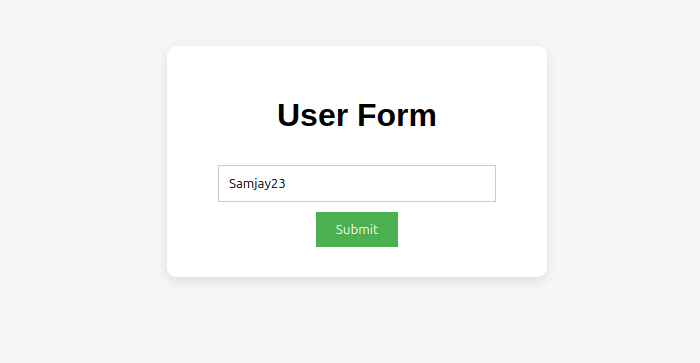
- A centered form
- Input field and button
- Clean layout
Result Page
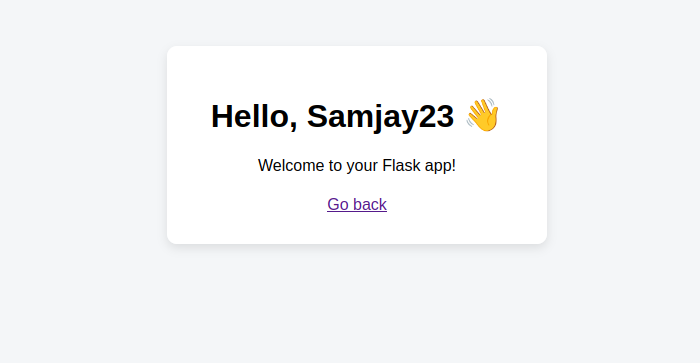
- Displays “Hello, John”
- Styled card layout
- Optional image
JSON API
{
"name": "John",
"status": "active"
}
Requirements Checklist
Make sure your app:
- Has at least 3 routes
- Uses templates
- Uses static files
- Handles a POST request
- Returns JSON
Bonus (Optional)
- Add a list of users
- Add more styling
- Add another API endpoint
Why This Project Matters
This is your first real backend application.
You are now:
- Handling requests
- Rendering dynamic pages
- Managing user input
- Building API endpoints
This is exactly how real web apps start.
Summary
You built a complete Flask application using:
- Routing
- Templates
- Static files
- Forms
- JSON APIs
You are now ready to move into more advanced backend topics.