
User login
User login
So far the auth-playground can create user accounts and store their passwords safely as hashes. But there’s nothing yet that lets a user actually use their account — there’s no sign-in page, no session, no recognition.
This lesson adds the missing half of the authentication system: the login flow. By the end, a returning user will be able to type their email and password, and the playground will remember who they are on the page that follows.
We’ll touch concepts you’ve already met:
- Sessions and cookies from Lesson 1 (the mechanism that makes “stay signed in” work)
- Password hashing from Lesson 3 (specifically, the verification side —
check_password_hash)
This is the lesson where it all comes together.
What login actually does
Before any code, picture the whole journey end-to-end:
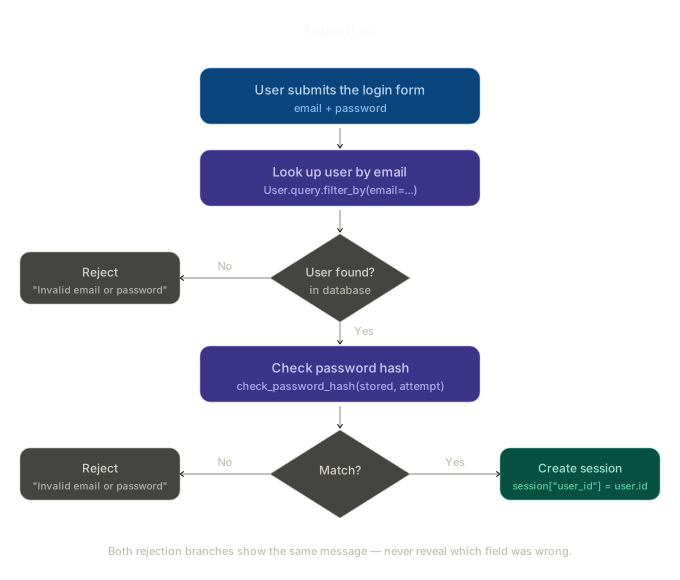
Walk through it:
- The user submits the login form with an email and a password.
- The server looks up that email in the
userstable. - Did we find a row? If no, reject with a generic error.
- If yes, check the password hash. Use
check_password_hashto compare the typed password against the stored hash. - Did it match? If no, reject with the same generic error.
- If yes, create a session. Store the user’s ID in
session["user_id"]. From this point on, every request from this browser will arrive with the session cookie attached, and the server will know who they are.
Two things worth noticing in the diagram before we write any code:
- Both rejection paths show the same error message — “Invalid email or password.” Not “We don’t recognise that email” and not “Wrong password.” We’ll come back to why in a moment.
- The session is created at the very end — only after both checks pass. Until that line runs, the user is still a guest.
Configuring the secret key
Sessions in Flask are signed cookies. The server signs them using a value called secret_key. If the key isn’t set, Flask raises an error the moment you try to put anything into session.
We touched on this in Lesson 2 — we set secret_key = "dev-only-change-me" just so flash() would work. That’s fine for development, but a real app needs the key to come from outside the source code.
Update the top of app.py:
import os
from flask import (
    Flask, render_template, request, redirect,
    url_for, flash, session
)
from werkzeug.security import generate_password_hash, check_password_hash
from models import db, User

app = Flask(__name__)
app.secret_key = os.environ.get("SECRET_KEY", "dev-only-change-me")
Three changes from Lesson 3:
import osat the top — to read environment variables.sessionandcheck_password_hashadded to the imports — we’ll need them in the new route.app.secret_key = os.environ.get(...)— read from theSECRET_KEYenvironment variable, falling back to"dev-only-change-me"if it’s not set.
A few things to understand:
- Why
os.environ.get? In production, the secret key should come from an environment variable — never hard-coded in source control. Locally, the fallback string keeps development simple. - Why “dev-only-change-me”? It’s a deliberately ugly fallback so you’ll notice if it ever leaks into a real deployment. In production, you’d set
SECRET_KEYto a long random value. - What happens if the key changes? Every existing session immediately becomes invalid. Users get silently logged out. That’s a feature — rotating the key is one way to force everyone out.
You can generate a strong key in a Python shell:
>>> import secrets
>>> secrets.token_hex(32)
'a3f7c91b8e2d4f56a9c0e1d3b5f7a9c1e3d5f7a9b1c3e5d7f9a1b3c5d7e9f1a3'
For our playground, the fallback is fine — we’re not in production.
The login page
Add a new template, templates/login.html. It mirrors register.html so closely you can almost diff them:
<!-- templates/login.html -->
<!DOCTYPE html>
<html lang="en">
<head>
  <meta charset="UTF-8">
  <title>Sign in</title>
  <style>
    body {
      font-family: system-ui, -apple-system, sans-serif;
      max-width: 480px;
      margin: 60px auto;
      padding: 0 20px;
      color: #1f2a26;
    }
    h1 { font-size: 22px; margin-bottom: 0.25rem; }
    p.lead { color: #6b7a72; font-size: 14px; margin-top: 0; }
    .card {
      background: #fff;
      border: 1px solid #e2ddd2;
      border-radius: 12px;
      padding: 24px;
      margin-top: 20px;
    }
    .flash {
      background: #f4e2dc;
      border: 1px solid #e5c5bc;
      color: #1f2a26;
      padding: 10px 14px;
      border-radius: 8px;
      font-size: 13px;
      margin-bottom: 16px;
    }
    label { display: block; font-size: 13px; font-weight: 600; margin-bottom: 4px; }
    input {
      width: 100%;
      box-sizing: border-box;
      padding: 9px 12px;
      border: 1px solid #d8d3c7;
      border-radius: 8px;
      font-size: 14px;
      font-family: inherit;
      margin-bottom: 14px;
    }
    button {
      background: #2f3e37;
      color: #fff;
      border: none;
      padding: 10px 18px;
      border-radius: 8px;
      font-size: 14px;
      font-weight: 500;
      cursor: pointer;
    }
    .nav { font-size: 13px; color: #6b7a72; margin-top: 14px; }
    .nav a { color: #4a6b5c; }
  </style>
</head>
<body>
  <h1>Sign in</h1>
  <p class="lead">Welcome back to the playground.</p>

  {% with messages = get_flashed_messages() %}
    {% for msg in messages %}
      <div class="flash">{{ msg }}</div>
    {% endfor %}
  {% endwith %}

  <div class="card">
    <form action="{{ url_for('login') }}" method="post">
      <label for="email">Email</label>
      <input id="email" name="email" type="email" required>

      <label for="password">Password</label>
      <input id="password" name="password" type="password" required>

      <button type="submit">Sign in</button>
    </form>
  </div>

  <p class="nav">No account yet? <a href="{{ url_for('register') }}">Register</a></p>
</body>
</html>
Two fields, one button. Login doesn’t need to validate that two password fields match, doesn’t need a name, doesn’t need a confirmation step. Strip it down.
The welcome page
Once login works, we need somewhere for the user to land. Create templates/welcome.html:
<!-- templates/welcome.html -->
<!DOCTYPE html>
<html lang="en">
<head>
<meta charset="UTF-8">
<title>Welcome</title>
<style>
body {
font-family: system-ui, -apple-system, sans-serif;
max-width: 520px;
margin: 60px auto;
padding: 0 20px;
color: #1f2a26;
}
h1 { font-size: 24px; margin-bottom: 0.25rem; }
p.lead { color: #6b7a72; font-size: 14px; margin-top: 0; }
.flash {
background: #d6e4dc;
border: 1px solid #94b4a3;
color: #1f2a26;
padding: 10px 14px;
border-radius: 8px;
font-size: 13px;
margin-bottom: 16px;
}
.card {
background: #fff;
border: 1px solid #e2ddd2;
border-radius: 12px;
padding: 24px;
margin-top: 20px;
}
.field { margin-bottom: 12px; }
.field-label { font-size: 12px; color: #6b7a72; margin: 0 0 2px; }
.field-value { font-size: 14px; font-weight: 500; margin: 0; }
.nav { font-size: 13px; color: #6b7a72; margin-top: 14px; }
.nav a { color: #4a6b5c; }
</style>
</head>
<body>
<h1>Hello, {{ user.name }}</h1>
<p class="lead">You're signed in.</p>
{% with messages = get_flashed_messages() %}
{% for msg in messages %}
<div class="flash">{{ msg }}</div>
{% endfor %}
{% endwith %}
<div class="card">
<div class="field">
<p class="field-label">Name</p>
<p class="field-value">{{ user.name }}</p>
</div>
<div class="field">
<p class="field-label">Email</p>
<p class="field-value">{{ user.email }}</p>
</div>
<div class="field">
<p class="field-label">Joined</p>
<p class="field-value">{{ user.created_at.strftime("%d %b %Y") }}</p>
</div>
</div>
<p class="nav">
<a href="{{ url_for('users') }}">All users</a> ·
<a href="{{ url_for('register') }}">Register another</a>
</p>
</body>
</html>
The page does one thing: greet the user by name and show the fields we have on them. It’s the simplest possible demonstration that the server knows who you are.
Drop the password column from /users
Now that login is working, there’s no reason to show password hashes on a public page. We were only doing it to teach. Update templates/users.html to drop that column:
<!-- templates/users.html -->
<!DOCTYPE html>
<html lang="en">
<head>
<meta charset="UTF-8">
<title>All users</title>
<style>
body {
font-family: system-ui, -apple-system, sans-serif;
max-width: 640px;
margin: 60px auto;
padding: 0 20px;
color: #1f2a26;
}
h1 { font-size: 22px; margin-bottom: 0.25rem; }
p.lead { color: #6b7a72; font-size: 14px; margin-top: 0; }
.flash {
background: #d6e4dc;
border: 1px solid #94b4a3;
color: #1f2a26;
padding: 10px 14px;
border-radius: 8px;
font-size: 13px;
margin-bottom: 16px;
}
table {
width: 100%;
border-collapse: collapse;
margin-top: 16px;
background: #fff;
border: 1px solid #e2ddd2;
border-radius: 12px;
overflow: hidden;
}
th, td {
text-align: left;
padding: 10px 14px;
font-size: 14px;
border-bottom: 1px solid #e2ddd2;
}
th {
background: #f4f1ea;
font-weight: 600;
font-size: 13px;
color: #6b7a72;
}
tr:last-child td { border-bottom: none; }
.empty { text-align: center; color: #6b7a72; padding: 32px; }
.nav { font-size: 13px; color: #6b7a72; margin-top: 14px; }
.nav a { color: #4a6b5c; }
</style>
</head>
<body>
<h1>All users</h1>
<p class="lead">Everyone registered in the playground database.</p>
{% with messages = get_flashed_messages() %}
{% for msg in messages %}
<div class="flash">{{ msg }}</div>
{% endfor %}
{% endwith %}
{% if users %}
<table>
<thead>
<tr><th>Name</th><th>Email</th><th>Joined</th></tr>
</thead>
<tbody>
{% for u in users %}
<tr>
<td>{{ u.name }}</td>
<td>{{ u.email }}</td>
<td>{{ u.created_at.strftime("%d %b %Y") }}</td>
</tr>
{% endfor %}
</tbody>
</table>
{% else %}
<div class="empty">No users yet. <a href="{{ url_for('register') }}">Register one</a>.</div>
{% endif %}
<p class="nav">
<a href="{{ url_for('login') }}">Sign in</a> ·
<a href="{{ url_for('register') }}">Register</a>
</p>
</body>
</html>
Three columns instead of four. No more sensitive data on display. The hash still exists in the database — we just stopped rendering it.
The login route
Now the brains. Add this to app.py:
@app.route("/login", methods=["GET", "POST"])
def login():
    if request.method == "POST":
        email = request.form.get("email", "").strip().lower()
        password = request.form.get("password", "")

        if not email or not password:
            flash("Please enter your email and password.")
            return redirect(url_for("login"))

        user = User.query.filter_by(email=email).first()

        if user is None or not check_password_hash(user.password, password):
            flash("Invalid email or password.")
            return redirect(url_for("login"))

        session.clear()
        session["user_id"] = user.id
        session["user_name"] = user.name

        flash(f"Welcome back, {user.name}.")
        return redirect(url_for("welcome"))

    return render_template("login.html")
Walk through it:
- Pull the email and password from the form. Normalise the email with
.strip().lower()— same as registration, so case-insensitive lookups work. - Reject empty submissions. A minor convenience.
- Look up the user by email.
.first()returns the user row orNone. - Verify the password. If the user doesn’t exist or the password doesn’t match, reject with one combined error message.
- Clear the session before logging in. A subtle but important detail — see below.
- Store identifying info in the session. We save the user’s ID (so we can look them up later) and their name (so we can show “Welcome back, Alice” without re-querying the database).
- Redirect to the welcome page. Successful login should always land somewhere meaningful.
The welcome route
This is where we use the session for the first time:
@app.route("/welcome")
def welcome():
    user_id = session.get("user_id")
    if user_id is None:
        flash("Please sign in first.")
        return redirect(url_for("login"))

    user = User.query.get(user_id)
    return render_template("welcome.html", user=user)
Three small things to notice:
session.get("user_id")notsession["user_id"]—getreturnsNoneif the key isn’t there. A guest would crash with[].- Guest fallback. If there’s no
user_id, we redirect to login with a flash. This is rough access control — we’ll make it elegant in Lesson 6 with a@login_requireddecorator. User.query.get(user_id)— fetch the full user row from the database. We pass it to the template so the welcome page can show name, email, and join date.
A small redirect update
While we’re at it, the / route should redirect signed-in users to /welcome instead of /register:
@app.route("/")
def index():
    if session.get("user_id"):
        return redirect(url_for("welcome"))
    return redirect(url_for("register"))
Tiny thing — just a nicer landing experience.
Why one combined error message?
This is the most important security teaching point in the whole lesson, so pay attention to it.
Look at these two error messages:
- “We don’t have an account with that email.”
- “Wrong password.”
They feel helpful. They tell the user exactly what went wrong, right?
They also leak information.
Scenario: An attacker is trying to figure out who has accounts on your site. Maybe they’ve stolen a list of email addresses from some other breach, and they want to know which of those people use your service.
If they type alice@example.com with the password x, and the site says “Wrong password” — the attacker just learned that Alice has an account here. They didn’t need to crack her password. The site told them.
If they type notauser@example.com with the password x, and the site says “We don’t have an account with that email” — they just learned that address isn’t registered. Useful for narrowing the list.
This kind of leak is called user enumeration, and it’s a known weakness in countless real-world apps.
The fix is trivial. Always show the same generic message:
Invalid email or password.
The attacker can’t tell whether the email was wrong, the password was wrong, or both. They have to brute-force the whole space.
This is why both rejection branches in our flow diagram lead to the same message. It’s not a typo — it’s the right call.
Why session.clear() before login?
Notice this line:
session.clear()
session["user_id"] = user.id
Before storing the new user’s identity, we wipe whatever was previously in the session. Why?
Imagine Bob signs in to the playground, browses around, and then logs out (which we’ll build in Lesson 5). Whatever leftover session data Bob had — flash messages, preferences, half-filled form drafts — is now sitting in his browser’s cookie. If Alice walks up to the same computer and logs in without the session being cleared, her new user_id would be added on top of Bob’s leftover crumbs.
This is also a defence against an attack called session fixation. An attacker who can somehow get you to use their pre-prepared session ID would, on your successful login, suddenly have a valid logged-in session as you. Clearing the session before login (or, equivalently, regenerating the session ID) neutralises this attack.
It’s one line. The protection is real. Always do it.
The full updated app.py
For clarity, here’s the whole file after all the Lesson 4 changes:
# app.py
import os
from flask import (
    Flask, render_template, request, redirect,
    url_for, flash, session
)
from werkzeug.security import generate_password_hash, check_password_hash
from models import db, User

app = Flask(__name__)
app.secret_key = os.environ.get("SECRET_KEY", "dev-only-change-me")
app.config["SQLALCHEMY_DATABASE_URI"] = "sqlite:///playground.db"
app.config["SQLALCHEMY_TRACK_MODIFICATIONS"] = False

db.init_app(app)

with app.app_context():
    db.create_all()


@app.route("/")
def index():
    if session.get("user_id"):
        return redirect(url_for("welcome"))
    return redirect(url_for("register"))


@app.route("/register", methods=["GET", "POST"])
def register():
    if request.method == "POST":
        name = request.form.get("name", "").strip()
        email = request.form.get("email", "").strip().lower()
        password = request.form.get("password", "")
        confirm = request.form.get("confirm_password", "")

        if not name or not email or not password:
            flash("Please fill in every field.")
            return redirect(url_for("register"))

        if password != confirm:
            flash("Passwords don't match.")
            return redirect(url_for("register"))

        if len(password) < 8:
            flash("Password must be at least 8 characters.")
            return redirect(url_for("register"))

        existing = User.query.filter_by(email=email).first()
        if existing:
            flash("An account with that email already exists.")
            return redirect(url_for("register"))

        user = User(
            name=name,
            email=email,
            password=generate_password_hash(password),
        )
        db.session.add(user)
        db.session.commit()

        flash(f"Account created for {email}. Please sign in.")
        return redirect(url_for("login"))

    return render_template("register.html")


@app.route("/login", methods=["GET", "POST"])
def login():
    if request.method == "POST":
        email = request.form.get("email", "").strip().lower()
        password = request.form.get("password", "")

        if not email or not password:
            flash("Please enter your email and password.")
            return redirect(url_for("login"))

        user = User.query.filter_by(email=email).first()

        if user is None or not check_password_hash(user.password, password):
            flash("Invalid email or password.")
            return redirect(url_for("login"))

        session.clear()
        session["user_id"] = user.id
        session["user_name"] = user.name

        flash(f"Welcome back, {user.name}.")
        return redirect(url_for("welcome"))

    return render_template("login.html")


@app.route("/welcome")
def welcome():
    user_id = session.get("user_id")
    if user_id is None:
        flash("Please sign in first.")
        return redirect(url_for("login"))

    user = User.query.get(user_id)
    return render_template("welcome.html", user=user)


@app.route("/users")
def users():
    all_users = User.query.order_by(User.created_at.desc()).all()
    return render_template("users.html", users=all_users)


if __name__ == "__main__":
    app.run(debug=True)
Test the full loop
Wipe the database one more time and restart, just so all your users have hashed passwords (any Lesson 2 users still have plain text in there):
rm instance/playground.db
python app.py
Then walk through the whole journey:
- Register Alice with a real password (e.g.
sunshine123). You’ll be redirected to the login page with a flash message: “Account created for alice@example.com. Please sign in.” - Sign in as Alice — you’ll land on
/welcomeand see “Hello, Alice Carter” plus the welcome message in a flash banner. - Click “All users” — confirm the password column is gone.
- Open dev tools (F12) → Application → Cookies and look at the
sessioncookie. It’s there. It’s signed. It carries Alice’s identity invisibly with every request. - Sign out by manually deleting the session cookie, then refresh. You should land back on the login page.
- Try the security checks:
- Sign in with the wrong password → “Invalid email or password.”
- Sign in with
noone@example.com→ exactly the same message. - Sign in with empty fields → “Please enter your email and password.”
If all of that works, you’ve shipped a complete sign-in system.
Heads up — sessions persist across runs. If you restart
python app.py, the SQLite database is wiped only if you delete the file, but your browser’ssessioncookie persists. If you’d registered users in Lesson 2 or 3 and then deleted the database, your old cookie now points to auser_idthat doesn’t exist anymore. Visiting/welcomewill silently render withuser=Noneand you’ll see a slightly broken page. Clear the cookie and start fresh.
Common mistakes
A few traps to watch for:
- Comparing passwords with
==. This won’t work —user.passwordis a hash, not the plain password. You must usecheck_password_hash(stored_hash, password_attempt). - Storing the password itself in the session. Don’t. Store the user ID. The password should never be in the cookie, in the session, or anywhere except the database (as a hash).
- Forgetting
.strip().lower()on the email. If a user registered asalice@example.comand typesALICE@example.comat login, you want both to work. Lowercase before lookup. - Different error messages for different failures. “Wrong password” vs “Email not found” — covered above. Always combine them.
- Forgetting
session.clear()before logging in. Stale session data from a previous user lingers. - Setting a real secret key in code and committing it. Use environment variables. If a secret leaks to GitHub, rotate it immediately.
Summary
- The login flow: receive credentials → look up user → verify hash → create session.
check_password_hash(stored_hash, attempt)is the verification side of Lesson 3’s hashing.- Always show one combined error message for any failure — never tell an attacker which field was wrong.
- Call
session.clear()before populating the new session to prevent stale data and session fixation. - Store the user’s ID (and maybe display name) in the session — never the password.
app.secret_keyshould come from an environment variable, not be hard-coded.- Reading the session on other routes is just
session.get("user_id").
Outcome
The auth-playground now has a complete sign-in flow. Returning users can authenticate, land on a personalised welcome page, and the server recognises them on every request via the session cookie. Next lesson, we close the loop with logout — ending a session cleanly when the user is done.