
Intro to APIs
Intro to APIs
Welcome to Module 7. For the last two modules you’ve built Flask apps that took a request, looked up some data, picked a template, rendered HTML, and sent it back to a browser. That model works, and it’ll keep working for a long time. But it’s only one of the ways servers can talk to the world.
This module teaches the other way: REST APIs. By the end you’ll be able to build a backend that doesn’t render any HTML at all — it just serves data, in a format other programs can read. That backend can then power a website, a mobile app, a CLI tool, an integration with a partner, or all of them at once.
The library we’ll use is FastAPI — a modern Python framework designed specifically for building APIs. We’ll get to it soon enough. First we need to make sure the idea of an API is solid in your head, because the move from “render HTML for a browser” to “return JSON for anyone” is bigger than it sounds.
This first lesson is all concepts. No code, no installation. By the end you’ll know what an API is, why so many modern apps are built around them, and what’s actually flying back and forth on the wire when you click a button on a modern website.
What an API is
API stands for Application Programming Interface. That phrase is technically correct and almost always unhelpful. Let’s say it differently.
An API is the way one program talks to another. When your code says “give me the weather for Tokyo” or “create a user with this email” or “list my GitHub repositories” — and a remote server answers — that conversation is happening through an API.
In this module we’re specifically interested in web APIs: APIs that work over HTTP, the same protocol your browser uses. A web API is a server that, instead of returning HTML pages for humans, returns structured data for other programs.
Picture the simplest possible exchange:
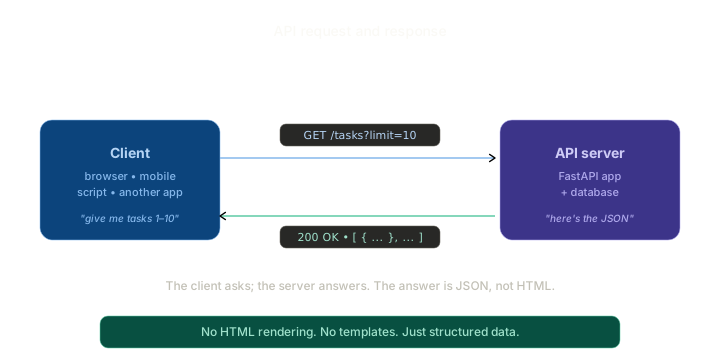
The client (which could be anything — a web page, a mobile app, a script, another server) sends an HTTP request. The server processes it and sends back a response. The response is JSON — a compact, plain-text data format that any programming language can read.
Notice what’s not there: no HTML, no templates, no CSS. The server doesn’t care what the response looks like in the end. It just hands over the data and walks away. Whoever’s making the request decides what to do with it.
This is the entire mental shift this module asks you to make. The server’s job is data. Presentation is somebody else’s problem.
Why this shift matters
In Modules 4 and 5 your Flask app did two jobs at once: it managed data and it produced the page the user saw. Every route in your Books app finished with render_template(...). The browser and the server were tightly coupled — change the design, edit a template; change the data, edit a route. Same project, same codebase.
That’s fine for a small project. It stops being fine the moment you want to do any of the following:
- Ship a mobile app. Mobile apps don’t run Flask templates. They have their own UI, written in Swift or Kotlin or React Native. They need data, not pages.
- Switch to a single-page web app. Modern frontends built with React or Vue render themselves in the browser. They expect the server to feed them JSON, not finished HTML.
- Let other developers build on your service. If you’ve ever used “Sign in with Google” or pulled a Stripe payment widget into a website, those companies expose APIs that other people’s code consumes. Your service can do the same.
- Split a big app into smaller services. Large systems often consist of many backends talking to each other — payment service, user service, search service. They talk via APIs.
In all four cases, the answer is the same: stop returning HTML, start returning data. Let whoever’s calling figure out the presentation.
Here’s what that looks like at scale:
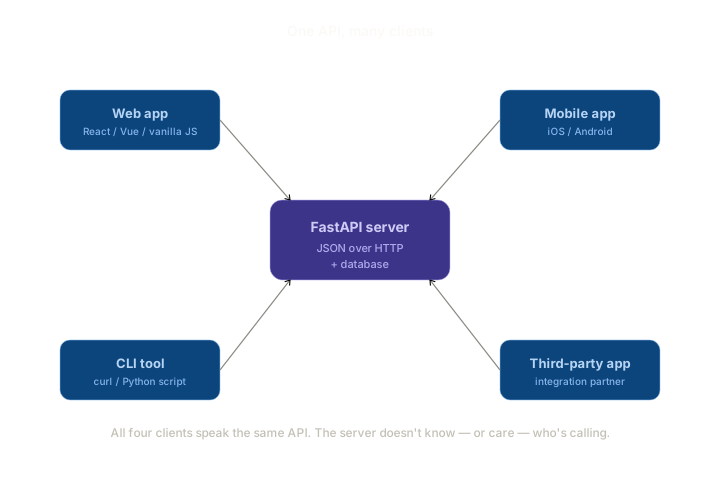
One backend. Four kinds of callers. All using the same endpoints, all getting the same JSON shapes back. The backend doesn’t know — or care — whether the request came from a phone, a website, a curl command, or another company’s server. As far as it’s concerned, every request is the same thing: a request for data.
That decoupling is what makes APIs powerful. You can build the backend once and ship clients to as many platforms as you can dream up.
What “REST” means (briefly)
You’ll see the phrase REST API everywhere. We’ll cover this properly in Lesson 1, but here’s the one-line preview so the term doesn’t feel mysterious right now.
REST is a set of conventions for how to design web APIs. The big idea: organise your API around resources (things like “users” or “tasks” or “books”) and use the standard HTTP methods (GET, POST, PUT, DELETE) to do things to them.
So instead of having a hundred ad-hoc URLs like /getAllTasks and /createNewTask and /removeTaskById, a REST API would have:
GET /tasks— list all tasksPOST /tasks— create a new taskGET /tasks/42— get the task with ID 42DELETE /tasks/42— delete that task
Cleaner, more predictable, and instantly understandable by anyone who’s seen another REST API before.
That’s the gist. We’ll unpack the conventions properly next lesson. For now, just notice the pattern: the URL identifies the thing, and the HTTP method describes the action.
A quick taste of JSON
JSON stands for JavaScript Object Notation, though it has nothing to do with JavaScript in practice — every language reads and writes it. It’s just a way to represent data as text.
A single task might look like this in JSON:
{
  "id": 42,
  "title": "Pick up dry cleaning",
  "completed": false,
  "due_date": "2026-06-01"
}
A list of tasks:
[
  { "id": 42, "title": "Pick up dry cleaning", "completed": false },
  { "id": 43, "title": "Reply to Alice", "completed": true },
  { "id": 44, "title": "Buy groceries", "completed": false }
]
That’s the whole format. Curly braces for objects, square brackets for lists, double-quoted strings, numbers, true / false / null. Nothing else.
Python’s dict and list map directly to JSON objects and arrays. When FastAPI returns a Python dict or list from a route, it converts it to JSON for you automatically. You’ll see this in Lesson 2.
How an API call really works
Imagine you’re building a to-do app, and the user clicks a button to mark task 42 as completed. With a Flask app that renders HTML, the browser would submit a form, the server would update the database, and a new HTML page would come back. Easy, but slow — a full round-trip refresh.
With an API, it looks more like this:
- JavaScript on the page sends a request. Something like
PATCH /tasks/42with a JSON body{"completed": true}. - The API server updates the database. Just the one row. No template rendering.
- The server returns a small JSON response. Maybe
{"id": 42, "completed": true}. That’s all. - JavaScript on the page receives the response and updates that one checkbox in place. No reload. No new page.
The total payload is tiny — a few dozen bytes each way. The user experience is instant. And the same API endpoint could be called by a mobile app, a desktop app, or another service, and would behave identically.
This is why every modern web product you use — Gmail, Twitter, Spotify, Notion, Linear — is built around APIs. The backend hands out JSON. The frontend (which often has separate teams building for web, iOS, and Android) consumes that JSON and renders whatever’s appropriate for the platform.
What FastAPI brings
We’ve talked about APIs generically. So why specifically FastAPI?
In Python, there are several frameworks that can serve APIs. Flask can — you’ve already used jsonify() in Module 5 when we built the JWT API. Django has Django REST Framework. There’s also Falcon, Starlette, and others.
FastAPI is the modern favourite for a few reasons:
- It’s built for APIs first. Flask is a general-purpose web framework that happens to support JSON. FastAPI is a JSON-first framework that happens to support HTML. The defaults assume you’re building an API.
- Automatic validation. When you say “this endpoint takes a JSON body shaped like this,” FastAPI uses Pydantic to enforce that shape, generate clear error messages, and reject malformed requests — all without you writing the checks. You’ll meet this in Lessons 5 and 6.
- Automatic documentation. Every FastAPI app comes with an interactive
/docspage (called Swagger UI) that lists every endpoint, what it expects, and lets you try it in the browser. You’ll see this in Lesson 2 and it’ll change how you think about API development. - Async support. FastAPI is built on top of
asyncio. Most of the time you won’t notice — your code can be regular synchronous Python — but when you need concurrency (e.g., calling several other APIs at once), it’s right there. We’ll cover this lightly in Lesson 9. - Modern Python. Type hints aren’t optional decoration in FastAPI; they’re the way you describe your API. If you’ve ever found yourself wishing Python had stronger type-driven tooling, FastAPI is what that looks like.
You don’t need to know any of those features yet. Just know that FastAPI is the tool we’ll use, and there are good reasons it’s currently the most popular API framework in Python.
What this module covers
A quick map of the road ahead so you know where we’re going:
- Lessons 0–1 — concepts. APIs, REST, JSON, HTTP methods. No code.
- Lessons 2–7 — building blocks. Each lesson introduces one piece (routes, path parameters, request bodies, validation, response models) with a tiny standalone demo.
- Lesson 8 — the mini project. We build a Books API — same domain as your Module 4 / 5 work, but now exposed as a REST API instead of a server-rendered web app.
- Lessons 9–12 — context lessons. Async, API authentication, consuming APIs, best practices. Shorter, more conceptual.
By the end you’ll have built a working JSON API that does CRUD properly, validates inputs cleanly, handles errors gracefully, and serves any kind of client. The Flask app from Module 5 was the foundation. This module is the natural step beyond.
Summary
- An API is the interface through which one program talks to another.
- A web API is a server that returns data (usually JSON) instead of HTML pages.
- The big mental shift: the server’s job is data. Presentation is the client’s problem.
- This decoupling lets one backend serve many clients — web, mobile, CLI, third parties.
- REST is a convention for designing web APIs around resources and HTTP methods.
- JSON is the data format APIs almost always use.
- FastAPI is a modern Python framework built specifically for APIs, with automatic validation and interactive docs.
Outcome
You now know what an API is, why APIs power most modern apps, and what’s different about building one compared to the HTML-rendering Flask apps you’ve built so far. Next lesson, we go one level deeper — covering REST, HTTP methods, status codes, and the rules of the road for web APIs. After that, we start writing FastAPI code.