
REST fundamentals
REST fundamentals
Lesson 0 introduced APIs in the broadest sense — servers that hand out JSON instead of HTML. That mental model is enough to get started, but it leaves an obvious question unanswered.
How do you actually design one?
If you’re building an API for tasks, do you call it /getAllTasks, /tasksAll, /task-list, /api/tasks/list, or just /tasks? Do you write a separate URL for every action, or use the same URL with different verbs? When you create a task, where does it go? When you delete one, what should the server send back?
These aren’t matters of personal taste. There’s a widely-followed set of conventions called REST, and once you’ve internalised the rules, the answers to most “how should I design this endpoint?” questions become obvious. This lesson is about those conventions.
No code yet. We need the design vocabulary firmly in place before we start writing routes — otherwise the first FastAPI app you build (next lesson) won’t have anywhere to stand.
What REST is
REST stands for Representational State Transfer, a phrase coined by Roy Fielding in his 2000 doctoral thesis. The name is academic and unhelpful; the ideas are not. Strip them down to plain language and you get a handful of conventions:
- Organise your API around resources — the nouns of your domain (tasks, users, books, orders).
- Use URLs to identify resources —
/tasksfor the collection,/tasks/42for an individual. - Use HTTP methods to express actions —
GETto read,POSTto create,PUT/PATCHto update,DELETEto remove. - Use HTTP status codes to communicate outcomes —
200for success,404for “not found,”400for “bad request,” and so on. - Keep requests stateless — every request carries everything the server needs to handle it. The server doesn’t remember what happened on the previous request.
An API that follows these rules is called a RESTful API. Almost every public web API you encounter — GitHub’s, Stripe’s, Spotify’s, Twitter’s — is RESTful (or close enough). The conventions are the lingua franca of web APIs.
We’ll unpack each idea in turn.
Resources are nouns
The single most important shift when designing a REST API is this: organise your endpoints around the things your app deals with, not the actions people perform on them.
Imagine a task management app. The wrong way to design URLs:
/createTask
/getTask
/getAllTasks
/updateTask
/deleteTask
/markTaskComplete
/listOpenTasks
Every URL is a verb. Every action gets its own endpoint. You end up with dozens of URLs, no consistency, and no way to predict what /searchOpenTasksByDueDate is going to be called.
The RESTful way:
/tasks
/tasks/42
That’s it. Two URL patterns. The first refers to the collection of tasks. The second refers to task number 42, specifically. The action — read, create, update, delete — is communicated by the HTTP method, which we’ll get to next.
This pattern scales. A blog might have /posts, /posts/123, /comments, /comments/7. A user management API might have /users, /users/42, /users/42/roles. Once you see the pattern, every new resource fits the same shape.
A few rules of thumb that hold up in practice:
- Use plural nouns for collections:
/tasks, not/task. The plural is more honest about the shape — you’re accessing a list, and individual items live inside the list. - Use IDs to identify members:
/tasks/42. Never embed business-logic queries in the URL itself. - Nest resources only when they’re truly owned:
/users/42/tasksis fine if tasks belong to users./users/42/profile/settings/notifications/emailis not — too deep, too brittle.
HTTP methods are the verbs
Now that the URLs are nouns, where do the actions go? Into the HTTP method of the request.
Every HTTP request has a method (sometimes called a verb): GET, POST, PUT, PATCH, DELETE. These existed long before REST — your browser uses them every day. REST just gives them specific meanings in an API context.
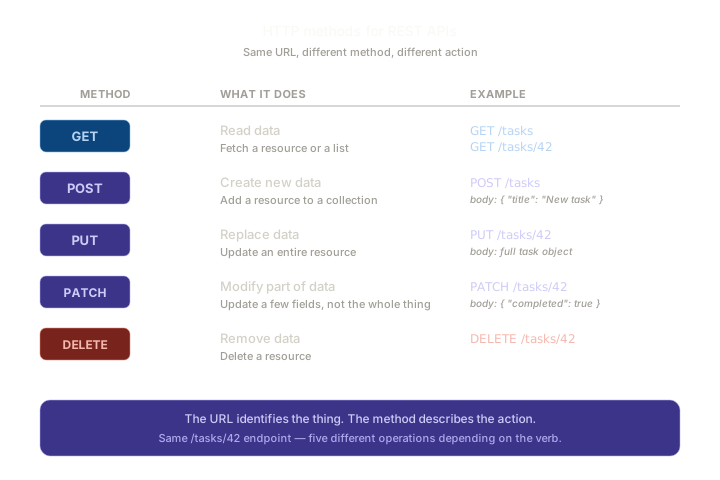
Walk through each one:
GET — read data
GET requests fetch data without changing anything on the server. Two common shapes:
GET /tasks— return all tasks (probably as a JSON array).GET /tasks/42— return one task by ID.
A GET request never has a body. Any parameters go in the URL itself, usually as query strings (/tasks?status=completed&limit=10) — we’ll cover that in Lesson 4.
The crucial property: GET is safe. Calling GET /tasks ten times in a row should change nothing. The server might return slightly different data each time (if other people are adding tasks), but the act of asking doesn’t change state.
POST — create new data
POST requests create new resources. The URL points at the collection; the request body describes the new item.
POST /tasks
body: { "title": "Buy groceries", "due_date": "2026-06-01" }
The server creates a new task, assigns it an ID, and (conventionally) returns the newly-created object — usually with status code 201 Created.
POST is not safe. Calling it twice creates two tasks. We’ll see this matter when we talk about idempotency in Lesson 12.
PUT — replace data
PUT updates an entire resource by replacing it. You send the whole object, including any unchanged fields, and the server overwrites the existing row.
PUT /tasks/42
body: {
  "title": "Buy groceries",
  "completed": true,
  "due_date": "2026-06-01"
}
Even if you only meant to change completed, you have to send all the fields. That’s the “replace” semantic — the server treats the body as the new, full state of the resource.
PATCH — modify part of data
PATCH is the surgical update. It sends only the fields that should change.
PATCH /tasks/42
body: { "completed": true }
The server reads 42, applies the change, and leaves the other fields untouched.
In practice, most APIs use PATCH for nearly all updates and rarely use PUT. Sending less data is cheaper and avoids accidental overwrites — if two people are editing the same record, a PATCH is less likely to clobber the other’s changes.
If you only learn one of PUT / PATCH, learn PATCH. It’s more useful day-to-day.
DELETE — remove data
DELETE removes a resource.
DELETE /tasks/42
No request body needed — the URL already says which thing to delete. The server confirms the deletion and (conventionally) returns status code 204 No Content, which we’ll come back to in a moment.
The same URL, different methods
Here’s where REST’s pattern starts to feel elegant. Look at all the things you can do with the single URL /tasks/42:
| Method | Effect |
|---|---|
| GET | Fetch task 42 |
| PUT | Replace task 42 entirely |
| PATCH | Update some fields of task 42 |
| DELETE | Delete task 42 |
Four different operations, one URL. The URL says which resource; the method says what to do with it. No more /createTask, /updateTask, /deleteTask — they collapse into a clean, predictable shape.
You’ll see this pattern again and again. Every well-designed REST API uses it.
Status codes communicate outcomes
When you build HTML web apps, the standard “everything worked” response is to return a page and let the user see for themselves. APIs don’t have that luxury — the caller is another program, and the program needs an unambiguous signal about whether the request succeeded.
That’s what HTTP status codes are for. Every response carries a three-digit code. The first digit gives the broad category:
- 2xx — success. It worked.
- 3xx — redirection. Look somewhere else. (Rare in APIs.)
- 4xx — client error. You sent something wrong.
- 5xx — server error. We did something wrong.
The specific codes you’ll use most:
| Code | Name | When to use it |
|---|---|---|
| 200 | OK | Successful GET, PUT, or PATCH |
| 201 | Created | Successful POST that created a new resource |
| 204 | No Content | Successful DELETE — nothing to return |
| 400 | Bad Request | The request was malformed (missing field, wrong type) |
| 401 | Unauthorized | The caller isn’t signed in / didn’t provide credentials |
| 403 | Forbidden | The caller is signed in but isn’t allowed to do this |
| 404 | Not Found | The resource doesn’t exist |
| 409 | Conflict | Tried to create something that already exists (e.g. duplicate email) |
| 422 | Unprocessable Entity | Validation failed — wrong data, even if syntactically correct |
| 500 | Internal Server Error | Something blew up on the server |
You don’t need to memorise all of them. Notice the pattern: 2xx means “fine,” 4xx means “your fault,” 5xx means “my fault.” That alone is enough to read most API responses.
A few subtleties worth knowing:
200vs201. Both mean success.201specifically signals “I created something new” — used forPOSTresponses. Use200for everything else successful.204is “success, but nothing to send back.” Common afterDELETE— the resource is gone, what would you return?204says “operation succeeded, body is intentionally empty.”401vs403.401means “I don’t know who you are.”403means “I know who you are, and the answer is no.” The distinction matters:401usually means “go log in”;403means “you can’t do this even if you log in again.”400vs422. Both mean the client sent bad data.400is for malformed requests (broken JSON, missing required fields at the structural level).422is for valid requests with semantic issues (the JSON parses fine, but the email isn’t an email). FastAPI uses422for Pydantic validation errors automatically.
FastAPI handles many of these for you, but you’ll also set them explicitly on certain responses. We’ll come back to status codes in Lesson 8 when we’re building the Books API.
Statelessness
The last REST principle is short but worth naming.
Every request must contain everything the server needs to handle it.
Concretely: the server should not rely on remembering the previous request, the previous session, or any kind of conversation state. If a request needs to know who the user is, it carries an authentication token. If a request needs to know which page of results to return, the URL says so (?page=3). Nothing is implicit.
This sounds restrictive but it’s a major reason APIs scale so well. A stateless server can handle a million users across a hundred servers, because no single server needs to “remember” any client. Any server can handle any request.
This is also exactly the JWT model we covered in Module 5, Lesson 10. The client carries identity in a token; the server validates it; no shared session state is required. Sessions and cookies (which we used everywhere in Module 5 except the JWT lesson) are technically a form of state, but they’re tolerated because the state is just a lookup key — the bulk of the conversation still lives in the request.
If you’re building a strictly RESTful API for mobile clients or microservices, you’ll likely use tokens, not cookies. If you’re building an API consumed by your own browser frontend, sessions are pragmatic and fine. We’ll cover both flavours later in the module.
A worked example: the tasks API
Pulling it all together — what would a complete REST API for tasks look like? Here’s the standard shape:
| Method | URL | What it does | Typical response |
|---|---|---|---|
| GET | /tasks |
List all tasks | 200 OK + array of tasks |
| POST | /tasks |
Create a new task | 201 Created + the new task |
| GET | /tasks/42 |
Fetch task 42 | 200 OK + one task |
| PATCH | /tasks/42 |
Update some fields of task 42 | 200 OK + the updated task |
| PUT | /tasks/42 |
Replace task 42 entirely | 200 OK + the updated task |
| DELETE | /tasks/42 |
Delete task 42 | 204 No Content |
Six lines. That’s the entire CRUD interface for a resource. If you’ve designed one REST API, you’ve roughly designed them all — books, users, comments, anything. The shape doesn’t change.
You’re going to write something very close to this table by the end of Lesson 8. The point of this lesson is that you can read it right now and predict, before any code is written, what each endpoint should do.
What REST isn’t
A few things people often expect REST to be that it isn’t:
- REST doesn’t require JSON. You can return XML, HTML, or any other format. JSON is just the most popular choice today.
- REST isn’t a Python thing. Or a Flask thing. Or a FastAPI thing. It’s protocol-level — these are conventions for how to use HTTP, independent of language or framework.
- REST isn’t strictly enforced. Real-world APIs bend the rules constantly. You’ll see endpoints like
POST /tasks/42/complete(a verb in the URL!) in major APIs because sometimes the “right” REST design is awkward. Treat REST as a strong default, not a religion. - REST isn’t the only option. Alternatives like GraphQL, gRPC, and tRPC exist, with different trade-offs. They’re outside this module’s scope, but you should know they exist.
The goal is APIs that other developers can understand without reading your docs. REST is the most widely-known convention for getting there.
Summary
- A REST API organises endpoints around resources (nouns) and uses HTTP methods (verbs) to describe actions.
- URLs identify the thing; methods say what to do with it.
- The five core methods:
GET(read),POST(create),PUT(replace),PATCH(partial update),DELETE(remove). - Status codes communicate outcomes:
2xxsuccess,4xxclient error,5xxserver error. - The most-used codes:
200,201,204,400,401,403,404,422. - Statelessness — every request stands alone. The server doesn’t remember conversations.
- A standard CRUD resource is six endpoints around one URL pattern. Memorise the shape.
Outcome
You now know the design language of web APIs. You can look at a URL like PATCH /tasks/42 and immediately know what it’s supposed to do, and you can sketch the endpoints for a new resource without thinking hard about it. Next lesson, we put it into practice — installing FastAPI, writing your first route, and seeing the magical /docs page that comes free with every FastAPI app.