
Sessions and cookies
Sessions and cookies
In Lesson 0 we said authentication works in four stages, and the last one — session — is what makes the user “stay logged in” across pages. But what is a session, actually? And what’s a cookie, and how do the two work together?
This lesson answers those questions before we touch any real authentication code. By the end you’ll understand exactly what happens behind the scenes every time you click “Stay signed in” on a website — and you’ll have built a tiny throwaway app that lets you watch a session work with your own eyes.
The problem: HTTP forgets everything
Here’s something strange about the web. Every time your browser asks a server for a page, it’s a brand new conversation. The server has no memory of what came before.
You can prove it to yourself. Open a website, log in, and then imagine the server’s point of view as you click around:
- Request 1: “GET /login” — Someone wants the login page. Send it.
- Request 2: “POST /login” with email + password — Someone is submitting credentials. Check them.
- Request 3: “GET /dashboard” — Someone wants the dashboard. But who?
By request 3, the server has already forgotten the login from request 2. To HTTP, every request is a stranger walking up to the counter for the first time.
This forgetfulness is called statelessness, and it’s a deliberate design choice — it makes the web scalable and simple. But it creates a problem: how does the server remember who you are between clicks?
The answer is sessions and cookies.
What a cookie is
A cookie is a small piece of text that the server asks the browser to save and send back on every future request.
That’s the whole idea. When the server wants the browser to remember something, it includes a special header in the response:
Set-Cookie: session_id=abc123
The browser sees this header, saves the cookie, and from that moment on, every request to the same site includes the cookie in its headers:
Cookie: session_id=abc123
The server reads the cookie on each request and uses it to recognise the visitor. The browser does this automatically — you never have to write code to send a cookie. That’s how clicking from /dashboard to /profile still feels like the server knows you.
A cookie can hold any small text value. The server decides what to put in it. The browser just stores it and faithfully sends it back.
What a session is
A cookie alone is just a piece of text. The interesting part is what the server does with it.
A session is the server’s record of who a visitor is and what they’re doing. It usually contains things like:
- The user’s ID (so we know which row in the database is theirs)
- When they logged in
- Maybe their preferences or temporary data
The session lives on the server. The cookie just holds a key — usually called a session ID — that points to the session record.
Think of it like a coat check at a restaurant. You hand over your coat, the attendant gives you a numbered ticket. The ticket itself is small and almost meaningless — but when you bring it back, the attendant uses the number to find your coat. The ticket is the cookie. The coat (and the rack it sits on) is the session.
This separation matters. The browser never sees the actual session data. It only holds the ticket. If someone steals the cookie they get the ticket, not the full session record — but they can still impersonate you while the ticket is valid. (That’s why cookies need careful security, which we’ll cover later in the module.)
The full round-trip
Now let’s put it together. Here’s exactly what happens from the very first visit through every later page load:
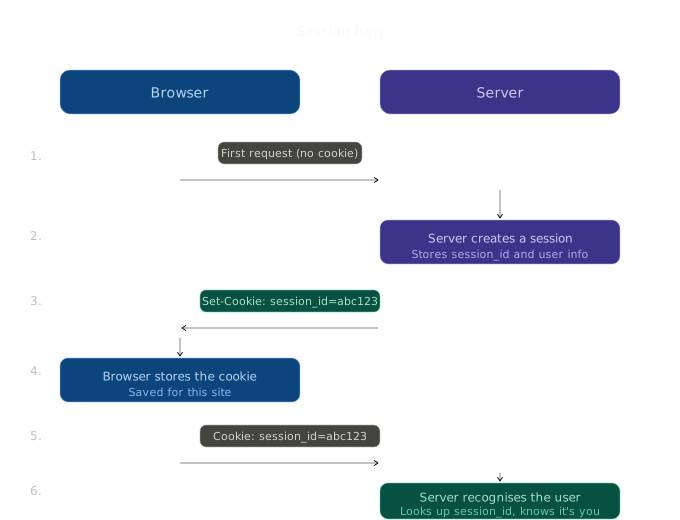
Walk through the six steps with me:
-
First request. A visitor opens the site. Their browser sends a normal request to the server. There’s no cookie yet, because they’ve never been here before.
-
The server creates a session. Behind the scenes, the server creates a record — usually in memory or in a database. The record might say something like “session abc123 belongs to user 42, logged in at 14:05.”
-
The server sends back the cookie. Along with the page, the server includes a
Set-Cookie: session_id=abc123header in the response. -
The browser stores the cookie. Quietly, on the user’s machine. They don’t see it. They never have to think about it.
-
Every later request sends the cookie. When the user clicks any link or submits any form on the same site, the browser automatically attaches
Cookie: session_id=abc123to the request. -
The server recognises the user. It reads the cookie, looks up session
abc123in its records, sees “ah, this is user 42,” and serves the right page.
This loop repeats on every click. The user feels like the site “knows them” — but really, it’s just looking them up by the ticket they’re carrying.
How Flask handles sessions
Flask gives you all of this almost for free. There’s a built-in object called session that behaves like a Python dictionary. You put things in it; Flask handles the cookie machinery automatically.
A tiny example:
from flask import Flask, session, redirect, url_for

app = Flask(__name__)
app.secret_key = "change-this-to-a-long-random-string"

@app.route("/sign-in-as-alice")
def sign_in_as_alice():
    session["user_id"] = 1
    session["user_name"] = "Alice"
    return redirect(url_for("welcome"))

@app.route("/welcome")
def welcome():
    name = session.get("user_name", "guest")
    return f"Welcome, {name}!"
What’s happening here is quietly powerful:
- When you set
session["user_id"] = 1, Flask packages the session data, signs it with yoursecret_key, and sends it back as a cookie automatically. - When the user visits
/welcome, Flask reads the cookie, unpacks it, and gives you back a familiar Python dictionary. - The browser never sees raw session data, and even if someone tampered with the cookie, the signature would no longer match — and Flask would reject it.
You don’t write any Set-Cookie headers yourself. You don’t generate session IDs by hand. You just put things in session and read them back, the way you would with any dictionary.
About
secret_key: This is the value Flask uses to sign every session cookie. It must be long, random, and kept private. If your secret leaks, anyone can forge sessions. We’ll set this up properly in Lesson 4.
Server-side sessions vs signed cookies
There’s a subtle detail worth knowing now, because it’ll come up later.
By default, Flask uses signed cookies — the session data itself is packed into the cookie and sent to the browser. It’s protected from tampering by the signature, but the user can read it (it’s just base64-encoded). This works great for small amounts of data like a user ID.
Real production apps often use server-side sessions — the cookie only holds an opaque session ID, and all the actual data lives on the server. This is more like the coat-check analogy. It’s safer for storing larger or more sensitive data.
For this module, Flask’s default signed cookies are perfect. You’ll know when you need to upgrade to server-side storage — and there’s a Flask extension called Flask-Session that handles it for you.
Hands-on: a tiny session counter
Theory’s good, but you’ll understand sessions ten times better after running a real one. Let’s build the smallest possible Flask app that uses the session — a counter that remembers how many times you’ve clicked.
No database, no users, no login form. Just a number that survives between page loads, scoped to your browser.
Project structure
Create a new folder anywhere outside your Books app. The whole demo is two files:
lesson-1-counter/
├── session_counter.py
└── templates/
    └── index.html
session_counter.py
# session_counter.py
from flask import Flask, session, render_template, redirect, url_for

app = Flask(__name__)
app.secret_key = "dev-only-change-me"


@app.route("/")
def index():
    count = session.get("count", 0)
    return render_template("index.html", count=count)


@app.route("/increment", methods=["POST"])
def increment():
    session["count"] = session.get("count", 0) + 1
    return redirect(url_for("index"))


@app.route("/reset", methods=["POST"])
def reset():
    session.pop("count", None)
    return redirect(url_for("index"))


if __name__ == "__main__":
    app.run(debug=True)
Three routes, about twenty lines. Watch what each one does:
/readscountfrom the session, defaulting to 0 if it isn’t there. Renders the page./incrementreads the count, adds one, writes it back to the session, redirects home. Flask handles the cookie automatically./resetremovescountfrom the session entirely.
templates/index.html
<!-- templates/index.html -->
<!DOCTYPE html>
<html lang="en">
<head>
  <meta charset="UTF-8">
  <title>Session counter</title>
  <style>
    body {
      font-family: system-ui, -apple-system, sans-serif;
      max-width: 480px;
      margin: 80px auto;
      padding: 0 20px;
      color: #1f2a26;
      text-align: center;
    }
    h1 { font-size: 22px; margin-bottom: 0.5rem; }
    p.lead { color: #6b7a72; font-size: 14px; }
    .count {
      font-size: 64px;
      font-weight: 700;
      margin: 32px 0;
      color: #4a6b5c;
    }
    form { display: inline-block; margin: 0 4px; }
    button {
      padding: 10px 18px;
      border-radius: 8px;
      border: 1px solid #d8d3c7;
      font-size: 14px;
      cursor: pointer;
      background: #fff;
    }
    button.primary { background: #4a6b5c; color: #fff; border-color: #4a6b5c; }
    button.danger  { color: #a33a2a; border-color: #e5c5bc; }
  </style>
</head>
<body>
  <h1>Session counter</h1>
  <p class="lead">Each click increments a number stored in your session.</p>

  <div class="count">{{ count }}</div>

  <form action="{{ url_for('increment') }}" method="post">
    <button type="submit" class="primary">+ Increment</button>
  </form>
  <form action="{{ url_for('reset') }}" method="post">
    <button type="submit" class="danger">Reset</button>
  </form>
</body>
</html>
Run it
From the project folder:
pip install flask
python session_counter.py
Then open http://127.0.0.1:5000 and click Increment a few times. The number goes up, and it stays up across page refreshes — because the value is in your session, attached to your browser via your cookie.
Now look at the cookie
Open your browser’s dev tools (F12), go to Application → Cookies, and click 127.0.0.1. You’ll see one cookie called session. Its value is a long opaque string — that’s your signed session data, packed inside the cookie.
Try these three small experiments:
- Open the same URL in a different browser (or a private window). You’ll see count = 0. Your two browsers have separate cookies, so separate sessions.
- Delete the
sessioncookie in dev tools, then refresh the page. Count is back to 0. The “ticket” is gone — the server has nothing to look up. - Click Increment again. A new cookie appears immediately. The server just started a new session for you.
That’s the whole authentication mechanism, condensed into a counter. Sessions in real apps store user_id instead of count, but the plumbing is identical.
Guided task: see a real cookie
You’ve seen the mechanism in your own demo. Now look at a real one.
Steps:
- Open any website you’re logged into (Gmail, Twitter, anything).
- Open dev tools (F12), go to Application → Cookies.
- Find the entry that looks like authentication:
session_id,auth_token,sid.
Look at the columns:
- Value — a long random-looking string. That’s the ticket. Real apps use longer, more opaque tickets than our demo, but the idea is the same.
- HttpOnly — when checked, JavaScript on the page can’t read this cookie. Only the server can. This protects against attackers who manage to inject scripts.
- Secure — when checked, the cookie only travels over HTTPS, never plain HTTP.
- Expires — how long the cookie lives.
If you’ve ever wondered how Gmail just knows you’re you when you open a new tab, this is the entire mystery. A cookie called something like __Secure-1PSID is being sent on every request, and the server is looking it up to recognise you.
Summary
- HTTP is stateless — every request is a fresh stranger to the server.
- Cookies are small pieces of text the browser saves and sends back automatically.
- Sessions are server-side records of who a visitor is. The cookie just holds the key.
- The flow is always: server creates session → sends cookie → browser stores it → browser sends it back on every request → server uses it to recognise the user.
- Flask gives you a
sessionobject that handles all of this with a dictionary-like API. - You just built and ran a working session-based counter. It uses the same machinery a real login system does.
Outcome
You now understand how a server remembers a user between requests, and you’ve watched the mechanism (cookies + sessions) work in your own browser. Next, we’ll move from counters to people — building a tiny app where you can register actual user accounts.