
Request bodies and Pydantic
Request bodies and Pydantic
For four lessons now your endpoints have only ever read — query parameters, path parameters, and seeded in-memory data. Even the POST in Lesson 3 was a fake: it created a hardcoded task because we hadn’t learned how to accept real input from a client yet.
This is that lesson.
By the end you’ll have a POST endpoint that accepts a real JSON body from the client, parses it into a typed Python object, and validates every field automatically. The tool that does this is called Pydantic, and it’s the single biggest reason FastAPI is fun to use.
If you’re coming from Flask, you might be used to writing code like this:
# Flask, manual parsing and validation
data = request.get_json()
if "title" not in data:
    return jsonify({"error": "title is required"}), 400
title = data["title"]
if not isinstance(title, str):
    return jsonify({"error": "title must be a string"}), 400
priority = data.get("priority", 2)
if not isinstance(priority, int):
    return jsonify({"error": "priority must be an integer"}), 400
# ...repeat for every field, on every endpoint
FastAPI replaces all of that with a single Python class declaration. Let’s see how.
The mental model
When a client sends a POST request with a JSON body, three things have to happen on the server before your handler can do useful work:
- Parse the bytes. Read the request body and decode it from JSON to a Python dict.
- Validate the shape. Confirm that required fields are present, that types match, that values are sensible.
- Hand it to your code. Pass the typed, validated data to the function.
Here’s the picture:
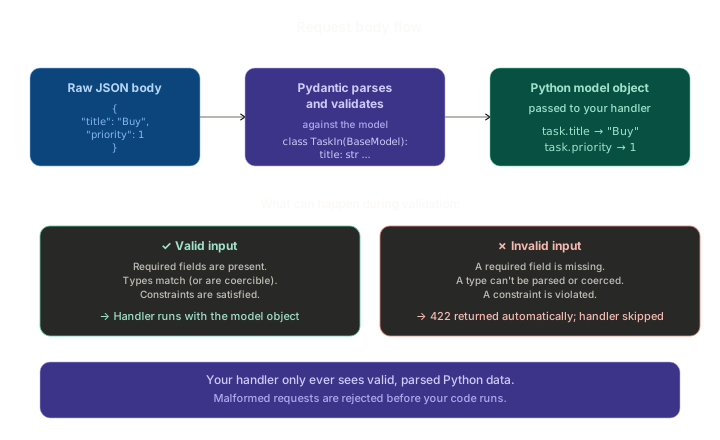
The trick FastAPI plays is to combine all three steps into one declaration. You describe what the body should look like — using a Pydantic model — and FastAPI handles parsing, validation, and conversion automatically. Your handler only sees data that already passed every check.
If validation fails, your handler never runs. The client gets a clear 422 error explaining what went wrong, and you never have to write the “is this a string?” or “is this field missing?” boilerplate.
What Pydantic is
Pydantic is a Python library for data validation using type hints. It’s not specific to FastAPI — you can use it standalone for any data validation task — but FastAPI was designed around it from day one.
The core idea: you declare data shapes by writing Python classes that inherit from BaseModel. The class attributes use type hints to describe each field. Pydantic generates the validation logic for you.
A minimal example:
from pydantic import BaseModel

class Task(BaseModel):
    title: str
    completed: bool = False
    priority: int = 2
That’s a complete model. Reading it:
title: str— required (no default value), must be a string.completed: bool = False— optional (defaults toFalse), must be a boolean if provided.priority: int = 2— optional (defaults to2), must be an integer.
You can instantiate a Task from a dict, and Pydantic will validate as it constructs:
>>> Task(title="Buy groceries")
Task(title='Buy groceries', completed=False, priority=2)

>>> Task(title="Reply", completed=True, priority=1)
Task(title='Reply', completed=True, priority=1)

>>> Task()
# raises ValidationError — 'title' is required
Notice it’s just Python. No FastAPI involved yet. Pydantic is doing real work that’s useful in any data-parsing context (CLIs, config files, scripts, queue workers).
Connecting Pydantic to FastAPI
Now the magic: when you put a Pydantic model in a FastAPI route handler’s signature, FastAPI knows to expect a request body matching that model.
@app.post("/tasks")
def create_task(task: TaskIn):
    # task is already a Pydantic object — fully parsed, fully validated.
    # You can use task.title, task.completed, task.priority directly.
    ...
That single line — task: TaskIn — tells FastAPI:
- Expect a JSON request body.
- Parse it as a
TaskIninstance. - Validate every field according to the model.
- If anything’s wrong, return
422with the validation errors. - If everything’s right, run the handler with
taskpopulated.
Compare it once more to what you’d write in Flask. The four lines of manual checking from earlier collapse into one parameter annotation. Multiply that across an API with twenty endpoints, and the savings get serious — both in code volume and in bugs you no longer have.
Build it
Create a new folder:
fastapi-bodies/
└── main.py
The full file:
# main.py
from fastapi import FastAPI
from pydantic import BaseModel

app = FastAPI(title="Request bodies demo")


class TaskIn(BaseModel):
    title: str
    completed: bool = False
    priority: int = 2


tasks: list[dict] = []
next_id = 1


@app.get("/tasks")
def list_tasks():
    return tasks


@app.post("/tasks", status_code=201)
def create_task(task: TaskIn):
    global next_id
    new_task = {
        "id": next_id,
        "title": task.title,
        "completed": task.completed,
        "priority": task.priority,
    }
    tasks.append(new_task)
    next_id += 1
    return new_task
Walk through the new bits.
The TaskIn class
class TaskIn(BaseModel):
    title: str
    completed: bool = False
    priority: int = 2
The In suffix is a convention many teams use to mean “this is what the client sends in.” In Lesson 7 we’ll introduce Out models for what the server sends back, and you’ll see why they’re sometimes different. For now, TaskIn is just a Pydantic model that describes a creatable task.
The handler signature
def create_task(task: TaskIn):
task is the parameter; TaskIn is its type. FastAPI sees that TaskIn is a Pydantic model and infers “this is the request body” — no decorator, no extra config.
Inside the function, task is a fully-validated TaskIn instance. You access fields as attributes (task.title), not dict keys. That’s a small but real upgrade: typos like task.titel fail loudly at runtime, whereas task["titel"] would silently return None.
Building the response
The handler builds a dict that includes the new ID plus the input fields:
new_task = {
    "id": next_id,
    "title": task.title,
    "completed": task.completed,
    "priority": task.priority,
}
That’s a bit clunky — we’re manually copying fields. In Lesson 7 we’ll learn the cleaner pattern: separate input/output models with task.model_dump() and **spread to remove the boilerplate. For now, explicit is fine.
Run it
uvicorn main:app --reload
The interactive docs at http://127.0.0.1:8000/docs now look different from previous lessons. Click on POST /tasks and you’ll see a request body schema section — FastAPI has generated a complete description of what the endpoint expects:
- A JSON object
- A required
titlestring - An optional
completedboolean (defaultfalse) - An optional
priorityinteger (default2)
There’s even a “Try it out” form with the fields pre-populated as an example, so you can submit a request without leaving the docs page. That whole UI was generated from one Pydantic class.
Try it with curl
Test the happy path first:
curl -X POST http://127.0.0.1:8000/tasks \
  -H "Content-Type: application/json" \
  -d '{"title": "Buy groceries", "completed": false, "priority": 1}'
Response:
{"id":1,"title":"Buy groceries","completed":false,"priority":1}
Notice the -H "Content-Type: application/json" — this is required. The server needs to know the body is JSON, not form data. Postman and Insomnia handle this automatically when you choose the JSON body type; with curl, you set it explicitly.
Just the required field
completed and priority have defaults, so they’re optional:
curl -X POST http://127.0.0.1:8000/tasks \
  -H "Content-Type: application/json" \
  -d '{"title": "Reply to Alice"}'
{"id":2,"title":"Reply to Alice","completed":false,"priority":2}
The defaults kicked in — completed: false, priority: 2.
Watch validation fire
Try sending a body without the required title:
curl -X POST http://127.0.0.1:8000/tasks \
  -H "Content-Type: application/json" \
  -d '{"completed": true}'
{
  "detail": [
    {
      "type": "missing",
      "loc": ["body", "title"],
      "msg": "Field required",
      "input": {"completed": true}
    }
  ]
}
Status 422. The response is a structured list of every validation problem — loc says where the error is (body → title), msg says what’s wrong, input echoes what was sent. Notice this is much better than a vague “Bad Request” — a client can use the loc field to highlight the specific input field that needs fixing.
Try a bad type
curl -X POST http://127.0.0.1:8000/tasks \
  -H "Content-Type: application/json" \
  -d '{"title": "Test", "priority": "high"}'
{
  "detail": [
    {
      "type": "int_parsing",
      "loc": ["body", "priority"],
      "msg": "Input should be a valid integer, unable to parse string as an integer",
      "input": "high"
    }
  ]
}
priority is declared int, the client sent "high", validation failed, the handler never ran.
A note on type coercion
Pydantic is fairly forgiving with simple type conversions. A few cases worth knowing:
# String "3" gets coerced to int 3
curl -X POST .../tasks -H "Content-Type: application/json" \
  -d '{"title": "Test", "priority": "3"}'
# → 201, priority: 3
"3" is a valid representation of the integer 3, so Pydantic accepts it. "high" is not, so that fails.
Booleans are the trickier case. Pydantic accepts the strings "true", "false", "yes", "no", "on", "off", "1", "0" (all case-insensitive), and the integers 0 and 1:
curl -X POST .../tasks -H "Content-Type: application/json" \
  -d '{"title": "Maybe", "completed": "yes"}'
# → 201, completed: true
But anything outside that list is rejected:
curl -X POST .../tasks -H "Content-Type: application/json" \
  -d '{"title": "Maybe", "completed": "maybe"}'
# → 422
This is lenient by design — APIs receive data from many kinds of clients, and being strict about "true" vs true would frustrate more users than it would help. If you need stricter behaviour (e.g., reject "yes" and only accept actual booleans), Pydantic has a Strict type modifier — but you rarely need it in practice.
Extra fields are ignored
If the client sends fields your model doesn’t know about, they’re silently dropped:
curl -X POST .../tasks -H "Content-Type: application/json" \
  -d '{"title": "With extras", "made_up_field": "ignored"}'
{"id":3,"title":"With extras","completed":false,"priority":2}
The made_up_field doesn’t appear in the response — Pydantic discarded it during parsing.
This default is convenient for forward compatibility: if a client sends a slightly newer version of the request shape, your old server doesn’t break, it just ignores the unknown bits. If you’d prefer strict rejection of unknown fields, Pydantic has a config option for that (model_config = {"extra": "forbid"}). Most teams don’t bother — the default is fine.
What about sending the wrong content type?
Try sending a form body instead of JSON:
curl -X POST http://127.0.0.1:8000/tasks -d "title=Form"
Without the -H "Content-Type: application/json", curl defaults to application/x-www-form-urlencoded — the format HTML forms use. FastAPI is expecting JSON for this endpoint, so it returns 422:
{
  "detail": [
    {
      "type": "missing",
      "loc": ["body", "title"],
      "msg": "Field required",
      "input": null
    }
  ]
}
The lesson: always send the correct Content-Type header. JSON for JSON endpoints. FastAPI does support form-data and file uploads, but those need explicit declarations (Form(...), File(...)) — we won’t cover them in this module.
What FastAPI is doing under the hood
To recap the magic from the diagram:
- Request arrives with a JSON body.
- FastAPI reads the route handler’s signature and sees
task: TaskIn— a Pydantic model. - The body is parsed from JSON to a Python dict.
- Pydantic validates the dict against
TaskIn— checking required fields, type compatibility, coercion rules, constraints. - On success, a
TaskIninstance is constructed and passed to your handler astask. - On failure, FastAPI returns
422with a structured error response. Your handler is skipped entirely.
You wrote: one Pydantic class, one type-annotated parameter. FastAPI handled steps 1, 3, 4, 5, and 6. Validation logic that used to be 50 lines of isinstance(...) checks now lives in a four-line class declaration.
Common pitfalls
- Forgetting the
Content-Type: application/jsonheader in curl. Without it, FastAPI doesn’t recognise the body as JSON and rejects the request as malformed. Postman and the Swagger UI set this automatically. - Using a Pydantic model in the wrong place. A model on a query parameter doesn’t do what you think — FastAPI will try to read it from the body, not the URL. For query params, stick to the patterns from Lesson 4 (
str | None = None,Query(...)). - Calling
task["title"]instead oftask.title. A Pydantic instance isn’t a dict. Attribute access works; subscript access doesn’t. (You can convert to a dict withtask.model_dump()if you need the dict form.) - Putting required fields after optional ones in the model. Pydantic doesn’t care about ordering for validation, but readers do. Convention: required fields first, optional fields (those with defaults) below them.
- Trying to add validation in the handler. Don’t write
if not task.title: ...checks inside your view — put constraints on the model itself. We’ll cover how to do that properly in the next lesson.
Summary
- A request body is the JSON payload a client sends along with a POST, PUT, or PATCH request.
- Pydantic models describe the expected shape using a Python class with type hints.
- Adding a Pydantic model as a parameter to a FastAPI route handler tells FastAPI to expect and parse a request body of that shape.
- Required fields have no default; optional fields have one (
completed: bool = False). - Pydantic does type coercion for compatible types (string
"3"→ int3) and is fairly lenient with booleans. - Failed validation returns
422with a structured error response; your handler doesn’t run. - The OpenAPI docs auto-generate a complete request body schema and example, with no extra work.
Outcome
Your API now accepts real, structured client input. You can create resources by sending JSON, defaults fill in for missing optional fields, and bad input is rejected before it ever reaches your code. Next lesson, we go deeper into validation — adding length limits, value constraints, custom error messages, and the kinds of rules that turn a “works for friendly input” API into one that’s safe to expose to the public.