
API validation
API validation
In Lesson 5 your API got its first request body. Pydantic parsed the JSON, confirmed each field’s type, and either passed a clean object to your handler or returned a 422 error. That was parsing. This lesson is about constraints.
Type checking is only the floor. Real APIs need rules like “the title must be between 1 and 120 characters,” “the priority must be between 1 and 5,” “the status must be one of these three exact values,” “the email must actually look like an email.” Without those rules, a client can send a 50,000-character title or a negative priority of -42 and your code happily stores nonsense in your database.
By the end of this lesson:
- You’ll know the most useful constraints to add to a Pydantic field — length limits, numeric bounds, allowed values, email format.
- You’ll know how to write a custom validator when the built-ins don’t fit.
- You’ll understand what the 422 response really looks like and what each field of it means.
- And you’ll have the right instinct: validate at the edge, not deep inside your code.
The picture
Pydantic runs four kinds of checks against every request body. Some you’ve already met:
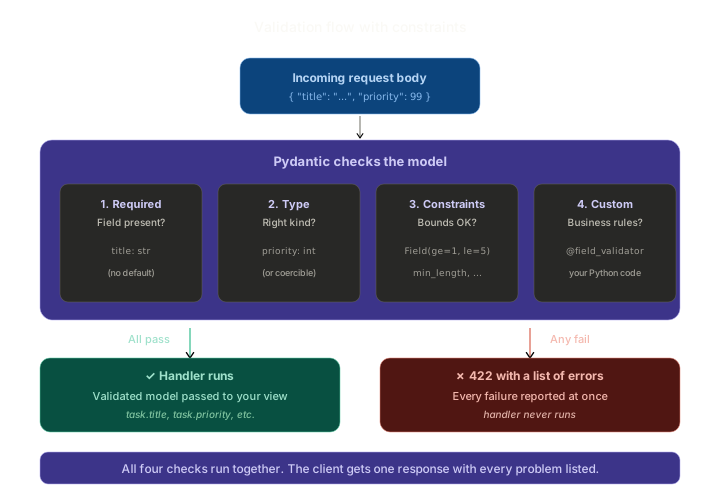
- Required check — is the field present at all? Determined by whether the type hint has a default value.
- Type check — can the value be parsed (or coerced) into the declared type?
- Constraint check — does the value satisfy the rules attached to the field (length, range, pattern, allowed values)?
- Custom check — does it pass any extra Python logic you’ve written?
If all four pass, your handler runs with a validated model. If any fails, FastAPI returns a 422 listing every problem — not just the first one — and your handler never executes.
You wrote the simplest version in Lesson 5. This lesson is about checks 3 and 4.
Why “edge validation” matters
A quick principle before we touch code.
Imagine you skip Pydantic and put validation logic inside your view function:
@app.post("/tasks")
def create_task(task: TaskIn):
    if not task.title:
        raise HTTPException(400, "title required")
    if len(task.title) > 120:
        raise HTTPException(400, "title too long")
    if task.priority < 1 or task.priority > 5:
        raise HTTPException(400, "priority out of range")
    # ... finally do the work
That works — for one endpoint. But you’ll write the same checks in update_task, replace_task, and any other endpoint that touches a task. The rules live in three places, and the day someone tightens “title too long” from 120 to 100, three views need updating. One gets forgotten. Bug.
The Pydantic approach pushes all the rules into one place — the model itself. Every endpoint that uses TaskIn automatically inherits every rule. Change the rule once, every endpoint follows. This is the difference between a form validator and a type system: types are cheaper to keep consistent.
The general guideline:
Validate at the edge — where data enters your system. Once it’s past the model, trust it.
Adding constraints with Field(...)
Pydantic provides a Field helper that lets you attach metadata and constraints to any field. The most useful constraints, by type:
For strings:
min_length— shortest allowed length.max_length— longest allowed length.pattern— a regex the string must match.
For numbers (int, float):
ge— greater than or equal to.le— less than or equal to.gt— strictly greater than.lt— strictly less than.
For everything:
default— the value used when the field is missing.description— human-readable explanation that shows up in the OpenAPI docs.
Let’s apply these to our TaskIn model. Open the Lesson 5 demo (or start a fresh fastapi-validation/main.py) and replace the model:
# main.py
from typing import Literal
from fastapi import FastAPI
from pydantic import BaseModel, Field, EmailStr, field_validator

app = FastAPI(title="Validation demo")


class TaskIn(BaseModel):
    title: str = Field(
        min_length=1,
        max_length=120,
        description="Short, human-readable description of the task.",
    )
    priority: int = Field(
        default=2,
        ge=1,
        le=5,
        description="1 = highest priority, 5 = lowest.",
    )
    status: Literal["todo", "in_progress", "done"] = Field(
        default="todo",
        description="Workflow state. Only the three listed values are allowed.",
    )
    owner_email: EmailStr | None = Field(
        default=None,
        description="Optional email of whoever owns this task.",
    )
Walk through each field.
title
title: str = Field(min_length=1, max_length=120, description="...")
- Required (no
default=— if you providedefault=...inField(), the field becomes optional). - Must be a non-empty string between 1 and 120 characters.
- The description shows up in
/docsnext to the field.
A subtle bit: min_length=1 is what makes empty strings ("") invalid. Without it, type-checking alone would accept "" as a valid str.
priority
priority: int = Field(default=2, ge=1, le=5, description="...")
- Optional, defaults to
2. - Must be an integer between 1 and 5, inclusive.
ge=1, le=5is the most common pattern — “from 1 to 5, including the endpoints.”- For exclusive bounds, use
gt/lt. Most of the timege/leis what you want.
status
status: Literal["todo", "in_progress", "done"] = Field(default="todo", description="...")
- Optional, defaults to
"todo". - Must be exactly one of the three listed values. Anything else is a 422.
Literal[...] from typing is the cleanest way to declare a “one of these values” enumeration in Pydantic. It generates an enum in the OpenAPI schema, so the docs page and any code generators will show a dropdown.
You could also use Python’s enum.Enum, but Literal is simpler and more direct for small, hard-coded sets.
owner_email
owner_email: EmailStr | None = Field(default=None, description="...")
- Optional (the
| Noneanddefault=Nonetogether mean “may be omitted, may be null”). - If provided, must be a syntactically valid email address.
EmailStr is a special Pydantic type that runs an actual email validity check. It needs the email-validator package:
pip install 'pydantic[email]'
(The square-bracket syntax installs Pydantic with the optional email extra in one step.)
EmailStr only checks the syntax of the address — foo@bar.baz passes even though bar.baz isn’t a real domain. To verify the email actually exists you’d have to send a confirmation message; Pydantic isn’t trying to do that.
Custom validators with @field_validator
The built-in constraints cover most needs, but sometimes the rule is “this depends on Python logic you’d have to write yourself.” Pydantic supports this through @field_validator:
class TaskIn(BaseModel):
    title: str = Field(min_length=1, max_length=120)
    # ...other fields...

    @field_validator("title")
    @classmethod
    def title_must_not_be_only_whitespace(cls, v: str) -> str:
        if v.strip() == "":
            raise ValueError("title cannot be just whitespace")
        return v.strip()
Two things to notice:
- Raising
ValueErrorsignals “validation failed.” Pydantic catches it, packages it into a 422 response, and includes your message. - Returning a value from the validator replaces the original value. Here, we
.strip()the title — leading and trailing whitespace are quietly removed before the value reaches the handler.
This is a powerful pattern: validators can both reject input and normalise it. A title of " Buy groceries " becomes "Buy groceries" automatically.
The @classmethod decorator is required — Pydantic’s API. v is the value being validated; you receive it after the built-in checks pass (so it’s already a str by this point).
You can attach multiple validators to the same field, and they run in declaration order. For complex rules — “if priority is 1, owner_email is required” — you’d use @model_validator(mode="after"), which sees the whole object at once. We won’t go that deep here; the field-level pattern handles 90% of needs.
Run it
Save main.py, then:
uvicorn main:app --reload
The first thing to check: open http://127.0.0.1:8000/docs and click POST /tasks. The request body schema now shows every constraint:
title— minLength 1, maxLength 120, description present.priority— minimum 1, maximum 5, default 2.status— enum:["todo", "in_progress", "done"], default “todo”.owner_email— format: email, nullable.
The constraints didn’t just become enforceable — they became discoverable. Anyone reading the docs knows exactly what’s allowed without reading your source code.
Try it with curl
Let’s exercise every constraint. We’ll need the rest of the demo file — the routes that use this model:
tasks: list[dict] = []
next_id = 1


@app.get("/tasks")
def list_tasks():
    return tasks


@app.post("/tasks", status_code=201)
def create_task(task: TaskIn):
    global next_id
    new_task = {
        "id": next_id,
        "title": task.title,
        "priority": task.priority,
        "status": task.status,
        "owner_email": task.owner_email,
    }
    tasks.append(new_task)
    next_id += 1
    return new_task
Happy path
curl -X POST http://127.0.0.1:8000/tasks \
  -H "Content-Type: application/json" \
  -d '{"title": "Buy groceries"}'
{"id":1,"title":"Buy groceries","priority":2,"status":"todo","owner_email":null}
Defaults filled in, response is clean.
Title trimming
curl -X POST http://127.0.0.1:8000/tasks \
  -H "Content-Type: application/json" \
  -d '{"title": "  Reply to Alice  "}'
{"id":2,"title":"Reply to Alice","priority":2,"status":"todo","owner_email":null}
The custom validator silently stripped the surrounding whitespace.
Whitespace-only title
curl -X POST http://127.0.0.1:8000/tasks \
  -H "Content-Type: application/json" \
  -d '{"title": "   "}'
{
  "detail": [
    {
      "type": "value_error",
      "loc": ["body", "title"],
      "msg": "Value error, title cannot be just whitespace",
      "input": "   "
    }
  ]
}
422, with our custom message included.
Out-of-range priority
curl -X POST http://127.0.0.1:8000/tasks \
  -H "Content-Type: application/json" \
  -d '{"title": "Test", "priority": 99}'
{
  "detail": [
    {
      "type": "less_than_equal",
      "loc": ["body", "priority"],
      "msg": "Input should be less than or equal to 5",
      "ctx": {"le": 5},
      "input": 99
    }
  ]
}
The error mentions le: 5 in ctx — clients building user-facing forms can use that to show “must be 5 or less” without parsing the message.
Invalid status
curl -X POST http://127.0.0.1:8000/tasks \
  -H "Content-Type: application/json" \
  -d '{"title": "Test", "status": "unknown"}'
{
  "detail": [
    {
      "type": "literal_error",
      "loc": ["body", "status"],
      "msg": "Input should be 'todo', 'in_progress' or 'done'",
      "input": "unknown",
      "ctx": {"expected": "'todo', 'in_progress' or 'done'"}
    }
  ]
}
The error lists every allowed value — beautifully helpful for the client.
Bad email
curl -X POST http://127.0.0.1:8000/tasks \
  -H "Content-Type: application/json" \
  -d '{"title": "Test", "owner_email": "not-an-email"}'
{
  "detail": [
    {
      "type": "value_error",
      "loc": ["body", "owner_email"],
      "msg": "value is not a valid email address: An email address must have an @-sign.",
      "input": "not-an-email"
    }
  ]
}
EmailStr’s check produces a specific, descriptive error.
Multiple errors at once
Here’s something to internalise. Send a request that violates several rules at once:
curl -X POST http://127.0.0.1:8000/tasks \
  -H "Content-Type: application/json" \
  -d '{"title": "", "priority": 99, "status": "invalid", "owner_email": "not-an-email"}'
{
  "detail": [
    {"type": "string_too_short", "loc": ["body", "title"], "msg": "String should have at least 1 character", ...},
    {"type": "less_than_equal",  "loc": ["body", "priority"], "msg": "Input should be less than or equal to 5", ...},
    {"type": "literal_error",    "loc": ["body", "status"], "msg": "Input should be 'todo', 'in_progress' or 'done'", ...},
    {"type": "value_error",      "loc": ["body", "owner_email"], "msg": "value is not a valid email address: ...", ...}
  ]
}
Four problems, four entries in detail, one response. The client doesn’t have to fix one error, resubmit, find the next one, fix that, resubmit, etc. They get the complete picture in a single round-trip.
A user-facing form using your API can iterate through detail, find each loc (which is always ["body", "<field_name>"] for body fields), and highlight every broken input field at once. That’s the difference between a form that says “please fix the errors below” and one that says “please fix the error above… now please fix the next error above…”.
The shape of the 422 response
Every entry in detail follows the same structure:
{
  "type": "less_than_equal",
  "loc": ["body", "priority"],
  "msg": "Input should be less than or equal to 5",
  "input": 99,
  "ctx": {"le": 5}
}
Let’s name each field:
type— a stable, machine-readable identifier for the kind of error.string_too_short,int_parsing,missing,literal_error,value_error, etc. Useful if your client wants to react differently based on error type.loc— a list pointing at the offending field.["body", "priority"]means “in the body, the priority field.” Nested fields produce deeper paths.msg— a human-readable description.input— the actual value that failed validation. Helpful when the client wants to remind the user what they typed.ctx— optional extra context (the limit that was exceeded, the allowed values, etc.).
This is the same shape across every FastAPI endpoint, every Pydantic model, every error type. Once your client knows how to parse one validation error, it knows how to parse all of them.
Common pitfalls
- Putting
defaultin the type hint vsField(default=...). Both work for optional fields:priority: int = 2orpriority: int = Field(default=2, ge=1, le=5). Use the long form when you need constraints. - Forgetting
min_length=1on strings you expect to be non-empty. Type-checking alone accepts"". If you want “at least one character,” say so. - Using
Literalfor large value sets. Fine for 3–5 values. For 50 statuses, use a realEnumand document them properly. - Custom validators that mutate the input silently in surprising ways. Trimming whitespace is fine. Replacing the title with
"DEFAULT"because it was empty is not fine — that’s hiding a problem. If something should fail, raise; if it should be normalised, normalise. Don’t blur the line. - Trying to validate cross-field rules with
@field_validator. Each field validator only sees its own field. For “if A is X, then B is required” rules, use@model_validator(mode="after")— but most of the time, redesigning the model so the constraint is local is cleaner. - Putting EmailStr without installing the optional dependency. You’ll get an obscure ImportError. Run
pip install 'pydantic[email]'. - Stuffing all validation logic into the view function. Don’t. Pydantic exists to centralise this. Edge validation only.
Summary
- The four checks in order: required, type, constraints, custom. All four must pass.
Field(...)attaches constraints (min_length,max_length,ge,le,pattern, etc.) and adescription.Literal["a", "b", "c"]declares “one of these exact values.”EmailStrvalidates email-address syntax (installpydantic[email]).@field_validator("field_name")runs custom Python after the built-in checks. RaiseValueErrorto fail, return a value to normalise.- The 422 response contains every validation error, with
type,loc,msg,input, and optionalctx. - All validation happens at the edge — once data is past the model, trust it.
Outcome
Your API is now genuinely safe to expose to clients you don’t control. Bad input — missing fields, wrong types, out-of-range values, malformed emails — is rejected cleanly with structured errors before any of your code runs. Next lesson, we turn our attention to the other direction: shaping the responses your API sends back. Some fields you’ll always want to return; some you should never expose; sometimes the output shape should differ from the input shape entirely. That’s what response models are for.