
Introduction to authentication
Introduction to authentication
In Module 4 you built the Books app — a personal reading list where you could add a book, edit it, mark it as “Reading” or “Finished,” and see your whole collection in one place. It worked beautifully.
But it had one quiet problem.
If you deployed that app to the internet right now, anyone who found the URL could see your books. They could add books to your list. They could delete the book you just finished. There was no concept of “this is my list” because the app had no idea who you were.
In this module, we fix that. We’re going to upgrade the Books app so every visitor must sign in before they can manage books, and so each person sees only their own reading list.
To do that, we need to understand authentication.
What authentication actually means
Authentication is the process of a website answering one question:
“Who is this person making the request?”
When you open Twitter, Instagram, or your email, the site doesn’t show everyone’s messages — it shows yours. That only works because, at some point, you proved who you were. You typed a password, scanned a fingerprint, or clicked a magic link. The site checked that proof, decided it trusted you, and started treating every page you load as “the pages for this user.”
That entire process — proving who you are and then being recognised on every page after — is authentication.
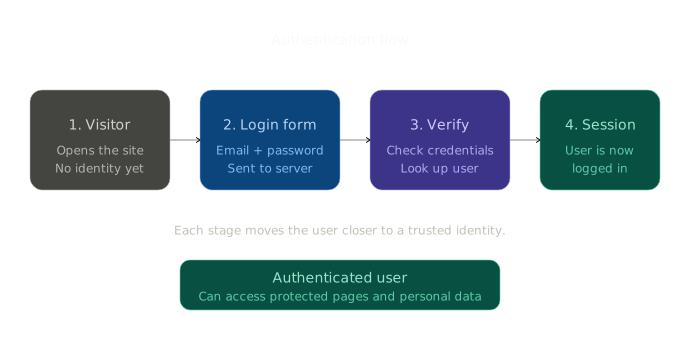
The diagram shows the four stages of the authentication journey:
- A visitor arrives. The server has no idea who they are.
- They submit a login form with their credentials (email and password).
- The server verifies those credentials against the database.
- A session is created, and from now on the user is recognised on every page.
You’ll build every one of those stages in this module.
Authentication vs authorization
Two words that sound alike and trip up almost every beginner. Get the difference clear once and you’ll never confuse them again.
Authentication asks: “Who are you?”
Authorization asks: “Are you allowed to do this?”
Imagine a hotel. When you check in at the front desk and show your ID, that’s authentication — the hotel now knows you’re Alice. When you tap your room key on door 412 and it opens, that’s authorization — Alice is allowed into room 412, but not into room 413.
In our Books app, the same split applies:
- When someone signs in with their email and password, we’re authenticating them — confirming they are who they claim to be.
- When that signed-in user tries to delete a book, we authorize the action — but only if that book belongs to them.
This module is mostly about authentication. The last lesson briefly introduces authorization (roles and permissions) so you know it exists and where to learn more.
Guests and authenticated users
Once a site has authentication, every visitor is in exactly one of two states.
Guest — someone who has not signed in. The server doesn’t know who they are. They can see public pages (the homepage, the login page, maybe a marketing page), but they cannot see private data.
Authenticated user — someone who has signed in. The server knows their identity. They can see their own data and perform actions on it.
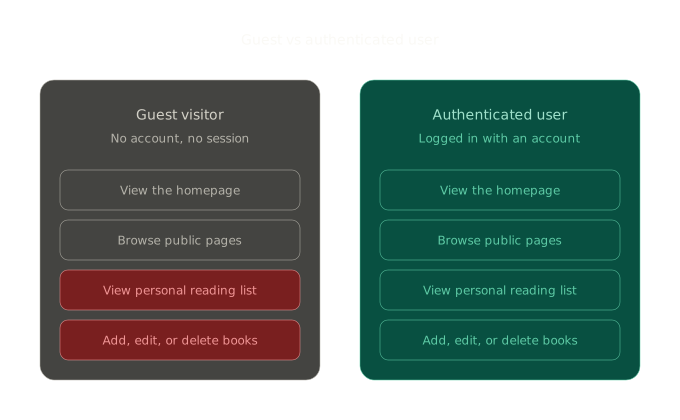
Notice what changes and what stays the same:
- Public pages are visible to both — that’s the whole point of a public page.
- Private pages and personal actions are blocked for guests and allowed for authenticated users.
Designing a site means deciding, for every single page and action, which group it belongs to. We’ll do exactly that for the Books app over the next eight lessons.
Why this matters
It’s tempting to think of authentication as “just adding a login page.” It’s much more than that. Authentication is the foundation that makes the following things possible:
- Personalisation. “Welcome back, Alice” only works if the app knows it’s Alice.
- Privacy. Your reading list shouldn’t be visible to strangers.
- Trust. When you click “Delete book,” the app needs to be sure the request really came from you and not someone who guessed the URL.
- Multi-user data. Without authentication, a CRUD app is single-user by accident. With it, a CRUD app becomes a real product.
Every meaningful web application you’ve ever used has an authentication system underneath it. By the end of this module, you’ll have built one yourself.
What’s coming in this module
Here’s the path we’ll walk together:
- Lesson 1 — Sessions and cookies. How servers remember who you are between page loads.
- Lesson 2 — Creating user accounts. Adding a
Usermodel and a registration page to the Books app. - Lesson 3 — Password hashing. Why we never, ever store passwords as plain text.
- Lesson 4 — User login. Verifying credentials and starting a session.
- Lesson 5 — User logout. Ending a session cleanly.
- Lesson 6 — Access control. Protecting pages so only signed-in users can reach them.
- Lesson 7 — Showing the logged-in user. Personalising the navigation and dashboard.
- Lesson 8 — Mini project. Putting it all together — your Books app becomes a real multi-user application.
After that, four shorter lessons introduce ideas you’ll meet in real-world projects: Flask-Login, JWT, OAuth, and roles/permissions. They’re conceptual previews, not deep dives — just enough to recognise them when you see them out in the wild.
Summary
- Authentication answers the question “who is this person?”
- It happens in four stages: visitor → login form → verify → session.
- Authentication is not the same as authorization. The first proves identity; the second checks permission.
- Every visitor is either a guest or an authenticated user. Your job as a developer is to decide what each one can do.
- Without authentication, an app is single-user by accident. With it, it becomes a real product.
Outcome
You now understand what authentication is, why it matters, and how it differs from authorization. You’re ready to look at the mechanism that makes it all work: sessions and cookies — coming up next.