
API routes and methods
API routes and methods
In Lesson 2 you wrote one endpoint and saw it work. That was enough to prove FastAPI exists. Now we need to learn the actual unit of construction — adding multiple routes for the same resource and seeing how FastAPI keeps them sorted.
By the end of this lesson, you’ll have a small in-memory tasks API with four endpoints: list all tasks, count them, create a new one, and clear the whole list. No database, no validation, no request bodies — those each get their own lesson coming up. We’re focused on one question: how does FastAPI match a request to a function?
It turns out the answer is pleasingly simple.
What a route really is
A route is the link between a URL and a function. When you wrote this in Lesson 2:
@app.get("/")
def read_root():
    return {"message": "Hello from FastAPI"}
…you registered one route. That decorator told FastAPI: “if a GET request arrives for /, run this function and use its return value as the response.”
When you have many routes — and most real APIs have dozens — FastAPI keeps them in an internal routing table. On every incoming request, it looks up the URL and method in that table and dispatches to the matching function. Here’s the picture:
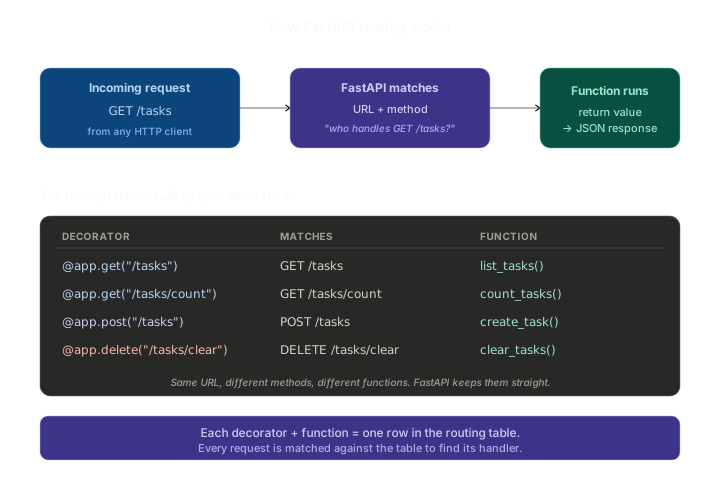
Three stages, in order:
- A request arrives — some client (browser, mobile app, curl, another server) sends
GET /tasksto your URL. - FastAPI matches. It looks at the URL and the HTTP method, finds the row in its routing table, and picks the function that should handle it.
- The function runs. Whatever it returns becomes the response body, JSON-encoded.
That’s the whole thing. The table in the diagram shows the four routes we’re about to build, each registered by a single decorator.
Method-specific decorators
In Flask, you registered all routes with @app.route(...) and listed the methods as a keyword argument:
# Flask
@app.route("/tasks", methods=["GET", "POST"])
def handle_tasks():
    if request.method == "POST":
        # create
    else:
        # list
That works, but it means one function handles multiple methods, and the function has to branch on request.method internally. Two different operations sharing the same function and the same set of imports tends to grow messy.
FastAPI flips this. Each HTTP method gets its own decorator, and each function handles one method on one URL:
@app.get("/tasks")
def list_tasks(): ...

@app.post("/tasks")
def create_task(): ...
Same URL /tasks, two different functions, two different decorators. No branching, no if request.method == ... clutter, no shared state to worry about. The HTTP methods you’ve already met from Lesson 1 each have a decorator:
@app.get(...)      # read
@app.post(...)     # create
@app.put(...)      # replace
@app.patch(...)    # partial update
@app.delete(...)   # remove
This is one of the small joys of FastAPI. Each function does one job, and the decorator above it tells you instantly which HTTP method it’s responsible for.
Build a tiny tasks API
Let’s put this into practice. Create a fresh folder:
fastapi-routes/
└── main.py
The full main.py, then we’ll walk through it:
# main.py
from fastapi import FastAPI

app = FastAPI(title="Routes demo")


# In-memory "database" — a simple list of dicts.
tasks = [
    {"id": 1, "title": "Buy groceries", "completed": False},
    {"id": 2, "title": "Reply to Alice", "completed": True},
    {"id": 3, "title": "Book dentist", "completed": False},
]


@app.get("/tasks")
def list_tasks():
    return tasks


@app.get("/tasks/count")
def count_tasks():
    return {
        "total": len(tasks),
        "completed": sum(1 for t in tasks if t["completed"])
    }


@app.post("/tasks", status_code=201)
def create_task():
    # We can't read a request body yet — that's Lesson 5.
    # For now, just append a hardcoded task to prove POST works.
    new_id = max(t["id"] for t in tasks) + 1 if tasks else 1
    new_task = {"id": new_id, "title": "New task", "completed": False}
    tasks.append(new_task)
    return new_task


@app.delete("/tasks/clear", status_code=204)
def clear_tasks():
    tasks.clear()
    return None
Four endpoints. Let’s walk through each one.
The in-memory list
tasks = [
    {"id": 1, "title": "Buy groceries", "completed": False},
    ...
]
A Python list of dicts. This stands in for a database — every restart wipes it and starts fresh from the three seeded tasks. That’s intentional for this lesson: zero setup, easy to reason about, perfect for learning routing.
GET /tasks — list everything
@app.get("/tasks")
def list_tasks():
    return tasks
Return the list directly. FastAPI serialises Python lists to JSON arrays. The client gets:
[
  {"id": 1, "title": "Buy groceries", "completed": false},
  {"id": 2, "title": "Reply to Alice", "completed": true},
  {"id": 3, "title": "Book dentist", "completed": false}
]
Notice how Python’s False became JSON’s false (lowercase). FastAPI handles those small format differences for you.
GET /tasks/count — derived data
@app.get("/tasks/count")
def count_tasks():
    return {
        "total": len(tasks),
        "completed": sum(1 for t in tasks if t["completed"])
    }
This one’s a summary endpoint — derived information, not raw records. Returns:
{"total": 3, "completed": 1}
Two things to notice:
- The URL is
/tasks/count— distinct from/tasks. That literalcountsegment will not be confused with an ID like/tasks/42(we’ll cover dynamic URL segments properly in Lesson 4). - GET endpoints can return computed data — they don’t have to be straight lookups. As long as the operation is read-only and safe (GET doesn’t change state), summaries and aggregates fit fine.
POST /tasks — create
@app.post("/tasks", status_code=201)
def create_task():
    new_id = max(t["id"] for t in tasks) + 1 if tasks else 1
    new_task = {"id": new_id, "title": "New task", "completed": False}
    tasks.append(new_task)
    return new_task
Two new things here.
The status_code=201 argument. Remember from Lesson 1 that POST responses should ideally return 201 Created instead of the default 200 OK. FastAPI’s decorators accept a status_code keyword so you can set this declaratively rather than building a response object manually. The same trick works on any method decorator.
A hardcoded task body. A real POST would read the request body (title, completed, whatever) and use it to build the new row. We can’t do that yet — request bodies require Pydantic models, which are Lesson 5’s topic. For now, the endpoint just appends a placeholder so you can see the POST machinery work.
The new_id line handles the case where the list is empty: if there are no tasks, start at ID 1; otherwise pick max(existing IDs) + 1. Simple ID generation; production code would use a database’s auto-increment.
DELETE /tasks/clear — bulk delete
@app.delete("/tasks/clear", status_code=204)
def clear_tasks():
    tasks.clear()
    return None
204 No Content is the right code here: the operation succeeded, and there’s nothing meaningful to return. Returning None from the function tells FastAPI to send an empty body.
(In Lesson 4 we’ll add DELETE /tasks/{id} for deleting a specific task. This bulk-clear endpoint is just a convenient way to reset the list during testing.)
Run it
From the project folder:
uvicorn main:app --reload
Open http://127.0.0.1:8000/docs. You’ll see all four endpoints listed, colour-coded by method (blue for GET, green for POST, red for DELETE). Each one is clickable — try them.
A walkthrough you can actually do:
1. List the seeded tasks.
curl http://127.0.0.1:8000/tasks
Returns the three seeded tasks.
2. Check the count.
curl http://127.0.0.1:8000/tasks/count
Returns {"total": 3, "completed": 1}.
3. Create one.
curl -X POST http://127.0.0.1:8000/tasks
Returns the new task with "id": 4. Note the response status: 201. You can see it explicitly with -i:
curl -i -X POST http://127.0.0.1:8000/tasks
The first line of the output will be HTTP/1.1 201 Created.
4. List again — your new task is there.
curl http://127.0.0.1:8000/tasks
Four tasks now. The count endpoint reflects it too:
curl http://127.0.0.1:8000/tasks/count
{"total": 4, "completed": 1}.
5. Clear everything.
curl -i -X DELETE http://127.0.0.1:8000/tasks/clear
Status 204 No Content, empty body. List one more time:
curl http://127.0.0.1:8000/tasks
[] — empty array, no tasks.
If you’d prefer to use the Swagger UI instead of curl, click each endpoint on the /docs page, hit “Try it out”, then “Execute”. Same effect, prettier interface.
What FastAPI is doing under the hood
Behind every one of those requests, FastAPI was doing exactly what the diagram at the top of the lesson showed:
- Receive the request (URL + method).
- Find the matching row in the routing table.
- Call the function. Take its return value. Convert it to JSON. Send it back with the right status code.
You wrote the function. The routing, the JSON conversion, the status codes — those are framework jobs. You declared what you wanted; FastAPI handled how.
A note on route order
FastAPI matches routes in the order they’re defined in your code. This rarely matters for distinct URLs like the ones in our demo (/tasks vs /tasks/count vs /tasks/clear are unambiguously different). But the moment you add dynamic segments (/tasks/{id}) in Lesson 4, ordering will matter — a literal /tasks/count route must be declared before a wildcard /tasks/{id} route, or every GET /tasks/count would be treated as “get the task whose ID is the string ‘count’.”
We don’t have that problem yet, but it’s worth knowing now so you’ll recognise the bug when it bites later.
Common pitfalls
- Putting
methods=["POST"]in the decorator. That’s Flask syntax. FastAPI uses@app.post(...),@app.get(...), etc. — the method is in the decorator name itself. - Returning
True/False(Python booleans) and expectingTrue/Falsein JSON. JSON hastrueandfalse(lowercase). FastAPI handles the conversion for you, but if you’re inspecting raw responses, that’s why the casing changes. - Forgetting
status_code=201on POST endpoints. Functionally everything still works — the default200 OKisn’t wrong, just less precise. Most production APIs use201 Createdfor POST responses; get into the habit early. - Two functions with the same name. Python lets you redefine names, but it doesn’t error — the second definition silently replaces the first. If your routes mysteriously stop working, check whether two
@app.get(...)decorators share a function name. - Modifying the seeded list and then “losing” your changes after a restart. Yes — the in-memory list resets every time uvicorn reloads. That’s expected for this demo; from Lesson 8 onwards we’ll use a real database.
Summary
- A route is one URL + one HTTP method + one function.
- FastAPI provides one decorator per method:
@app.get,@app.post,@app.put,@app.patch,@app.delete. - You can set the response status code on the decorator:
@app.post("/tasks", status_code=201). - Return Python lists, dicts, strings, numbers, booleans — FastAPI converts them to JSON automatically.
- Routes are matched against an internal table by URL + method.
- Literal-text route segments (
/tasks/count) must be declared before dynamic ones (/tasks/{id}), once we get to dynamic URLs.
Outcome
You’ve built an API with four endpoints, three HTTP methods, and an in-memory data store. You’ve seen GET, POST, and DELETE all in the same app, each with its own dedicated function. Next lesson, we add real flexibility: dynamic URLs like /tasks/42, and query strings like ?status=completed&limit=10. That’s how APIs accept input from clients without needing a request body.