
User logout
User logout
In Lesson 4 we built the login flow. A user types their credentials, the server creates a session, and they land on a welcome page that knows their name.
But sessions don’t end on their own. Someone needs to say it’s time to forget. That’s what logout is.
This is a short lesson by intent. Logout is a quick win, but it deserves its own dedicated lesson because how you end a session matters for security. Get it wrong and the user thinks they signed out while the server still thinks they’re logged in.
There’s also a pleasant side benefit. To add the sign-out button cleanly, we need it to appear on every page — and that’s the natural moment to introduce a base template. We’ll do both at once.
What logout actually does
Look at the picture before we touch any code:
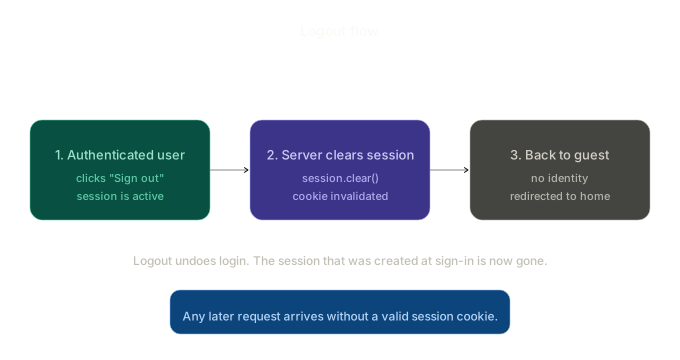
Three stages:
- The authenticated user clicks “Sign out.” Their session cookie is still attached to the request, so the server still recognises them.
- The server clears the session. One line —
session.clear(). The signed cookie is invalidated. - They’re back to being a guest. No identity, no privileged access. We redirect them somewhere sensible (login, in our case).
That’s the whole thing. Logout is the mirror image of login — login creates a session, logout destroys it.
The crucial part is that step 2 happens on the server. We don’t just navigate the user to a different page and hope they don’t come back. We actively wipe the session state so that even if they refresh, or hit the back button, or paste a deep link, they’re no longer authenticated.
The logout route
Add this to app.py, right after the welcome route:
@app.route("/logout", methods=["POST"])
def logout():
    session.clear()
    flash("You've been signed out.")
    return redirect(url_for("login"))
Three lines. Let’s unpack every one.
session.clear()
This is the entire logout. It deletes every key from the session — user_id, user_name, anything else we put there. Flask, on the next response, will send a Set-Cookie header that wipes the cookie in the browser too.
You could write session.pop("user_id", None) to only remove the user ID and keep other session data around. Don’t. It’s a foot-gun. Logout should be unambiguous — clear everything, leave nothing behind.
flash("You've been signed out.")
A small bit of feedback. Without it, the user clicks logout and gets dumped somewhere with no acknowledgement that anything happened. Flash messages bridge that gap.
return redirect(url_for("login"))
After clearing the session, send them somewhere. Login is a reasonable choice — they’re a guest now, so the most likely next action is signing back in. Some apps redirect to a public home page instead. Both are valid. Just don’t redirect to a page that requires authentication, because they no longer have it.
Why methods=["POST"]?
This is a small detail with a real security reason. Most routes in your app respond to GET. Why does logout specifically need POST?
Because of an attack called CSRF — Cross-Site Request Forgery.
Imagine someone sends you a link, or you stumble onto a page that contains this hidden image:
<img src="https://yourplayground.app/logout" />
The moment your browser loads that page, it tries to fetch the “image.” Since you’re logged in, your browser dutifully attaches your session cookie. Your server, seeing a GET /logout, clears your session. You just got logged out without clicking anything.
This particular example is more annoying than dangerous — getting logged out isn’t a catastrophe. But the same trick can do worse: transfer money, delete an account, change an email. Any state-changing action via GET is a CSRF risk.
The rule, which applies far beyond logout, is:
Actions that change state — logout, delete, update, create — should always use POST.
GET is for fetching data. POST is for changing it. Browsers won’t auto-submit POST requests from an <img> tag, so the trivial attack disappears.
Real production apps add a second layer of defence called a CSRF token — a per-form secret that has to match on submission. We won’t add tokens manually here, but if you reach for Flask-WTF later, it gives you CSRF protection for free.
A logout button needs a base template
Since the route is POST, we can’t just use an <a href> link. Anchor tags trigger GET. We need a small form.
But here’s the question: where do we put it? The user might be on /welcome, on /users, or on any future page we add. The sign-out button should appear on all of them.
We could copy-paste the form into every template. That’s the path to madness — three lessons from now, when we tweak the button, we’ll have to update it in seven places, and miss one.
The clean solution is a base template — a single layout file that every page inherits from. Each page provides its own content; the layout provides the wrapping. The logout button lives in the layout, in one place, and every page gets it for free.
If you haven’t used template inheritance before, here’s the idea in one sentence: a base template defines {% block %} slots, and child templates fill those slots with {% block %}{% endblock %} of their own.
Create templates/base.html
This file contains the topbar (with the conditional sign-out button), the flash messages, and a content slot. It also collects all the CSS from the page templates — every previous template’s <style> block was duplicating the same rules, so we centralise them here.
<!-- templates/base.html -->
<!DOCTYPE html>
<html lang="en">
<head>
  <meta charset="UTF-8">
  <title>{% block title %}Auth playground{% endblock %}</title>
  <style>
    body {
      font-family: system-ui, -apple-system, sans-serif;
      max-width: 640px;
      margin: 0 auto;
      padding: 0 20px;
      color: #1f2a26;
    }
    .topbar {
      display: flex;
      justify-content: space-between;
      align-items: center;
      padding: 18px 0;
      border-bottom: 1px solid #e2ddd2;
      margin-bottom: 32px;
    }
    .brand { font-size: 14px; font-weight: 600; color: #2f3e37; }
    .brand a { color: inherit; text-decoration: none; }
    .nav-form { margin: 0; }
    .nav-form button {
      background: #fff;
      color: #1f2a26;
      border: 1px solid #d8d3c7;
      padding: 6px 14px;
      border-radius: 8px;
      font-size: 13px;
      font-family: inherit;
      cursor: pointer;
    }
    .nav-form button:hover { background: #f4f1ea; }
    h1 { font-size: 22px; margin-bottom: 0.25rem; }
    p.lead { color: #6b7a72; font-size: 14px; margin-top: 0; }
    .card {
      background: #fff;
      border: 1px solid #e2ddd2;
      border-radius: 12px;
      padding: 24px;
      margin-top: 20px;
    }
    .flash {
      background: #f4e2dc;
      border: 1px solid #e5c5bc;
      color: #1f2a26;
      padding: 10px 14px;
      border-radius: 8px;
      font-size: 13px;
      margin-bottom: 16px;
    }
    label { display: block; font-size: 13px; font-weight: 600; margin-bottom: 4px; }
    input {
      width: 100%;
      box-sizing: border-box;
      padding: 9px 12px;
      border: 1px solid #d8d3c7;
      border-radius: 8px;
      font-size: 14px;
      font-family: inherit;
      margin-bottom: 14px;
    }
    button.primary {
      background: #2f3e37;
      color: #fff;
      border: none;
      padding: 10px 18px;
      border-radius: 8px;
      font-size: 14px;
      font-weight: 500;
      cursor: pointer;
    }
    table {
      width: 100%;
      border-collapse: collapse;
      margin-top: 16px;
      background: #fff;
      border: 1px solid #e2ddd2;
      border-radius: 12px;
      overflow: hidden;
    }
    th, td {
      text-align: left;
      padding: 10px 14px;
      font-size: 14px;
      border-bottom: 1px solid #e2ddd2;
    }
    th {
      background: #f4f1ea;
      font-weight: 600;
      font-size: 13px;
      color: #6b7a72;
    }
    tr:last-child td { border-bottom: none; }
    .empty { text-align: center; color: #6b7a72; padding: 32px; }
    .footer-nav { font-size: 13px; color: #6b7a72; margin-top: 14px; }
    .footer-nav a { color: #4a6b5c; }
    .field { margin-bottom: 12px; }
    .field-label { font-size: 12px; color: #6b7a72; margin: 0 0 2px; }
    .field-value { font-size: 14px; font-weight: 500; margin: 0; }
  </style>
</head>
<body>
  <div class="topbar">
    <div class="brand">
      <a href="{{ url_for('index') }}">Auth playground</a>
    </div>

    {% if session.user_id %}
      <form action="{{ url_for('logout') }}" method="post" class="nav-form">
        <button type="submit">Sign out</button>
      </form>
    {% endif %}
  </div>

  {% with messages = get_flashed_messages() %}
    {% for msg in messages %}
      <div class="flash">{{ msg }}</div>
    {% endfor %}
  {% endwith %}

  {% block content %}{% endblock %}
</body>
</html>
A few things worth pointing out:
{% block title %}and{% block content %}— these are the slots child templates will fill.{% if session.user_id %}— only show the Sign out button when someone’s signed in. Flask exposes thesessionobject to Jinja directly, so we don’t need to pass it from any view function.<form method="post">around the button — that’s how we get a POST request from a button click, without writing any JavaScript.- The flash block lives in the layout. Now every page gets flash rendering for free, including pages we haven’t written yet.
Convert the existing templates
Now we go through every template, strip out the body shell (the <!DOCTYPE>, <head>, <style>, repeated flash block), and replace it with a tiny shell that extends base.html.
templates/register.html
<!-- templates/register.html -->
{% extends "base.html" %}

{% block title %}Register{% endblock %}

{% block content %}
<h1>Create an account</h1>
<p class="lead">A tiny demo of the registration flow.</p>

<div class="card">
  <form action="{{ url_for('register') }}" method="post">
    <label for="name">Name</label>
    <input id="name" name="name" type="text" required>

    <label for="email">Email</label>
    <input id="email" name="email" type="email" required>

    <label for="password">Password</label>
    <input id="password" name="password" type="password" minlength="8" required>

    <label for="confirm_password">Confirm password</label>
    <input id="confirm_password" name="confirm_password" type="password" minlength="8" required>

    <button type="submit" class="primary">Create account</button>
  </form>
</div>

<p class="footer-nav">
  Have an account? <a href="{{ url_for('login') }}">Sign in</a>
</p>
{% endblock %}
Compare it to the Lesson 2 version. The CSS, the <!DOCTYPE>, the <head>, the flash messages block — all gone. Just the content that’s unique to this page. Cleaner, shorter, and the styling stays in sync with every other page automatically.
templates/login.html
<!-- templates/login.html -->
{% extends "base.html" %}

{% block title %}Sign in{% endblock %}

{% block content %}
<h1>Sign in</h1>
<p class="lead">Welcome back to the playground.</p>

<div class="card">
  <form action="{{ url_for('login') }}" method="post">
    <label for="email">Email</label>
    <input id="email" name="email" type="email" required>

    <label for="password">Password</label>
    <input id="password" name="password" type="password" required>

    <button type="submit" class="primary">Sign in</button>
  </form>
</div>

<p class="footer-nav">No account yet? <a href="{{ url_for('register') }}">Register</a></p>
{% endblock %}
templates/welcome.html
<!-- templates/welcome.html -->
{% extends "base.html" %}

{% block title %}Welcome{% endblock %}

{% block content %}
<h1>Hello, {{ user.name }}</h1>
<p class="lead">You're signed in.</p>

<div class="card">
  <div class="field">
    <p class="field-label">Name</p>
    <p class="field-value">{{ user.name }}</p>
  </div>
  <div class="field">
    <p class="field-label">Email</p>
    <p class="field-value">{{ user.email }}</p>
  </div>
  <div class="field">
    <p class="field-label">Joined</p>
    <p class="field-value">{{ user.created_at.strftime("%d %b %Y") }}</p>
  </div>
</div>

<p class="footer-nav">
  <a href="{{ url_for('users') }}">All users</a>
</p>
{% endblock %}
templates/users.html
<!-- templates/users.html -->
{% extends "base.html" %}
{% block title %}All users{% endblock %}
{% block content %}
<h1>All users</h1>
<p class="lead">Everyone registered in the playground database.</p>
{% if users %}
<table>
<thead>
<tr><th>Name</th><th>Email</th><th>Joined</th></tr>
</thead>
<tbody>
{% for u in users %}
<tr>
<td>{{ u.name }}</td>
<td>{{ u.email }}</td>
<td>{{ u.created_at.strftime("%d %b %Y") }}</td>
</tr>
{% endfor %}
</tbody>
</table>
{% else %}
<div class="empty">No users yet. <a href="{{ url_for('register') }}">Register one</a>.</div>
{% endif %}
<p class="footer-nav">
<a href="{{ url_for('login') }}">Sign in</a> ·
<a href="{{ url_for('register') }}">Register</a>
</p>
{% endblock %}
Notice the pattern: every child template now starts with {% extends "base.html" %}, declares a title, and provides content. Nothing else. The styling, the topbar, the flash banner — all inherited.
Reading the session in templates
Look back at the base.html line:
{% if session.user_id %}
Jinja gives us access to the Flask session object directly inside templates. We don’t have to pass it as a context variable from every route — it’s there automatically.
This will come back in the next two lessons when we want to conditionally show or hide entire menu items based on whether the visitor is signed in.
Run it
Restart the app and walk through the whole loop:
- Visit
/loginas a guest. Look at the topbar — just the brand, no sign-out button. - Sign in. Land on
/welcome. Now the topbar shows a Sign out button on the right. - Visit
/users. Sign-out button is still there. Visit/register. Still there. The button follows you everywhere because it lives in the base template. - Click “Sign out.” You land on the login page with a flash message: “You’ve been signed out.” The topbar no longer shows the button.
- Hit the back button. You might briefly see the welcome page from the browser’s cache, but try clicking anywhere — you’ll immediately get bounced. The server-side session is gone.
What logout doesn’t do
Worth being clear about the scope.
Logout doesn’t delete the user. It just ends this session. The user can log right back in with the same credentials.
Logout doesn’t end sessions on other devices. If the same user is logged in on their phone and their laptop, clicking “Sign out” on the laptop only clears the laptop’s session. The phone is still signed in. Some apps offer a “sign out everywhere” feature — that requires server-side session tracking, which we’re not doing in this playground.
Logout doesn’t invalidate any cached pages. The browser may have cached HTML from logged-in pages. Hitting back will show that cached HTML — but the next request to the server (clicking any link, submitting any form) will be unauthenticated. If you want to be strict about not showing cached private pages after logout, you’d add Cache-Control: no-store headers on those routes.
For our purposes, single-device logout via session.clear() is correct and sufficient.
Common mistakes
- Logout via
GET. Covered above. Any attacker-controlled HTML can trigger it. AlwaysPOST. - Using
session.pop("user_id")instead ofsession.clear(). Leaves orphan session data behind. Always clear everything. - Redirecting to a protected page after logout. The user just signed out — they no longer have access. They’ll get bounced again. Redirect to a public page like login.
- Forgetting to hide the logout button from guests. Not a security problem (the form would just do nothing on click), but it looks broken. Always wrap in
{% if session.user_id %}. - No feedback after logout. The user clicks the button, nothing visible changes, they’re not sure if it worked. Always include a flash message.
- Putting the sign-out form in every page individually. You’ll forget it on a new page in three weeks. Put it in the base template once.
Summary
- Logout is
session.clear(). That’s the entire mechanism. - Use POST, not GET —
GET /logoutis exploitable via CSRF. - A small
<form>with a submit button is the cleanest way to trigger a POST from a click. - The sign-out button lives in
base.htmlso every page inherits it. - Show it conditionally with
{% if session.user_id %}so guests don’t see a broken button. - After clearing, redirect to a public page and flash a confirmation.
- Logout ends one session. It doesn’t delete the user, log them out from other devices, or invalidate cached HTML.
Outcome
The auth-playground now has a complete sign-in / sign-out loop. Users can register, log in, get recognised across pages, and sign out cleanly when they’re done. The base template means every future page automatically gets the topbar, flash messages, and conditional logout button — no copy-paste. Next lesson, we tighten the screws — we’ll enforce authentication on private routes, so guests can’t reach pages they shouldn’t.